Our Top Picks
The best keyboard for Valorant is a compact, wired board with adjustable actuation and rapid trigger, because those two features give you fine control over movement stops. In this set, the Aula WIN60 HE and the Redragon K673 HE are the two listings that match that description directly: both list magnetic or Hall-effect style switches, adjustable actuation and an 8000 Hz polling claim. The other four listings are weaker fits, and the Valorant keycap set is not a keyboard at all. Everything below rests on published titles, manufacturer documentation and buyer feedback.
Top picks at a glance

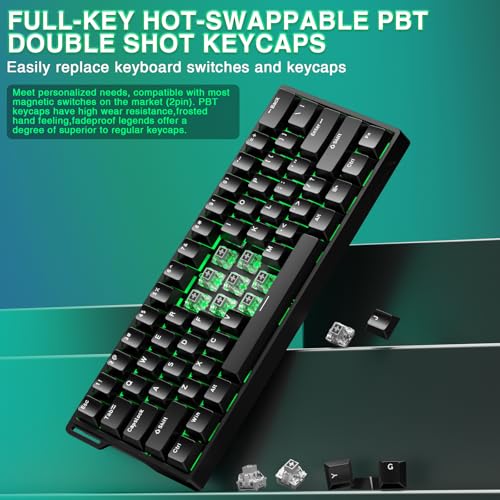
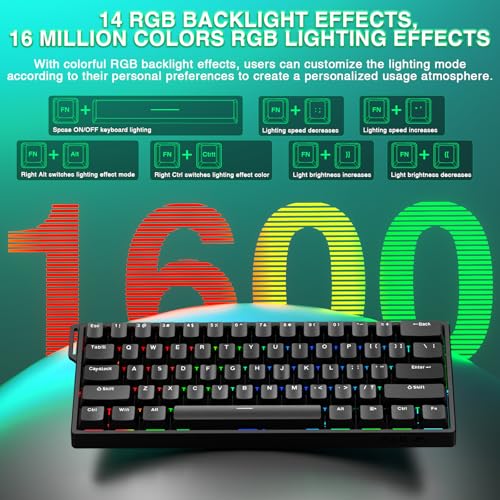
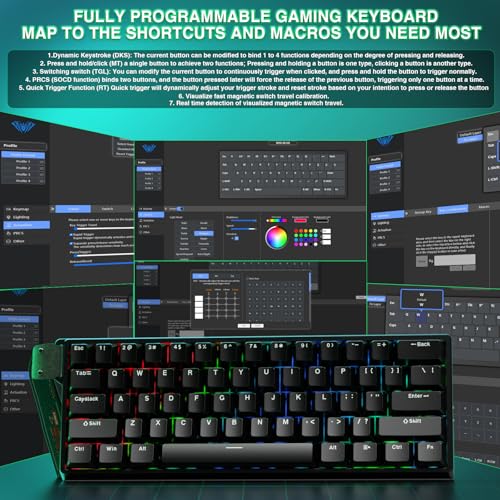
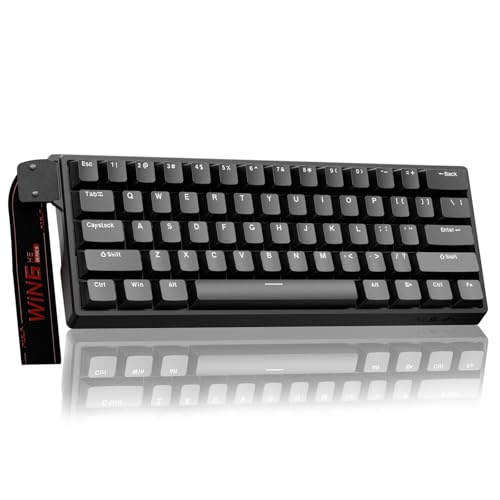
Aula WIN60 HE - 60% Mechanical Gaming Keyboard Wired, Magnetic Switch Hot Swappable, Adjustable Actuation Rapid Trigger Mode, 8000 Hz Polling Rate, RGB Small Keyboard 60 Percent Compact Design for PC


As an Amazon Associate we earn from qualifying purchases. Product prices and availability are accurate as of the date/time indicated.

SteelSeries Apex 3 Gaming Keyboard - Black | 10-Zone RGB Illumination – IP32 Water Resistant – Premium Magnetic Wrist Rest (Whisper Quiet Gaming Switch)


As an Amazon Associate we earn from qualifying purchases. Product prices and availability are accurate as of the date/time indicated.

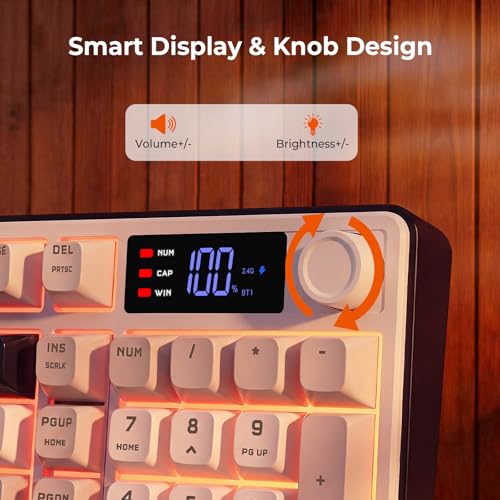
Redragon Wireless Gaming Keyboard, 98-Key Tri-Mode (BT/2.4G/Wired) RGB Computer Keyboard with Knob & Display, Fade-Resistant PBT Keycaps & 4000mAh Battery, Compatible with Windows/Mac - White Gray




As an Amazon Associate we earn from qualifying purchases. Product prices and availability are accurate as of the date/time indicated.

CHONCHOW TKL Gaming Keyboard and Mouse Combo, Wired RGB Set for PC Laptop | 75% Layout, LED Light Up MDA ABS Keycaps, Anti-Ghosting, Ergonomic Keyboard, Lightweight 6D Gaming Mouse for PC PS4 PS5 Xbox


As an Amazon Associate we earn from qualifying purchases. Product prices and availability are accurate as of the date/time indicated.

Valorant Custom Keycaps (Agent Neon) - Laser Engraved with Each Valorant Agent's Portrait, Skills, and Position. Fit with Any Mechanical Keyboard. Valorant Gift for Gamers, Adults, and Teens.


As an Amazon Associate we earn from qualifying purchases. Product prices and availability are accurate as of the date/time indicated.
| Model | Key point from the title | Price tier | Best for |
|---|---|---|---|
| Aula WIN60 HE | 60%, magnetic switches, rapid trigger, 8000 Hz | Mid-range | Small-desk, low-sensitivity players |
| Redragon K673 HE | 80% Hall-effect, rapid trigger, control wheel, 8K | Premium | Players who want arrows plus a function row |
| SteelSeries Apex 3 | 10-zone RGB, IP32, magnetic wrist rest | Premium | Quiet, general-purpose play |
| Redragon 98-key Tri-Mode | Wireless, knob, display, 4000mAh battery | Mid-range | Mixed work and casual play |
| CHONCHOW TKL Combo | Keyboard and mouse set, wired RGB | Budget | First desk setup |
| Valorant Agent Neon keycaps | Laser-engraved agent keycaps | Budget | Decoration only, not a keyboard |
What is changing in keyboards for Valorant
Tactical shooters reward precise stops. When you strafe sideways and want to shoot, you tap the opposite direction to halt movement, a habit known as counter-strafing. Traditional switches reset at a fixed point in their travel, so the stop depends on how far your finger rises. Magnetic and Hall-effect switches measure key position continuously, which lets a board offer adjustable actuation (how far you press) and rapid trigger (the key resets as soon as it moves back a small distance).
Polling rate is the other headline number. It describes how often the keyboard reports to the PC, and listings now advertise 8000 Hz. General knowledge says that is a reporting interval of 0.125 ms, compared with 1 ms at 1000 Hz, so the effect is subtle and depends on your system. Whether any of this changes your results is personal. Read the mechanical keyboard switches explained guide if the vocabulary is new, and check the rules of any tournament you enter, because organizers can restrict some keyboard features.
Another shift is software. Tunable boards usually depend on a companion app or a web configurator, which means the quality of that tool matters as much as the switches. Buyers should look for plain-language descriptions of where settings are stored and whether the board works without the app running, because background programs add one more thing to manage on a gaming PC.
How these listings were picked
Selection follows the product titles, manufacturer documentation and buyer feedback patterns, scored on four questions: does the title mention adjustable actuation or rapid trigger, is the connection wired, is the layout compact enough for mouse room, and does the product match the keyword. Nobody on the team used or measured these units. The titles are seller claims, so each section ends with items to confirm. Price tiers are relative within this set of six.
The six listings
Aula WIN60 HE
This 60 percent wired board lists magnetic switches, hot-swap support, adjustable actuation, rapid trigger mode, an 8000 Hz polling rate, RGB and a compact design. It is the closest match to the typical Valorant competitive setup: small footprint, direct cable and the features that affect counter-strafing. The brand field on the listing shows a different manufacturer name, which is worth a second look before purchase.
A realistic user is a player with a low mouse sensitivity who swings their arm across a mousepad and needs every centimeter of desk. Sixty percent layouts drop arrows, the function row and the number pad, so you will use layer shortcuts for some keys.
Hot-swap support matters here because magnetic switches vary in feel, and the title says you can change them. It also means a worn or disliked switch is a small fix rather than a replacement board. Because the features depend on companion software, it is smart to read how the settings are stored, in the keyboard or in an app, since onboard storage is handy for tournaments and travel.
- Pro: adjustable actuation and rapid trigger are both named in the title.
- Pro: compact footprint leaves mouse room.
- Con: no dedicated arrow keys or function row without layers.
- Con: the manufacturer name on the page does not match the title wording.
Check the listing for the software needed to set actuation, the switch type, and whether the 8000 Hz mode needs a specific USB port. Question to ask: am I comfortable with layers for the missing keys?
Redragon K673 HE
The K673 HE is an 80 percent wired Hall-effect keyboard with rapid trigger, a multi-function control wheel, “silky POM 8K switches”, pro software and a title that names Valorant and FPS precision directly. An 80 percent layout keeps the function row and arrows, so it behaves more like a trimmed TKL than a 60 percent board. The control wheel can handle volume or other functions.
This suits a player who wants rapid trigger but does not want to give up the function row, or someone who uses the same board for work and play. Because the title mentions “zero delay”, read that as marketing rather than a verified figure.
The mention of POM switch material is a seller detail about the stem and housing feel, and listings that name a material generally want to signal smoothness. Whether it is smoother than other magnetic switches is something only direct comparison could answer, so treat it as a claim and look for buyer comments on scratchiness or stabilizer rattle.
- Pro: rapid trigger, Hall-effect switches and software are all stated.
- Pro: 80 percent layout keeps function keys and arrows.
- Con: larger than 60 percent boards, so less mouse room.
- Con: “zero delay” is a seller phrase, not a specification.
Check the listing for adjustable actuation range, switch pre-install options and software OS support. Question to ask: will the 80 percent width fit my mouse sweeps?
SteelSeries Apex 3
The title lists 10-zone RGB, IP32 water resistance, a magnetic wrist rest and a “Whisper Quiet Gaming Switch”. It does not mention adjustable actuation, rapid trigger or a polling rate, so for Valorant it is a general gaming keyboard rather than a precision tool. The title also does not name the switch family, so verify it on the manufacturer page.
It fits someone who plays Valorant casually and wants a quiet keyboard that works for office tasks, with a wrist rest for long sessions. If your goal is competitive tuning, it is a weaker class than the Hall-effect listings above.
One practical reading of the title: IP32 is an ingress-protection rating that suggests protection against light drips, not submersion. A magnetic wrist rest also snaps on and off, which makes cleaning easy. These are comfort and durability features, not competitive ones, so match your expectations to the board’s role.
- Pro: magnetic wrist rest and quiet-switch claim.
- Pro: water-resistance rating in the title.
- Con: no adjustable actuation or rapid trigger listed.
- Con: full-size footprint reduces mouse space.
Check the listing for layout, software, and the switch name. Question to ask: do I want quiet and comfortable, or tunable and compact?
Redragon 98-Key Tri-Mode Wireless
This board lists a 98-key layout, Bluetooth, 2.4GHz and wired modes, RGB, a knob and display, fade-resistant PBT keycaps and a 4000mAh battery. It is aimed at versatility, not at esports tuning. Nothing in the title mentions adjustable actuation, rapid trigger or polling rate, so Valorant players should treat it as a good work-and-play board rather than a competitive one.
A student who types reports during the day and plays unranked matches at night is the best fit. Wired mode gives a safer option on match nights if wireless behavior concerns you.
A 98-key layout squeezes a number pad next to the main block, saving a little width over full-size but still more than a TKL. With the knob and the display, the title reads like a productivity-first board with gaming lighting, which is a valid role if Valorant is one of several uses.
- Pro: three connection modes and a large battery.
- Pro: PBT keycaps and a knob for daily use.
- Con: no competitive features listed in the title.
- Con: a 98-key layout takes more desk width.
Check the listing for switch type, hot-swap and the wireless receiver. Question to ask: do I need wireless at all, given I play at a fixed desk?
CHONCHOW TKL Keyboard and Mouse Combo
A wired RGB keyboard and mouse bundle, listed with a “75% layout” and “TKL” in the same title, which are different sizes and should be clarified on the listing. It lists MDA ABS keycaps, anti-ghosting, an ergonomic design and a lightweight 6D mouse for PC and consoles. As a bundle it is a weaker class than a standalone esports keyboard.
It fits a first setup where the keyboard and mouse are both missing, and the buyer wants lighting and a wired connection without shopping for each piece. For Valorant specifically, the mouse matters at least as much as the keyboard, so check its sensor details.
Because the same title says TKL and 75 percent, look at the product photos and the key count before trusting either label. ABS keycaps can develop shine over time, and a light mouse is not automatically a good mouse, so look for sensor and cable information before committing.
- Pro: two peripherals in a single listing.
- Pro: lowest price tier among keyboards here.
- Con: conflicting layout wording in the title.
- Con: no adjustable actuation or rapid trigger.
Check the listing for key count, switch type, mouse DPI and weight. Question to ask: would a better mouse or keyboard alone be a stronger use of this budget?
Valorant Custom Keycaps (Agent Neon)
This is not a keyboard. It is a keycap set laser-engraved with agent portraits, skills and positions, designed to fit mechanical keyboards. It will not change how a board registers input, and it is plainly off-type for a keyword about the best keyboard. It is included because it sits in the product list and some readers search for gifts.
As a gift for a player who already owns a mechanical keyboard, it is a fun cosmetic upgrade. The engraved symbols may also act as a memory aid for ability keys, though that is a personal preference rather than a performance feature.
If you do buy keycaps, make sure the set covers the keys you use, because themed sets sometimes include only a handful of keys and leave the rest of the board unchanged. Mixed sets can look patchy, so plan the color scheme before ordering.
- Pro: cosmetic, themed upgrade for existing boards.
- Pro: simple to swap if the stems match.
- Con: does not affect input or latency.
- Con: compatibility depends on your switch stems and layout.
Check the listing for how many keys are included, which keys are covered and the keycap material. Question to ask: does my board use the stem type and layout the set expects?
Buying guide for a Valorant keyboard
Actuation and rapid trigger
Actuation is the point at which a key press registers. Lower values react sooner but increase accidental presses. Rapid trigger releases the key as soon as your finger moves up a small amount, regardless of where the key sits in its travel. Start with a moderate actuation and adjust slowly. A practical method is to change one setting at a time in a practice range session, play a few rounds, and only then change another, so you can tell which adjustment helped. Keep the reset distance small but not so small that normal finger tremor triggers repeat presses.
Polling rate
Higher polling can reduce reporting delay, but the practical gain is small, and some PCs show extra CPU load. Treat it as a bonus, not the reason to buy. Also remember that your mouse and monitor set the pace of the whole chain: a keyboard reporting every 0.125 ms cannot help if the game runs at a low frame rate or the monitor refreshes slowly, so balance the budget across the desk instead of loading it all into one part.
Layout size
Compact layouts help players who use low sensitivity. See the full-size vs TKL keyboard comparison for how much width you save at each size.
Connection and switch technology
Wired boards avoid battery questions, and the wireless vs wired keyboard guide covers when wireless is acceptable. If a membrane board is tempting because of price, the mechanical vs membrane keyboard article explains what you lose.
| Spec concept | What to look for | Why it matters in Valorant |
|---|---|---|
| Adjustable actuation | Named in the title, plus software | Tunes how soon movement starts |
| Rapid trigger | Mentioned explicitly | Faster reset for counter-strafing |
| Polling rate | 1000 Hz or 8000 Hz, wired | Smaller reporting interval |
| Layout | 60, 65 or 80 percent | Mouse room and function keys |
| Connection | Wired preferred | No battery or interference worries |
Worked example: what a faster reset can mean
Assumptions, all illustrative guesses: your finger lifts at 100 mm per second, a standard reset happens about 1.5 mm into the release, and rapid trigger resets after 0.3 mm. The difference is 1.2 mm, which at 100 mm per second is 12 ms. A 240 Hz monitor shows a new frame about every 4.2 ms, so 12 ms is roughly three frames.
| Assumption | Fixed reset | Rapid trigger |
|---|---|---|
| Release distance before reset | 1.5 mm | 0.3 mm |
| Finger speed (assumed) | 100 mm/s | 100 mm/s |
| Time to reset | 15 ms | 3 ms |
| Frames at 240 Hz | About 3.6 | About 0.7 |
Keep in mind that a human reaction is far slower than these differences, so the benefit is about consistency in your movement habit, not raw reaction speed. If you have not built the habit, no keyboard will do it for you.
Quick decision flow: choose compact and wired for competitive play (Aula WIN60 HE); choose 80 percent if you need arrows and a function row (Redragon K673 HE); choose a quiet general board if you play casually (Apex 3 or the Redragon tri-mode); choose the bundle only if you need both devices.
| User | Suggested pick | Reason |
|---|---|---|
| Low-sensitivity ranked player | Aula WIN60 HE | 60 percent, rapid trigger, wired |
| Player who also works on the PC | Redragon K673 HE | Function row, arrows, wheel |
| Casual player in a shared room | SteelSeries Apex 3 | Quiet-switch claim |
| Student, one board for everything | Redragon 98-key tri-mode | Three modes, PBT keycaps |
Desk and settings checklist before ranked games
Hardware is only half of the setup. Start by checking your mousepad sweep with a ruler and leave that much clear space to the right of the board. Next, place the keyboard so your forearm stays roughly parallel to the desk and your wrists are not bent upward. If your board has software, save one profile with a moderate actuation and another with a lighter setting, then switch between them for a week and keep whichever causes fewer accidental presses.
- Update the firmware only if the manufacturer notes describe a real fix.
- Disable lighting effects that flash during a match if they distract you.
- Use a direct USB port on the PC for the high-polling mode instead of a hub.
- Keep a spare cable, since a failing cable is a common cause of dropped inputs.
- Write down your settings so you can restore them quickly after a driver update.
Mistakes buyers make
| Mistake | Fix |
|---|---|
| Paying for 8000 Hz and ignoring the rest | Prioritize actuation, rapid trigger and layout first |
| Setting actuation too low | Raise it until accidental presses stop |
| Buying a bundle for the keyboard alone | Compare against standalone options |
| Choosing wireless without checking the receiver | Read the listing for receiver and battery notes |
| Confusing keycaps with a keyboard | Confirm the product type in the title |
Verdict by use case
For the most competitive-leaning setup, pick the Aula WIN60 HE. For the same feature set with arrows and a function row, the Redragon K673 HE. For casual play and a quiet desk, the SteelSeries Apex 3 or the Redragon tri-mode board. The CHONCHOW combo suits a first desk, and the keycaps are only for decoration.
If you only remember one rule, make it this: spend on the features that match your habits. A player who rarely counter-strafes gains little from rapid trigger, while someone who crowds a small desk gains a lot from a 60 percent layout. Weigh the missing keys honestly before choosing a compact board, and keep the cable plan simple.
Frequently asked questions
Do I need a rapid trigger keyboard to play Valorant well?
No. Aim, game sense and crosshair placement matter far more than hardware. Rapid trigger can make counter-strafing feel sharper because the key resets as soon as your finger lifts, but players have climbed ranks on ordinary keyboards for years. Treat it as a refinement, not a requirement.
Is 8000 Hz polling worth it for a keyboard?
It reduces the reporting interval from 1 ms at 1000 Hz to 0.125 ms. That gap is smaller than one frame on most monitors, so the benefit is small and depends on your system. It can also use more CPU, so check your PC and the manufacturer notes.
Which layout is best for Valorant?
Compact layouts such as 60 percent or 75 percent leave extra mouse room, which helps low-sensitivity players who swing their arm. Full-size and TKL boards work well if you prefer the extra keys. Pick the size that matches your desk and your mouse movement.
Are wireless keyboards good enough for Valorant?
Many modern wireless boards use a 2.4GHz receiver that works well for games, but a cable removes battery and interference questions. If you choose wireless, read the listing for receiver type, battery capacity and how the board behaves when the battery is low.
Do Valorant keycaps change performance?
Cosmetic keycaps do not change how a keyboard registers input. They change looks and sometimes feel, depending on material and profile. Confirm that the stem type matches your switches before buying a set.
Can I use a keyboard and mouse combo for Valorant?
You can, and plenty of players start that way. The weak point is usually the mouse sensor and the keyboard’s lack of tuning options, so plan to upgrade the piece that limits you first.