Key takeaways
- Refresh rate and VRR: The Series X targets up to 120fps in many games, so a 120Hz-plus panel with FreeSync or VRR eliminates tearing and stutter. Even a 144Hz 1080p monitor is a huge upgrade over a 60Hz TV.
- Resolution: 1440p is the sweet spot for console gaming, sharper than 1080p without the price and HDMI 2.1 demands of true 4K. Choose 1080p to prioritize the highest frame rates on a budget.
- Input lag and response time: Low input lag keeps controls feeling immediate, and a 1ms response time reduces motion blur in shooters and racers. Gaming-branded monitors tune for both.
- HDMI version: HDMI 2.1 is needed for 4K/120, but many gamers happily run 1440p/120 or 1080p/120 over the monitor’s high-speed HDMI, which stretches your budget further.
- Panel type and HDR: IPS and OLED give the best color and viewing angles for that living-room feel, while fast VA panels offer deep contrast. Meaningful HDR needs a bright panel, so treat cheap “HDR” labels with skepticism.
What's inside
The Xbox Series X is a genuine 4K, 120Hz machine, but plug it into the wrong display and you’ll never see what it can do. To unlock the console’s best experience you want a monitor with HDMI 2.1 or at least a fast panel that supports high refresh rates, low input lag, and Variable Refresh Rate so fast-paced games stay smooth and tear-free. In 2026 there’s a monitor for every budget that keeps up with Microsoft’s flagship.
Deciding between a crisp 1440p high-refresh panel and a budget 1080p speed demon comes down to your games and your wallet. Below I cover exactly what specs matter for the Series X, then review monitors that pair well with the console, from affordable 144Hz options to premium OLED panels for the ultimate living-room-quality picture at your desk.
As an Amazon Associate we earn from qualifying purchases at no extra cost to you.


⚡ Save on Your Next PC — Amazon Prime
Prime members get fast free shipping on the systems above, plus early access to Prime Day & Black Friday PC deals. New members get a 30-day free trial.
Watch: Best Gaming Monitor for Xbox Series X — Video Review
How to Choose
- Refresh rate and VRR: The Series X targets up to 120fps in many games, so a 120Hz-plus panel with FreeSync or VRR eliminates tearing and stutter. Even a 144Hz 1080p monitor is a huge upgrade over a 60Hz TV.
- Resolution: 1440p is the sweet spot for console gaming, sharper than 1080p without the price and HDMI 2.1 demands of true 4K. Choose 1080p to prioritize the highest frame rates on a budget.
- Input lag and response time: Low input lag keeps controls feeling immediate, and a 1ms response time reduces motion blur in shooters and racers. Gaming-branded monitors tune for both.
- HDMI version: HDMI 2.1 is needed for 4K/120, but many gamers happily run 1440p/120 or 1080p/120 over the monitor’s high-speed HDMI, which stretches your budget further.
- Panel type and HDR: IPS and OLED give the best color and viewing angles for that living-room feel, while fast VA panels offer deep contrast. Meaningful HDR needs a bright panel, so treat cheap “HDR” labels with skepticism.
The Best Picks Reviewed
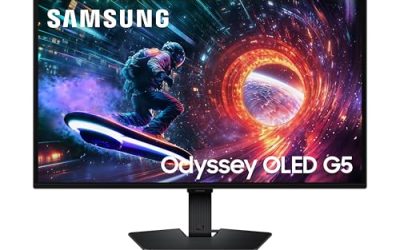
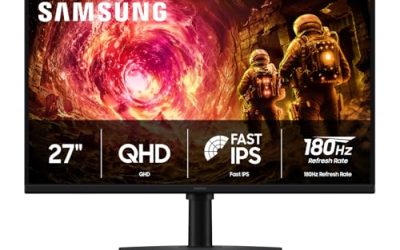
Samsung 27″ Odyssey G5 (G51F) QHD
The Odyssey G5 is my top all-round Series X monitor: a 27-inch 1440p panel that hits the console’s sweet-spot resolution with a high refresh rate and vivid color. It’s big enough to feel immersive on a desk, sharp enough to show off Xbox’s best-looking games, and priced sensibly for the quality you get.
GIGABYTE GO27Q24G 27″ W-OLED 240Hz QHD
For the best picture money can buy here, this W-OLED delivers perfect blacks, instant response, and a dazzling 1440p image that makes HDR games pop. The 240Hz ceiling is overkill for the console alone but future-proofs you for PC gaming too. It’s the premium pick when you want your desk to rival a high-end OLED TV.
Sceptre Curved 24.5″ 240Hz 1080p
Budget-focused competitive players will love this curved 24.5-inch panel: 1080p for maximum frame rates, up to 240Hz, a 1ms response time, and dual HDMI plus DisplayPort inputs. It’s an affordable way to get buttery-smooth motion in fast shooters where reaction time beats resolution.
SANSUI 32″ Curved 240Hz FHD
If you want a big, immersive screen without a big price, the SANSUI’s 32-inch curved 1080p panel wraps you into the action with a high refresh rate. The larger size suits couch-style desk setups and slower cinematic games, though at 1080p across 32 inches you trade some sharpness for scale.
Sceptre 27″ Prime 100Hz 1080p
The value entry point, this 27-inch 1080p monitor delivers 100Hz, a 1ms response, 100% sRGB color, and FreeSync with built-in speakers, everything a casual Series X player needs on a tight budget. It’s a clean, no-drama upgrade from a basic 60Hz display for not much money.
Frequently Asked Questions
Do I need HDMI 2.1 for the Xbox Series X?
Only if you want true 4K at 120Hz. Plenty of gamers run 1440p or 1080p at 120Hz over a monitor’s high-speed HDMI and get a fantastic, smooth experience without paying for HDMI 2.1.
Is 1440p or 4K better for console gaming?
1440p is the practical sweet spot, noticeably sharper than 1080p while far cheaper and less demanding than 4K/120. Many Xbox titles render at or near 1440p anyway, so you rarely lose detail.
What refresh rate should I get?
Aim for at least 120Hz to match the Series X’s high-frame-rate modes. A 144Hz or higher panel gives headroom and looks dramatically smoother than a 60Hz TV in fast games.
Does VRR matter on Xbox?
Yes. The Series X supports Variable Refresh Rate, and a FreeSync or VRR monitor syncs the display to the game’s frame rate, eliminating screen tearing and reducing stutter for a cleaner image.
Final Thoughts
For most Xbox Series X owners in 2026, a 27-inch 1440p, high-refresh monitor like the Samsung Odyssey G5 is the ideal balance of sharpness, smoothness, and price. Competitive players on a budget should grab a fast 1080p panel like the Sceptre 240Hz, and anyone chasing the absolute best image will love the GIGABYTE W-OLED. Prioritize a 120Hz-plus refresh rate and VRR, and your console’s games will finally look and feel their best.