
Key takeaways
- Audio connectivity: Prioritize chairs with Bluetooth 5.0 or higher and a wired 3.5 mm fallback so your stream audio never cuts out during a live broadcast.
- Ergonomic adjustability: Look for at least a 135-degree recline, adjustable lumbar support, and 3D armrests so you can dial in a comfortable posture for multi-hour streaming sessions.
- Build quality and weight capacity: Confirm the frame supports your body weight with a margin of at least 30 pounds; steel bases and high-density foam outlast budget alternatives.
- Camera-friendly recline and footrest: A lockable recline and retractable footrest let you shift between upright “talking head” framing and relaxed gameplay segments without leaving the shot.
- Extras that matter on stream: RGB lighting, massage modules, and app-based EQ controls add production value and viewer engagement, but only if they do not compromise core comfort.
The GTPLAYER Bluetooth Gaming Chair in Brick Red is our top pick for streamers who want reliable built-in audio without a headset, while the GTPLAYER ACE-PRO takes the runner-up spot thanks to its app-controlled speakers and linkage armrests.
Choosing a gaming chair with integrated speakers sounds simple, but most streamers quickly run into muddy bass, Bluetooth dropouts mid-broadcast, or chairs that fall apart after months of daily use. This guide cuts through the noise by evaluating six popular chairs on audio clarity, ergonomic support, build quality, and streaming-specific features like recline angle for camera framing and lumbar support for long sessions.
Our top picks


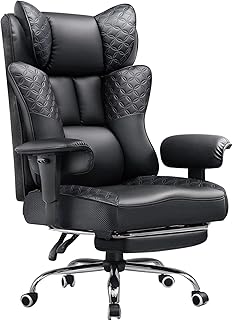


As an Amazon Associate we earn from qualifying purchases at no extra cost to you. Ratings are shown as listed on Amazon.
🛒 Best Price Today on Amazon
Prime members get fast, free shipping on everything above, plus member-only deals. New members get a 30-day free trial — cancel anytime.
Quick Comparison
| Product | Best For | Standout Feature | Rating |
|---|---|---|---|
| GTPLAYER Bluetooth Gaming Chair (Brick Red) | All-around streaming | 3D armrests + footrest combo | 4.4/5 |
| HOFFREE RGB Gaming Chair with Speakers | Budget-conscious creators | RGB LED + massage lumbar | 4.2/5 |
| GTPLAYER ACE-PRO Gaming Chair | Premium setups | App-controlled Bluetooth audio | 4.5/5 |
| GTPLAYER Dragon Series (Royal Blue) | Heavy-duty daily use | Reinforced esports frame | 4.3/5 |
| GTPLAYER Big and Tall Gaming Chair | Larger streamers | Pocket-spring back + 150° recline | 4.3/5 |
How to Choose a Gaming Chair with Built-In Audio for Streamers
- Audio connectivity: Prioritize chairs with Bluetooth 5.0 or higher and a wired 3.5 mm fallback so your stream audio never cuts out during a live broadcast.
- Ergonomic adjustability: Look for at least a 135-degree recline, adjustable lumbar support, and 3D armrests so you can dial in a comfortable posture for multi-hour streaming sessions.
- Build quality and weight capacity: Confirm the frame supports your body weight with a margin of at least 30 pounds; steel bases and high-density foam outlast budget alternatives.
- Camera-friendly recline and footrest: A lockable recline and retractable footrest let you shift between upright “talking head” framing and relaxed gameplay segments without leaving the shot.
- Extras that matter on stream: RGB lighting, massage modules, and app-based EQ controls add production value and viewer engagement, but only if they do not compromise core comfort.
The Best Gaming Chairs with Built-In Audio for Streamers Reviewed
Best Overall: GTPLAYER Bluetooth Gaming Chair (Brick Red)
With its 3D armrests, adjustable backrest, integrated Bluetooth speakers, and pull-out footrest, this chair covers every ergonomic and audio need a mid-budget streamer has. It is the safest recommendation for creators who want a single chair for gaming, recording, and casual office work without overthinking the purchase.
Best Budget: HOFFREE RGB Gaming Chair with Speakers
Streamers just starting out get Bluetooth audio, RGB LED lighting, and a massage lumbar module at a price that leaves room in the budget for a capture card or microphone. The high-back design and footrest make it surprisingly comfortable for the cost, though the speakers lean bass-heavy for critical audio monitoring.
Best Premium: GTPLAYER ACE-PRO Gaming Chair
The ACE-PRO pairs built-in speakers with a companion app for EQ tuning and Bluetooth control, giving audio-focused streamers granular sound shaping without extra desk hardware. Its linkage armrests and reclining mechanism feel a tier above the competition, justifying the higher price for full-time broadcasters.
Best for Heavy-Duty Streaming Sessions: GTPLAYER Dragon Series (Royal Blue)
Built on a reinforced esports frame, the Dragon Series is designed for streamers who sit eight-plus hours a day and need a chair that will not sag or creak on camera. The heavy-duty construction and ergonomic contouring make it ideal for marathon charity streams or back-to-back broadcast schedules.
Best for Larger Streamers: GTPLAYER Big and Tall Gaming Chair
With a wider seat, pocket-spring back support, deluxe embossed leather, and a 150-degree recline, this chair accommodates bigger frames without sacrificing comfort or audio. Streamers who have found standard gaming chairs too narrow will appreciate the generous dimensions and soft armrests during long sessions.
Frequently Asked Questions
Do built-in chair speakers replace a headset for streaming?
For casual gameplay commentary they work well, but most professional streamers still use a headset or studio headphones for accurate audio monitoring. Chair speakers excel as a secondary output for game audio, alerts, or background music while you keep your mic feed clean.
Will Bluetooth audio cause lag during a live stream?
Modern Bluetooth 5.0 chairs introduce roughly 40-80 ms of latency, which is imperceptible for game audio playback. If you notice sync issues, switch to the included 3.5 mm aux cable for a zero-delay wired connection.
How important is lumbar support for streaming?
Critical. Streaming sessions regularly exceed four hours, and poor lumbar support leads to lower-back fatigue that shows on camera as slouching. Look for chairs with adjustable or built-in lumbar pillows rather than flat backrests.
Can I use these chairs with a dual-PC streaming setup?
Absolutely. The chairs connect to your audio source independently of your capture card or PC configuration. Simply pair the chair speakers to whichever device outputs your game or chat audio, and your capture pipeline remains unaffected.
Final Thoughts
For most streamers, the GTPLAYER Bluetooth Gaming Chair in Brick Red delivers the best balance of audio quality, ergonomic adjustment, and value. If your budget allows, step up to the GTPLAYER ACE-PRO for app-controlled sound and premium linkage armrests. Larger creators or those running marathon broadcast schedules should seriously consider the GTPLAYER Big and Tall or Dragon Series for their reinforced builds and generous dimensions.





