
Key takeaways
- Cable Routing Features: Look for built-in cable trays, grommets, or channels that keep power and data runs off the desktop surface. Desks with enclosed drawers or shelves give you extra room to stash power strips and excess cable length out of sight.
- Size and Monitor Capacity: Triple-monitor setups and VR base stations need real estate. Aim for at least 48 inches of width for a single curved monitor and headset, or 60+ inches if you’re running multiple displays and accessories.
- Standing vs. Fixed Height: Electric standing desks help with long sessions and pair well with active VR use, but verify that cable runs have enough slack to accommodate height changes without straining connectors.
- Weight Capacity: A heavy gaming monitor, monitor arm, speakers, and console or PC can add up fast. Choose a desk rated for at least 175 pounds to avoid wobble and long-term frame fatigue.
- Accessory Integration: Consider whether you need a built-in PC stand, headphone hook, charging station, or controller storage. Desks that combine cable management with these extras reduce the clutter of aftermarket add-ons.
What's inside
If you’re running a Bigscreen Beyond or Meta Quest 3 alongside a triple-monitor gaming setup, the last thing you want is a tangle of cables snagging your headset’s tether or cluttering your play space. Poor cable management doesn’t just look bad — it can damage expensive gear, block sensors, and make swapping between VR and desktop gaming a frustrating chore. A desk with built-in cable management keeps power, display, and USB runs routed cleanly so your focus stays on the game, not the mess.
This guide covers the best gaming desks with integrated cable management features, from cable trays and grommets to full controller drawers and PC showcase stands. We’ve selected options across standing desks, L-shaped corner units, and traditional gaming desks to match different room sizes, budgets, and multi-accessory setups. Each pick balances build quality, cable organization, and compatibility with the hardware you already own.
As an Amazon Associate we earn from qualifying purchases.


🛒 Best Price Today on Amazon
Prime members get fast, free shipping on everything above, plus member-only deals. New members get a 30-day free trial — cancel anytime.
Watch: Best Gaming Desks with Built-In Cable Management — Video Review
How to Choose a Gaming Desk with Built-In Cable Management
- Cable Routing Features: Look for built-in cable trays, grommets, or channels that keep power and data runs off the desktop surface. Desks with enclosed drawers or shelves give you extra room to stash power strips and excess cable length out of sight.
- Size and Monitor Capacity: Triple-monitor setups and VR base stations need real estate. Aim for at least 48 inches of width for a single curved monitor and headset, or 60+ inches if you’re running multiple displays and accessories.
- Standing vs. Fixed Height: Electric standing desks help with long sessions and pair well with active VR use, but verify that cable runs have enough slack to accommodate height changes without straining connectors.
- Weight Capacity: A heavy gaming monitor, monitor arm, speakers, and console or PC can add up fast. Choose a desk rated for at least 175 pounds to avoid wobble and long-term frame fatigue.
- Accessory Integration: Consider whether you need a built-in PC stand, headphone hook, charging station, or controller storage. Desks that combine cable management with these extras reduce the clutter of aftermarket add-ons.
The Best Gaming Desks with Built-In Cable Management Reviewed
AODK Gaming Desk with PC Showcase Stand
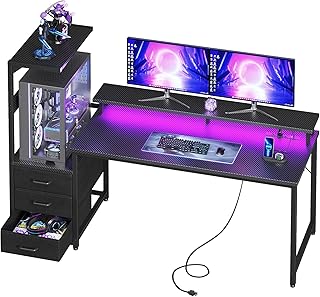
This 59-inch reversible desk stands out for its elevated PC showcase stand, which fits popular cases like the Lian Li O11 and Hyte Y60 while keeping your tower off the floor. Triple drawers hide cables, controllers, and clutter, making it one of the best options for gamers who want a clean, display-worthy battle station.
RESPAWN 1048 Gaming Desk
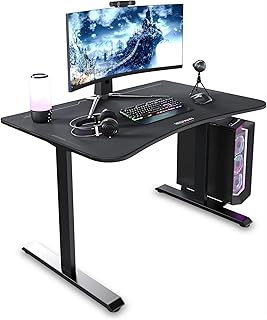
The 1048 delivers a full-surface mouse pad, an ergonomic curved desktop, and a dedicated cable tray at a competitive price. With a 175-pound weight capacity, it handles dual monitors and accessories without wobble, making it a solid pick for budget-conscious VR and desktop gamers.
Realbear 48×24 Electric Standing Desk
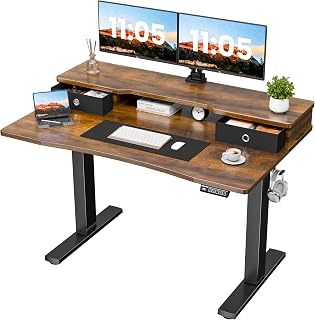
This sit-stand desk includes two drawers, a dual-monitor shelf, and built-in cable organizers alongside three preset height positions. The C-clamp mount compatibility and side hooks make it easy to integrate a monitor arm and headphones while keeping runs tidy.
FLEXISPOT 60″x24″ Standing Desk
FLEXISPOT’s one-piece, 1-inch thick desktop offers a premium surface for multi-monitor setups, and the stable steel frame handles height adjustments without shaking. While cable management is more basic, the generous surface area makes routing straightforward for dedicated gamers.
SIAGO 63×55 L-Shaped Standing Desk
This large L-shaped corner desk maximizes surface area for multi-monitor, multi-accessory setups, and includes a built-in charging station. The memory controller handles four presets, and the splice-board design gives you plenty of room to route cables along both legs of the desk.
Frequently Asked Questions
Do I need a special desk for VR headsets?
You don’t need a VR-specific desk, but you do want one with enough surface area for base stations, sensors, and a clear playspace. Cable management matters most here, since a tangled headset tether can interfere with tracking and movement.
Are standing desks good for gaming?
Yes, especially for VR users who alternate between seated desktop gaming and standing VR sessions. Look for a model with a stable frame and memory presets so you can switch positions quickly without recalibrating your setup each time.
How much weight should a gaming desk support?
Aim for at least 175 pounds. A large monitor, monitor arm, PC, speakers, and accessories add up quickly, and a higher rating means less frame flex during intense gaming or height adjustments.
What’s the best desk size for a multi-monitor setup?
For two or three monitors plus a headset, 60 inches or wider is ideal. If you have the corner space, an L-shaped desk gives you even more room for peripherals, controllers, and charging accessories.
Final Thoughts
For gamers who want a showcase-ready setup with serious cable-hiding storage, the AODK Gaming Desk is the top pick. If you want an electric standing desk with integrated organizers, the Realbear 48×24 is a strong choice. For large multi-monitor and VR setups with corner space, the SIAGO 63×55 L-shaped standing desk offers the most room and flexibility.





