
Key takeaways
- Switch Type: Linear switches offer smooth, uninterrupted travel ideal for gaming speed; tactile switches provide a noticeable bump for typing confidence; clicky switches add audible feedback but can annoy nearby coworkers.
- Actuation Force: Lighter switches (around 45gf) reduce finger fatigue during long gaming sessions, while heavier switches (55gf and above) help prevent accidental keypresses during intense typing.
- Pin Configuration: Check whether your keyboard supports 3-pin or 5-pin switches — 5-pin switches have two extra plastic legs for stability but can be trimmed to fit 3-pin boards.
- Lubrication: Pre-lubed switches save hours of manual work and deliver a smoother, quieter experience out of the box, making them excellent choices for first-time builders.
- Hot-Swappability: If you’re buying a complete keyboard, look for hot-swappable PCBs so you can experiment with different switches without soldering as your preferences evolve.
What's inside
Finding the right mechanical keyboard switches can feel overwhelming when you’re staring at a wall of acronyms, actuation forces, and stem materials. Whether you’re chasing a competitive edge in fast-paced shooters or building a board comfortable enough for eight-hour typing sessions, the wrong switch can cramp your style and your fingers. Switches fundamentally change how a keyboard feels, sounds, and performs, and there’s no universal “best” option — only the best fit for your specific needs.
This guide breaks down the top mechanical keyboard switches and switch-equipped keyboards available today. We’ve selected options spanning tactile, clicky, linear, and analog optical designs, covering both standalone switch sets for custom builders and complete keyboards for those who want a ready-to-go experience. From pre-lubed linear switches to hot-swappable gaming boards with adjustable actuation, these picks cover the full spectrum of typing and gaming preferences.
As an Amazon Associate we earn from qualifying purchases.




🛒 Best Price Today on Amazon
Prime members get fast, free shipping on everything above, plus member-only deals. New members get a 30-day free trial — cancel anytime.
Watch: Best Mechanical Keyboard Switches for Typing and Gaming — Video Review
How to Choose a/an Mechanical Keyboard Switches for Typing and Gaming
- Switch Type: Linear switches offer smooth, uninterrupted travel ideal for gaming speed; tactile switches provide a noticeable bump for typing confidence; clicky switches add audible feedback but can annoy nearby coworkers.
- Actuation Force: Lighter switches (around 45gf) reduce finger fatigue during long gaming sessions, while heavier switches (55gf and above) help prevent accidental keypresses during intense typing.
- Pin Configuration: Check whether your keyboard supports 3-pin or 5-pin switches — 5-pin switches have two extra plastic legs for stability but can be trimmed to fit 3-pin boards.
- Lubrication: Pre-lubed switches save hours of manual work and deliver a smoother, quieter experience out of the box, making them excellent choices for first-time builders.
- Hot-Swappability: If you’re buying a complete keyboard, look for hot-swappable PCBs so you can experiment with different switches without soldering as your preferences evolve.
The Best Mechanical Keyboard Switches for Typing and Gamings Reviewed
Razer Huntsman V3 Pro
This analog optical keyboard delivers Gen-2 switches with Rapid Trigger and adjustable actuation, making it one of the most responsive boards available for competitive esports. With an 8KHz polling rate, PBT keycaps, and dedicated media controls, it’s a complete package built for tournament-level performance.
ELUTENG Ice Blue Switches
These pre-lubed 48gf tactile switches offer a satisfying bump without being overly heavy, striking a strong balance for mixed typing and gaming use. The POM stem and 5-pin design make them a drop-in upgrade for MX-compatible hot-swappable boards at a budget-friendly price.
BlingKingdom MX Clicky Blue Switches
These 3-pin clicky switches deliver classic blue-switch feedback with a crisp tactile bump and audible click that typists love. Their dustproof housing and compatibility with most gaming keyboards make them a solid replacement option for worn-out stock switches.
Kailh Box White Clicky Switches
Kailh’s Box White switches combine a satisfying clicky sound signature with a dustproof box housing design that improves longevity and stability. The set includes 72 pieces and works with both 3-pin and 5-pin hot-swappable boards, giving builders flexibility across multiple projects.
GravaStar Mercury K1 Pro
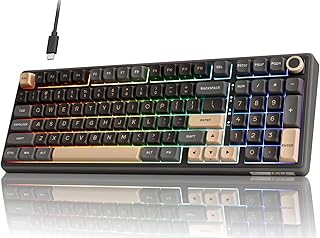
This 75% wireless keyboard pairs an aluminum alloy chassis with hot-swappable linear switches for a premium, smooth typing and gaming experience. The RGB lighting and compact layout make it a strong contender for gamers who want portability without sacrificing build quality.
Frequently Asked Questions
Are linear or tactile switches better for gaming?
Linear switches are generally preferred for gaming because they actuate smoothly without a tactile bump, allowing for faster repeated keypresses. However, many gamers successfully use tactile switches — the difference matters most at elite competitive levels where every millisecond counts.
Can I use typing switches for gaming and vice versa?
Absolutely. There’s no hard rule preventing crossover. Many people game on tactile switches and type on linear ones. The best switch is whichever feels most comfortable for your hands during your most common tasks.
What does pre-lubed mean, and does it matter?
Pre-lubed switches come factory-coated with lubricant on the stem and spring contacts, reducing scratchiness and spring ping. It saves significant manual labor and immediately improves feel, though enthusiasts often relube for perfection.
Do I need a hot-swappable keyboard to change switches?
Yes, unless you’re comfortable desoldering and resoldering each switch. Hot-swappable keyboards let you pull and replace switches with a simple tool, making experimentation easy and solder-free.
Final Thoughts
For competitive gamers who need every possible advantage, the Razer Huntsman V3 Pro with its adjustable actuation and 8KHz polling rate is hard to beat. Typists and mixed-use builders should consider the ELUTENG Ice Blue switches for their satisfying tactile feel, while the GravaStar Mercury K1 Pro offers a premium complete-keyboard solution for those who want wireless convenience without compromising on switch quality.





