Key takeaways
- Capacity over raw speed: At this price, a 1TB PCIe 4.0 drive beats a 500GB drive that’s marginally faster on paper. Modern games routinely exceed 100GB, and a drive kept above 80% full loses write performance regardless of its rating.
- PCIe 4.0 is the value sweet spot: Gen 5 drives are excellent but sit well above $100 in the capacities that matter. Gen 4 saturates what DirectStorage and console-style asset streaming actually need, and it runs cooler with less power draw.
- Watch for DRAM-less designs: Most budget NVMe drives omit a DRAM cache and lean on Host Memory Buffer instead. That’s fine for gaming loads, but it means sustained large file transfers will taper. Check sustained write figures, not just peak reads.
- Endurance and warranty: Look for at least a 5-year warranty and a TBW rating of 600TB or higher per terabyte of capacity. It’s the clearest signal of the NAND grade a manufacturer is willing to stand behind.
- Confirm your slot and clearance: M.2 2280 is standard, but laptops, the PS5, and small-form-factor cases have different heatsink clearances. A bare drive plus your motherboard’s own heatsink is usually the better buy over a bundled tall heatsink you can’t fit.
What's inside
Storage prices have finally settled into a sweet spot, but the sub-$100 shelf is also where the most misleading spec sheets live. A drive advertising 7,000 MB/s sequential reads can still stutter in a game that hammers it with small random reads, and a DRAM-less budget model can slow to a crawl once its SLC cache fills mid-installation. For gamers, the question isn’t which drive posts the biggest number in a benchmark screenshot — it’s which drive holds its speed through a 120GB install while your library sits at 85% capacity.
This guide covers the best SSDs you can realistically buy for under $100 in 2026, focused on the 500GB to 1TB capacities where that budget actually lands. We’ve weighed sustained write performance, controller quality, thermals in cramped laptop and console bays, and warranty terms. We also flag a couple of premium drives worth knowing about if your budget stretches — clearly marked, so you know exactly where the line sits.
As an Amazon Associate we earn from qualifying purchases.


⚡ Save on Your Next PC — Amazon Prime
Prime members get fast free shipping on the systems above, plus early access to Prime Day & Black Friday PC deals. New members get a 30-day free trial.
Watch: Best SSD Under $100 — Video Review
How to Choose SSD Under $100
- Capacity over raw speed: At this price, a 1TB PCIe 4.0 drive beats a 500GB drive that’s marginally faster on paper. Modern games routinely exceed 100GB, and a drive kept above 80% full loses write performance regardless of its rating.
- PCIe 4.0 is the value sweet spot: Gen 5 drives are excellent but sit well above $100 in the capacities that matter. Gen 4 saturates what DirectStorage and console-style asset streaming actually need, and it runs cooler with less power draw.
- Watch for DRAM-less designs: Most budget NVMe drives omit a DRAM cache and lean on Host Memory Buffer instead. That’s fine for gaming loads, but it means sustained large file transfers will taper. Check sustained write figures, not just peak reads.
- Endurance and warranty: Look for at least a 5-year warranty and a TBW rating of 600TB or higher per terabyte of capacity. It’s the clearest signal of the NAND grade a manufacturer is willing to stand behind.
- Confirm your slot and clearance: M.2 2280 is standard, but laptops, the PS5, and small-form-factor cases have different heatsink clearances. A bare drive plus your motherboard’s own heatsink is usually the better buy over a bundled tall heatsink you can’t fit.
The Best Picks Reviewed
Kingston NV3 1TB
The clearest value pick under $100 — a 1TB PCIe 4.0 drive at up to 6,000 MB/s that comfortably outpaces any SATA SSD and loads games as quickly as drives costing twice as much. It’s DRAM-less, so large sustained transfers will slow after the cache fills, but for a game library that’s a non-issue.
SanDisk Optimus 5100 500GB
A tidy PCIe 4.0 x4 drive rated up to 6,600 MB/s, best suited as a fast secondary drive for your three or four most-played titles or as a laptop boot upgrade. At 500GB it fills up quickly with modern releases, so treat it as a companion drive rather than your only one.
Samsung 990 PRO 1TB
Samsung’s flagship Gen 4 drive is the performance benchmark, with up to 7,450 MB/s reads, a full DRAM cache, and genuinely excellent sustained writes under load. It typically sits above our $100 cap, but if you find it discounted near that mark, it’s the best drive on this list without qualification.
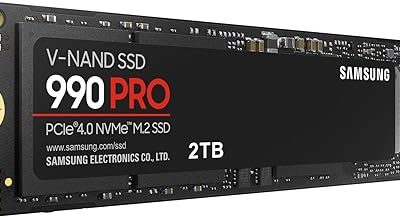
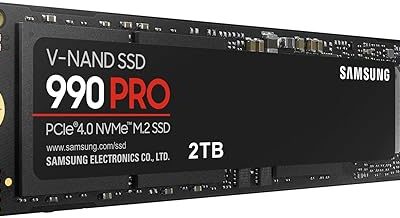
Samsung 990 PRO 2TB
The same controller and NAND as the 1TB model with double the headroom, which keeps the drive further from the capacity cliff where write speeds degrade. This is comfortably over budget at current pricing — worth bookmarking for a sale rather than planning around today.
Samsung 9100 PRO 1TB
A PCIe 5.0 x4 drive hitting up to 14,700 MB/s, which is genuinely impressive and almost entirely irrelevant to frame rates in 2026. It’s a well-built future-proofing purchase for Gen 5 platforms, but it sits far outside a $100 budget and offers no meaningful gaming advantage over a good Gen 4 drive.
Frequently Asked Questions
Is 1TB enough for gaming in 2026?
For most people, yes — 1TB comfortably holds a Windows install plus roughly eight to twelve modern titles. If you play multiple 150GB-plus live-service games simultaneously, plan on adding a second drive rather than stretching for 2TB now.
Will a PCIe 5.0 SSD load games faster than PCIe 4.0?
Barely. Real-world game load times between good Gen 4 and Gen 5 drives typically differ by a fraction of a second, because loading is bottlenecked by decompression and CPU work rather than raw sequential throughput. Spend the difference on capacity instead.
Do I need a heatsink?
For Gen 4 drives in a desktop, your motherboard’s built-in M.2 heatsink is sufficient. Bare drives are preferable for laptops and the PS5’s storage bay, where clearance is tight — check your console or laptop’s documented height limit before buying a model with a tall integrated cooler.
Are DRAM-less SSDs a problem for gaming?
Not meaningfully. Gaming workloads are read-heavy and burst-oriented, which Host Memory Buffer handles well. The tradeoff shows up in long sustained writes — bulk video transfers or cloning a full drive — not in loading screens.
Final Thoughts
If you’re holding firm at $100, the Kingston NV3 1TB is the pick: it delivers the capacity and PCIe 4.0 speed that actually matter for gaming without asking you to compromise on either. The SanDisk Optimus 5100 500GB is a sensible companion drive or laptop upgrade if you don’t need the full terabyte. And if your budget has room to grow, the Samsung 990 PRO 1TB remains the best-executed Gen 4 drive available — just be honest that it lives above the $100 line rather than within it.