Key takeaways
- Form factor first: Desktops and most laptops use M.2 2280, while the Steam Deck, ROG Ally, and many mini PCs require the shorter 2230 size. Buy the wrong length and it won’t fit, so check your slot before anything else.
- Capacity: 2TB is the current sweet spot for a serious library, holding roughly a dozen large games plus extras. Go 1TB only if budget is tight, and consider stepping down installs you rarely touch.
- PCIe generation: Gen4 drives hitting 5,000MB/s or more load levels fast and cut shader-compilation stutter. On a Gen3 system a Gen4 drive still works, just capped at the slower interface speed.
- DRAM vs DRAM-less: DRAM-less QLC drives are cheaper and fine for a game library that’s mostly read, while DRAM-equipped drives sustain heavy writes better if you also record or edit.
- Internal or external: An internal NVMe is fastest and cleanest, but a portable USB SSD lets you carry a library between a PC and a handheld without reinstalling.
Modern games are enormous. A single AAA title can eat 100GB or more, and once you’ve installed a handful of them alongside your favorite live-service games, even a 1TB drive fills up fast. If you’re constantly uninstalling games to make room, or if you game on a Steam Deck or ROG Ally where storage is at a premium, a bigger and faster SSD is the upgrade that pays off every single day.
The right drive depends on where your Steam library lives. Desktop and standard laptop builds want a roomy M.2 2280 NVMe, handhelds need the compact 2230 form factor, and some players prefer a fast external SSD to shuttle games between machines. Below I explain how to match the drive to your system, then review the best options for a big Steam library in 2026.
Our top picks
![SABRENT Rocket Q4 2230 NVMe SSD 2TB – PCIe Gen4 M.2 Internal SSD for Steam Deck, ROG Ally, Surface Pro, Mini PCs – DRAM-Less QLC, Up to 5GB/s, Single-Sided, Compact Form Factor [SB-213Q-2TB]](https://m.media-amazon.com/images/I/41QldUwQDlL._SL500_.jpg)


As an Amazon Associate we earn from qualifying purchases at no extra cost to you. Ratings are shown as listed on Amazon.
⚡ Save on Your Next PC — Amazon Prime
Prime members get fast free shipping on the systems above, plus early access to Prime Day & Black Friday PC deals. New members get a 30-day free trial.
Watch: Best SSD for a Large Steam Library — Video Review
How to Choose
- Form factor first: Desktops and most laptops use M.2 2280, while the Steam Deck, ROG Ally, and many mini PCs require the shorter 2230 size. Buy the wrong length and it won’t fit, so check your slot before anything else.
- Capacity: 2TB is the current sweet spot for a serious library, holding roughly a dozen large games plus extras. Go 1TB only if budget is tight, and consider stepping down installs you rarely touch.
- PCIe generation: Gen4 drives hitting 5,000MB/s or more load levels fast and cut shader-compilation stutter. On a Gen3 system a Gen4 drive still works, just capped at the slower interface speed.
- DRAM vs DRAM-less: DRAM-less QLC drives are cheaper and fine for a game library that’s mostly read, while DRAM-equipped drives sustain heavy writes better if you also record or edit.
- Internal or external: An internal NVMe is fastest and cleanest, but a portable USB SSD lets you carry a library between a PC and a handheld without reinstalling.
The Best Picks Reviewed
Silicon Power 2TB UD90 2230 NVMe Gen4
For Steam Deck and ROG Ally owners who want maximum capacity in the tiny 2230 slot, this Silicon Power 2TB drive is the pick. It hits up to 5,000MB/s reads, quadruples the stock 512GB storage of many handhelds, and is explicitly validated for Steam Deck compatibility, so you can finally stop juggling installs on the go.
SABRENT Rocket Q4 2230 NVMe 2TB
Another excellent 2230 option, the Sabrent Rocket Q4 packs 2TB of DRAM-less QLC into a single-sided drive that fits the tightest handheld and mini-PC bays. Speeds up to 5GB/s make game loads snappy, and the roomy capacity means your entire portable library can live on one drive without compromise.
WD SN740 512GB M.2 2230 (OEM)
If you want a proven, affordable capacity bump rather than a massive one, the WD SN740 is a single-sided 2230 Gen4 drive that’s become a community favorite for handheld upgrades. 512GB is a meaningful jump from tiny stock drives, and WD’s TLC NAND is reliable for a read-heavy game library.
Transcend ESD420 1TB External SSD
For players who bounce games between machines, this magnetic external SSD hits up to 2,000MB/s over USB and even clips onto MagSafe. It’s a tidy way to carry part of your Steam library to a friend’s place or between a laptop and desktop without reinstalling multi-gigabyte games.
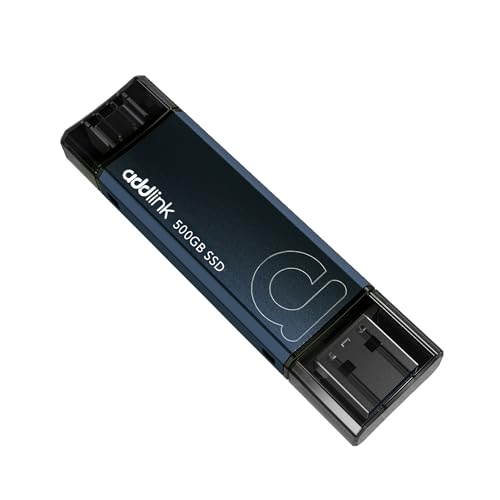
Addlink P50 500GB Portable SSD Stick
The pocket-sized P50 stick delivers up to 1,050MB/s over USB 3.2 Gen 2 with dual Type-C and Type-A connectors, so it plugs into almost anything. It’s a convenient overflow drive for a few extra installs or for backing up saves and game files you don’t need on your main drive.
Frequently Asked Questions
What size SSD do I need for a big Steam library?
2TB is the practical sweet spot in 2026, holding roughly ten to fifteen large AAA games plus smaller titles. If you keep dozens of games installed at once, 4TB is worth considering.
Does a faster SSD improve gaming performance?
It shortens load times and reduces streaming stutter in open-world games, but it won’t raise your frame rate. The bigger benefit for most people is simply having room to keep more games installed.
What SSD fits a Steam Deck?
The Steam Deck and many handhelds use the compact M.2 2230 form factor, not the standard 2280. Always confirm you’re buying a 2230, single-sided drive to ensure it fits and stays cool.
Is a DRAM-less SSD okay for games?
Yes. For a game library that’s mostly reads, a DRAM-less QLC drive performs great and costs less. DRAM matters more if you do sustained heavy writes like video capture or large file transfers.
Final Thoughts
Match the form factor to your system first, then chase capacity. For desktops, a 2TB Gen4 2280 drive keeps your whole library close, while Steam Deck and ROG Ally owners should grab a 2TB 2230 like the Silicon Power UD90 or Sabrent Rocket Q4. If you move games between machines, add a fast external like the Transcend ESD420. Buy 2TB if you can, and you’ll spend a lot less time staring at “not enough disk space.”