Key takeaways
- Prioritize latency over top speed: For gaming, consistent low latency matters more than headline throughput, so a solid Wi-Fi 6 router often beats an overpriced spec sheet.
- Look for QoS: Traffic prioritization keeps your game packets ahead of downloads and streaming, which is the single most useful budget feature.
- Check the ports: A gigabit or 2.5G LAN port lets you wire in your main PC or console for the most stable connection possible.
- Coverage for your space: Match antenna count and mesh support to your home size so you are not paying for range you do not need.
- Bonus value features: Built-in VPN clients, EasyMesh or OneMesh support, and subscription-free security stretch a small budget further.
What's inside
You do not need to spend a fortune to fix your gaming connection. While flagship routers grab headlines with 10G ports and quad-band Wi-Fi 7, the reality is that most players get the biggest improvement simply by moving off an old ISP-provided box to a capable modern router. In 2026 the budget end of the market is stronger than ever, delivering Wi-Fi 6, low-latency QoS, and even entry-level Wi-Fi 7 at prices that leave room in the build budget for games.
We focused on affordable routers that still deliver where it counts for gaming: stable low latency, solid coverage, and features like traffic prioritization and VPN support. Below are our top value picks, a buying framework to help you spend wisely, and answers to the questions budget-minded gamers ask most.
As an Amazon Associate we earn from qualifying purchases.





⚡ Save on Your Next PC — Amazon Prime
Prime members get fast free shipping on the systems above, plus early access to Prime Day & Black Friday PC deals. New members get a 30-day free trial.
Watch: Best Budget Gaming Router 2026 — Video Review
How to Choose a Budget Gaming Router
- Prioritize latency over top speed: For gaming, consistent low latency matters more than headline throughput, so a solid Wi-Fi 6 router often beats an overpriced spec sheet.
- Look for QoS: Traffic prioritization keeps your game packets ahead of downloads and streaming, which is the single most useful budget feature.
- Check the ports: A gigabit or 2.5G LAN port lets you wire in your main PC or console for the most stable connection possible.
- Coverage for your space: Match antenna count and mesh support to your home size so you are not paying for range you do not need.
- Bonus value features: Built-in VPN clients, EasyMesh or OneMesh support, and subscription-free security stretch a small budget further.
The Best Budget Gaming Routers Reviewed
TP-Link Archer AX55 (AX3000 Wi-Fi 6)
The TP-Link Archer AX55 is the value all-rounder to beat, delivering dependable AX3000 Wi-Fi 6 with EasyMesh support, VPN client and server functions, HomeShield security, and a USB 3.0 port. It covers the fundamentals of low-latency gaming without any wasted spend, making it our top overall budget pick.
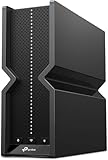
NETGEAR Nighthawk RS200 (Wi-Fi 7 BE6500)
The NETGEAR Nighthawk RS200 sneaks Wi-Fi 7 into the budget bracket, offering BE6500 speeds up to 6.5Gbps, a 2.5 Gig internet port, and coverage for up to 2,500 square feet. For players who want a taste of Wi-Fi 7 future-proofing without a flagship price, it is a compelling value.
ASUS RT-AX1800S (Wi-Fi 6)
The ASUS RT-AX1800S is the feature-rich bargain, bundling subscription-free network security, parental controls, a built-in VPN, and AiMesh compatibility. It is an easy recommendation for gamers who want ASUS software polish and expandable mesh coverage at an entry-level price.
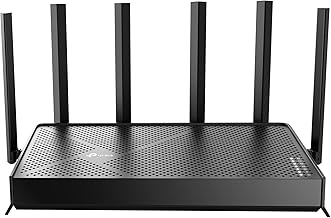
TP-Link Archer BE400 (Wi-Fi 7 BE6500)
The TP-Link Archer BE400 pairs dual 2.5Gbps ports with a quad-core CPU and Wi-Fi 7 BE6500 speeds, covering up to 2,400 square feet and 90 devices. Its multi-gig wired ports make it a smart choice for gamers who want to hardwire a PC or console on a budget.
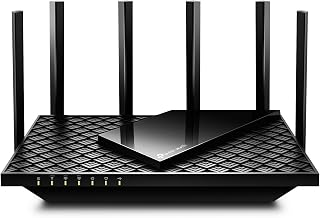
TP-Link Archer AX73 (AX5400 Wi-Fi 6)
The TP-Link Archer AX73 steps up range and throughput with AX5400 dual-band Wi-Fi 6 and six antennas for long-range coverage. It is the pick for larger budget homes where reaching a distant gaming room matters as much as raw speed, all while staying affordable.
Frequently Asked Questions
Can a budget router really improve my gaming?
Absolutely. Upgrading from an old ISP router to a modern budget model like the Archer AX55 adds QoS, better antennas, and a cleaner signal, which reduces jitter and lag spikes noticeably.
Is Wi-Fi 6 enough, or should I stretch to Wi-Fi 7?
Wi-Fi 6 is plenty for smooth gaming today. Stretch to a budget Wi-Fi 7 model like the Nighthawk RS200 only if you want future-proofing or already own Wi-Fi 7 devices.
Do I still need to wire in my console?
For the most stable connection, yes. Even budget routers with a 2.5G port, such as the Archer BE400, let you hardwire your main device for lower, more consistent latency than wireless.
Will a cheap router cover my whole house?
Many do for small to mid-size homes. For larger spaces, choose a long-range model like the Archer AX73 or a mesh-capable router such as the RT-AX1800S and add nodes later.
Final Thoughts
Great gaming performance does not require a premium price tag. The TP-Link Archer AX55 covers the essentials brilliantly, the NETGEAR Nighthawk RS200 sneaks in Wi-Fi 7, and the Archer AX73 stretches coverage for larger homes. Identify whether you need range, wired ports, or future-proofing, and you will find a budget router that delivers the stable, low-latency connection your games deserve.