Our Top Picks


Buying a first gaming keyboard and mouse separately forces a beginner to learn switch types, sensor specs and software ecosystems all at once, and it is easy to overspend on one half while neglecting the other. A combo solves that in a single box: keyboard and mouse designed to work together, one setup process, and a lower total than comparable parts bought apart. The real decision is simpler than the marketing suggests — wired or wireless, quiet membrane keys or a crisper mechanical-like feel, and a mouse shape that fits your hand.
This guide is for first-time PC gamers, students setting up a first desk, and anyone replacing a basic office set with something built for play. Every pick is a genuine gaming keyboard and mouse combo sold as one listing, chosen from the product names and specifications on its Amazon page. The list runs from a simple wired starter set to a tri-mode wireless option and a step-up bundle from a major brand.
Quick Picks
As an Amazon Associate we earn from qualifying purchases
| Product | Best for | Key spec from title |
|---|---|---|
| Redragon S101-3 PRO Gaming Keyboard and Mouse | First wired starter set | Programmable combo with independent macro record keys |
| Redragon S101M-KS Gaming Keyboard and Mouse Wireless | Cable-free beginner desks | Tri-mode connection with 4800 DPI gaming mouse |
| havit Wired Gaming Keyboard Mouse Combo HV-KB558CM | Quiet, simple plug-and-play play | 104 keys with 4800 DPI mouse and wrist rest |
| MSI Vigor GK30 Combo White | A crisper, mechanical-like feel | 6-zone RGB keyboard with 5000 DPI GM11 mouse |
| CORSAIR K55 RGB PRO + HARPOON RGB PRO Gaming Bundle | A brand-name step up | Five-zone RGB keyboard with 12,000 DPI mouse |
How to Choose
Wired or wireless, and what it changes day to day
A wired combo is the easiest first purchase: plug in one or two USB cables and everything works, with no batteries to charge and no receiver to lose. That simplicity suits a fixed desk where the PC never moves. Wireless combos free up the desk and work better with a laptop that travels between rooms, but they add charging routines and, on shared-receiver sets like the Redragon S101M-KS, one small 2-in-1 dongle controls both devices at once. Beginners who play fast shooters at a permanent desk rarely miss wireless; beginners sharing a family PC or a small table usually value the tidy cable-free layout more than the tiny convenience of never charging.
Keyboard feel: membrane, plunger and macro keys
Most beginner combos use membrane keys, which are quiet, soft and forgiving for mixed gaming and homework or office typing. Plunger switches, as on the MSI Vigor GK30, imitate the crisp travel of a mechanical board without a fully mechanical price or noise level. Neither is automatically better — the question is whether you type a lot in shared spaces. Also check extras that help a new player: dedicated multimedia keys save alt-tabbing to change volume, a wrist rest reduces fatigue in long sessions, and macro keys, like the independent record keys on the Redragon S101-3 PRO, save a repeated command instead of forcing you to memorise long sequences.
Mouse DPI, buttons and hand fit
DPI numbers on combo boxes look dramatic, but a beginner will spend nearly all their time in the lower half of any mouse’s range. What matters is that DPI changes in clear steps — 400 through 5000 on the MSI GM11, for example — so you can slow the pointer for aiming and speed it up for desktop work. Adjustable steps beat a huge maximum figure every time. Then look at shape and weight: a contoured mouse around 85 to 90 grams, like the HARPOON RGB PRO in the Corsair bundle, suits most medium hands, while symmetrical shapes fit either hand. Extra side buttons help in strategy games, but two are enough for a first mouse.
Layout, lighting and compatibility checks
Full-size 104-key layouts are the safest default for beginners because the number pad, arrow keys and function row are all where school, work and game tutorials expect them. Compact boards save space but force key combinations for everyday functions, a needless learning curve in month one. Lighting is mostly personal taste, though per-zone RGB is easier to tone down than a fixed rainbow pattern in a bedroom. Finally, confirm the operating system in the listing before ordering: most of these combos target Windows PCs, the havit set also lists Mac support, and console use is limited on nearly all of them.
The 5 Best Options
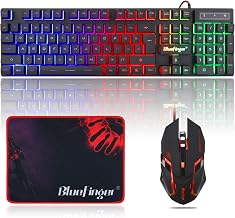
Redragon S101-3 PRO Gaming Keyboard and Mouse
This is the most straightforward starting point in the list: a full-size wired keyboard and mouse that work the moment they are plugged in, with software for anyone who wants to go further later. The keyboard adds independent macro record keys and programmable RGB backlighting, which gives a new player room to experiment without buying twice. The mouse offers several DPI steps and programmable buttons, enough to learn how sensitivity settings affect aim. For a first gaming desk on a tight budget, it covers the fundamentals in one box and leaves the advanced features optional rather than overwhelming.
Specs
- Wired gaming keyboard and mouse combo, sold as one set
- RGB backlit keyboard with programmable lighting and macro functions via software
- Independent macro record keys on the keyboard
- Gaming mouse adjustable up to 3200 DPI (800/1600/2400/3200 steps)
- Mouse with 6 buttons, 5 of them programmable
- 25 conflict-free keys and dedicated plus FN multimedia keys (114 keys total)
- Compatibility: Windows 10, 8, 7, Vista and XP, with limited Mac OS keyboard support
Best for: Beginners who want the classic wired starter combo with room to learn macros and lighting later.
Watch out for: The keyboard backlight is true RGB, but the mouse lighting is a single red backlight, so the two halves do not match effect for effect.
ASIN: B00NLZUM36
Redragon S101M-KS Gaming Keyboard and Mouse Wireless
The S101M-KS answers the most common complaint about starter combos — the cables. Its keyboard and mouse connect three ways: wired, Bluetooth, or through a single shared 2.4GHz receiver, so one USB port can run both devices and the desk stays clear. The full-size keyboard keeps 10 independent multimedia keys, which beginners use constantly for volume and playback, and the mouse reaches 4800 DPI with on-the-fly adjustment. It suits a laptop-based setup or a shared family PC where the peripherals get moved, stored or swapped between machines, and it still falls back to a cable when the battery runs low.
Specs
- Tri-mode wireless gaming keyboard and mouse combo: wired, Bluetooth and 2.4GHz receiver
- Shared 2-in-1 2.4GHz receiver controls keyboard and mouse together
- Full-size RGB keyboard with 10 independent multimedia keys and 12 FN combination multimedia keys
- RGB backlighting with 8 backlight patterns, adjustable speed and brightness
- Gaming mouse adjustable up to 4800 DPI
- Designed for Windows PC and computer use
Best for: Beginners who want one wireless set that can move between a laptop and a desktop.
Watch out for: Wireless convenience means remembering to recharge, and the shared receiver is small and easy to misplace when travelling.
ASIN: B0DXTV9BGJ
havit Wired Gaming Keyboard Mouse Combo HV-KB558CM
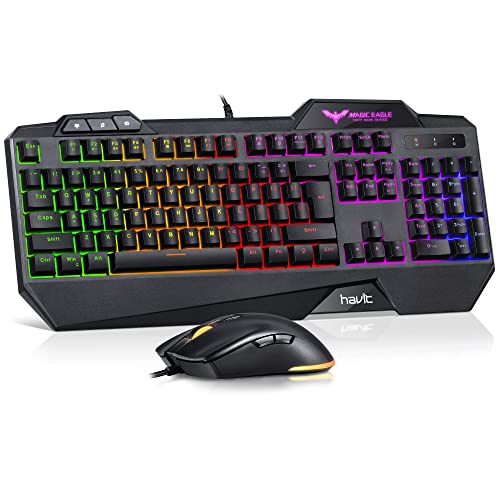
Havit’s combo is the quiet, no-drama option in this group. The 104-key keyboard uses a rainbow LED backlight rather than full software-driven RGB, the built-in wrist rest is part of the frame rather than a separate piece to lose, and the whole set is wired USB, so setup is finished in under a minute. The mouse reaches 4800 DPI, which is more range than a beginner needs, with steps low enough for careful aiming practice. The listing also names Mac alongside Windows, which makes this the easiest recommendation here for a household that shares one desk between a gaming PC and a Mac laptop.
Specs
- Wired gaming keyboard and mouse combo with USB connection
- 104-key keyboard with LED rainbow backlighting
- Ergonomic wrist rest built into the keyboard
- RGB gaming mouse adjustable up to 4800 DPI
- Listed for Windows and Mac PC gamers
- Model HV-KB558CM
Best for: Beginners who want the simplest plug-and-play set for a shared or mixed Windows and Mac desk.
Watch out for: Rainbow backlighting is a fixed multi-colour pattern rather than per-key RGB, so lighting customisation is limited.
ASIN: B016Y2BVKA
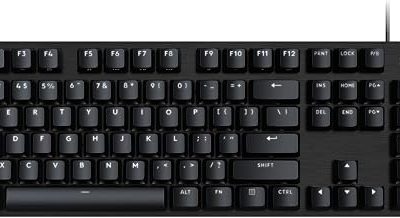
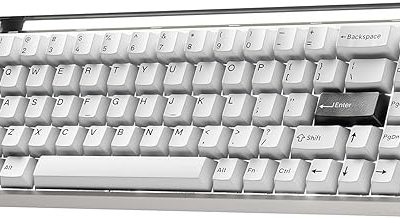
MSI Vigor GK30 Combo White

The GK30 Combo is for the beginner who already knows they dislike soft membrane keys. Its plunger switches are built to feel mechanical-like and crisp, with a rated life of over 12 million keystrokes, and the floating keycap design makes the board easy to clean after a spilled drink — the keyboard is also water repellent. Lighting runs across six zones rather than a single colour wash. The bundled Clutch GM11 mouse uses a PMW-3325 optical sensor with five preset DPI levels matched to different lighting colours, Omron switches rated beyond 10 million clicks, and a symmetrical shape that works in either hand.
Specs
- Wired gaming keyboard and mouse combo in white, sold as one set
- GK30 keyboard with mechanical-like plunger switches and 12+ million keystroke life
- 6-zone RGB lighting and water-repellent, splash-proof keyboard design
- 104/105/108 keys depending on language layout, with 6-key rollover and 20-key anti-ghosting
- Clutch GM11 mouse with PMW-3325 optical sensor, preset DPI 400/800/1600/3200/5000
- Mouse Omron switches rated for 10+ million clicks; mouse weight 89 g without cable
- 1.8 m cables with gold-plated connectors; keyboard weight 1042 g
Best for: Beginners who want a crisper key feel and a clean white setup from an established PC brand.
Watch out for: The white finish shows dust and desk grime faster than black, and the plunger keys are louder than a plain membrane board.
ASIN: B09B4SDPH5
CORSAIR K55 RGB PRO + HARPOON RGB PRO Gaming Bundle

Corsair’s bundle is the step-up pick for a beginner who would rather buy once from a major gaming brand. The K55 RGB PRO keyboard brings five-zone RGB backlighting, six dedicated macro keys and an IP42 dust and spill-resistant design, plus a soft detachable palm rest and dedicated volume and media keys. Both devices run through Corsair’s iCUE software, so lighting and macros live in one place as you learn. The HARPOON RGB PRO mouse is the strongest mouse in this list on paper: light at 85 grams, contoured with rubber side grips, and fitted with a 12,000 DPI optical sensor and six programmable buttons.
Specs
- Gaming bundle with CORSAIR keyboard and mouse, model CH-9226865-NA
- K55 RGB PRO keyboard with dynamic five-zone RGB backlighting via iCUE
- Six dedicated macro keys with Elgato Stream Deck software integration
- IP42-rated dust and spill-resistant keyboard design
- Soft textured detachable palm rest, plus dedicated volume and media keys
- HARPOON RGB PRO mouse: 85 g, contoured shape with rubber side grips
- Mouse optical sensor up to 12,000 DPI with six programmable buttons
Best for: Beginners who want a recognised brand, one software app for both devices, and hardware that will not need replacing as quickly.
Watch out for: The keyboard is still a membrane design despite the step-up positioning, so do not buy it expecting mechanical switches.
ASIN: B096GSQKL7
Which One Fits Your Situation
Your first gaming PC, built this month
Start with the Redragon S101-3 PRO. A new PC owner has enough to learn from game settings and launchers without adding charging or wireless pairing to the list. The wired connection always works, the full-size layout matches every tutorial, and the macro keys and lighting software are there to explore in month two. It is also the set you will mind least upgrading later, because its entry cost is modest.
A laptop that games at home and works elsewhere
Choose the Redragon S101M-KS. One shared receiver leaves your other USB port free, Bluetooth covers quick sessions without the dongle, and the wired mode rescues you when the battery fades mid-evening. The full-size keyboard is more comfortable for long homework or office sessions than a laptop’s built-in board, and the whole set packs away in a drawer when the desk has to become a dining table again. No other pick here moves between machines this easily.
A shared family or bedroom desk
The havit HV-KB558CM and the MSI Vigor GK30 Combo split this situation by noise. If the PC sits in a family room or a shared bedroom, the havit’s quieter membrane keys and simple wired setup cause the least friction. If the desk is yours alone and you type as much as you play, the GK30’s crisper plunger switches and water-repellent design handle long sessions and spilled drinks better. Both are full-size, so neither forces anyone to relearn the number pad.
You plan to keep this set for several years
Pick the CORSAIR bundle. Beginners who know gaming will become a long-term hobby benefit from the stronger mouse sensor, the spill-resistant keyboard and a single mature software package that will still be supported as their setup grows. The detachable palm rest and dedicated media keys are small comforts that matter more over years than over weeks. It costs more than the starter sets, but it is the pick least likely to feel like a temporary purchase.
Common Mistakes
- Choosing by the biggest DPI number on the box, when adjustable low DPI steps matter far more for learning to aim.
- Buying a compact keyboard first and then struggling with missing number pad and function keys in games, schoolwork and spreadsheets.
- Assuming a combo with a headset or mousepad bundled in is better value, when the extras often replace quality in the keyboard and mouse themselves.
- Forgetting to check operating system support, especially in mixed Windows and Mac households or when hoping to use the set on a console.
- Picking wireless for a fixed desk and then never building a charging habit, so the keyboard dies in the middle of a match.
Frequently Asked Questions
Is a combo good enough for a beginner, or should I buy separately?
A combo is the right starting point for most beginners. It guarantees the keyboard and mouse work together, keeps the total cost predictable, and removes the hardest early research. Buy separately later, when you know from experience whether you care more about switch feel, mouse weight or extra buttons, because that knowledge makes the second purchase far better targeted.
Do beginners need a mechanical keyboard?
No. Mechanical switches are a preference, not a requirement, and plenty of capable starter combos use membrane or plunger switches that are quieter and cheaper. A beginner gains more from a full-size layout, clear multimedia keys and a comfortable wrist position than from a specific switch type. If curiosity grows, a mechanical board is an easy single upgrade later.
What DPI should a beginner actually use?
Most beginners play comfortably somewhere between 800 and 1600 DPI, adjusting in small steps until turning and aiming feel controlled rather than twitchy. Every mouse in this guide can be set well below its maximum, which is the point: the headline figure is a ceiling, not a recommendation. Change one step at a time and play for a day before changing again.
Can these combos be used for school or office work too?
Yes, and that dual use is one of their strengths. Full-size layouts, number pads and multimedia keys are exactly what documents and spreadsheets need, and the quieter membrane sets suit shared rooms. If the lighting is distracting during work, most of these keyboards let you dim it or switch the pattern from the board itself without opening any software.
FAQ
Is a combo good enough for a beginner, or should I buy separately?
Do beginners need a mechanical keyboard?
What DPI should a beginner actually use?
Can these combos be used for school or office work too?
More from Amazon
Programs that pair well with the guide above. Offers and eligibility are set by Amazon and may change.
Free shipping on eligible items, Prime Video and more. Eligible new members can start with a free trial.
Start a Prime free trialAd-free music streaming. Eligible new subscribers can start with a free trial.
Try Music Unlimited freeA Prime membership for ages 18-24 with a trial period. Eligibility is set by Amazon.
See Prime for Young AdultsAudiobooks and podcasts to listen to on the go. Eligible new members can start with a free trial.
Try Audible freeAs an Amazon Associate we earn from qualifying purchases.