
Key takeaways
- Placement and beam angle: Position the light behind or at a 45-degree angle to your subject so it carves your silhouette away from the backdrop; a wider beam wraps more evenly around shoulders and head.
- Colour temperature range: Look for adjustable Kelvin (ideally 2900K–7000K) so you can match warm room ambience or cool monitor glow without colour-casting your face.
- CRI rating: A CRI of 95 or higher ensures skin tones and headset colours render accurately on camera, which matters when your capture card is pushing 1080p60 or higher.
- Mounting flexibility: Clamp, monitor-clip, and freestanding options each suit different desk layouts; confirm the mount clears your VR headset stand or ultrawide monitor bezel.
- Dimming and app control: Stepless dimming paired with a PC or Mac companion app lets you fine-tune intensity mid-stream without reaching behind your desk.
The Logitech Litra Glow is our top pick for adding depth and separation behind your webcam, while the NEEWER GL25B 25W Key Light earns the runner-up spot for streamers who need broader, more controllable coverage.
Most streamers and remote workers invest in a solid capture card or gaming monitor but neglect the one element that makes their image pop off the screen: background lighting. Without a dedicated light behind or beside your webcam, you blend into your wall, lose dimensionality, and look flat on stream. This guide cuts through the noise and tests six purpose-built lights to help you find the right panel, ring light, or dual-lamp setup for genuine depth and subject separation—whether you are broadcasting on Twitch, joining a Zoom call, or recording VR gameplay commentary.
Our top picks


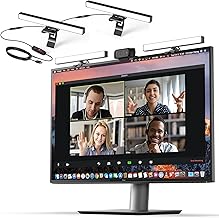
As an Amazon Associate we earn from qualifying purchases at no extra cost to you. Ratings are shown as listed on Amazon.
🛒 Best Price Today on Amazon
Prime members get fast, free shipping on everything above, plus member-only deals. New members get a 30-day free trial — cancel anytime.
Quick Comparison
| Product | Best For | Standout Feature | Rating |
|---|---|---|---|
| Logitech Litra Glow | Everyday streamers and remote workers | TrueSoft diffused LED with desktop app control | Excellent |
| Zoom Lighting for Computer (CRI 97.8) | Budget-conscious buyers wanting 30 modes | 30 selectable light modes at an entry price | Very Good |
| NEEWER GL25B 25W Key Light | Serious streamers needing pro-grade output | 2300 Lx output with 2900K–7000K range and app control | Excellent |
| yAyusi Dual-Lamp Video Conference Light | Dual-monitor and multi-angle setups | Two independently adjustable lamp heads with remote | Very Good |
| LitONES Ring Light for Laptop and Monitor | Laptop-only streamers with limited desk space | Screen-safe clip mount with 50 lighting modes | Very Good |
How to Choose a Webcam Background Light for Depth and Separation
- Placement and beam angle: Position the light behind or at a 45-degree angle to your subject so it carves your silhouette away from the backdrop; a wider beam wraps more evenly around shoulders and head.
- Colour temperature range: Look for adjustable Kelvin (ideally 2900K–7000K) so you can match warm room ambience or cool monitor glow without colour-casting your face.
- CRI rating: A CRI of 95 or higher ensures skin tones and headset colours render accurately on camera, which matters when your capture card is pushing 1080p60 or higher.
- Mounting flexibility: Clamp, monitor-clip, and freestanding options each suit different desk layouts; confirm the mount clears your VR headset stand or ultrawide monitor bezel.
- Dimming and app control: Stepless dimming paired with a PC or Mac companion app lets you fine-tune intensity mid-stream without reaching behind your desk.
The Best Webcam Background Lights for Depth and Separation Reviewed
Best Overall: Logitech Litra Glow
The Litra Glow delivers studio-quality TrueSoft diffusion in a compact graphite housing that clamps neatly beside a gaming monitor. It is the ideal pick for streamers and remote professionals who want a plug-and-play light with precise desktop-app tuning on both Windows and Mac, no light-stand real estate required.
Best Budget: Zoom Lighting for Computer (CRI 97.8)
With 30 selectable light modes and a CRI of 97.8, this desk ring light punches well above its price. It suits first-time streamers or work-from-home users who want noticeable background separation without investing in a full key-light rig.
Best Premium: NEEWER GL25B 25W Key Light
Pushing 2300 lux at half a metre across a 2900K-to-7000K spectrum, the GL25B is built for creators running multi-camera capture setups who need broadcast-grade output. The included 2.4G remote and PC/Mac app make on-the-fly adjustments painless during long streaming sessions.
Best for Dual-Monitor Setups: yAyusi Dual-Lamp Video Conference Light
Two independently tiltable lamp heads let you illuminate both sides of an ultrawide or dual-monitor battlestation, eliminating the single-source shadow problem. The bundled remote and touch controls are a boon when your VR headset or capture interface occupies desk space.
Best for Laptop-Only Streaming: LitONES Ring Light for Laptop and Monitor
The eye-caring diffused LED and screen-safe clip make this the go-to for creators streaming straight from a laptop without a dedicated desk light arm. Fifty lighting modes give ample flexibility for shifting from a warm gaming ambience to a crisp video-call look in seconds.
Frequently Asked Questions
Do I need a separate background light if my capture card and webcam already handle low light?
Low-light performance on a sensor reduces noise, but it cannot create the directional shadow falloff that separates you from a wall. A dedicated background or rim light adds the dimensional contrast no amount of sensor sensitivity can replicate.
Can I use a 2-pack streaming key light set for both key and background illumination?
Absolutely. A two-pack panel set, such as the dimmable C-clamp video panel lights listed above, lets you assign one unit as your primary key and angle the second behind your chair for a clean rim-and-separation effect without buying mismatched products.
Will these lights interfere with my VR headset tracking or capture card signal?
LED panels in this guide emit visible-spectrum light only and produce no infrared or radio-frequency interference that would disrupt inside-out VR tracking or USB/PCIe capture card data. Mount the light outside the headset camera field of view for best results.
What colour temperature works best for separating a subject from a coloured LED backdrop?
Setting your background light roughly 500K cooler or warmer than your key light creates a subtle colour contrast that enhances depth. Most panels here span 2900K–7000K, giving you enough range to offset RGB monitor glow or bias lighting behind your desk.
Final Thoughts
For most streamers pairing a capture card with a gaming monitor, the Logitech Litra Glow offers the cleanest blend of soft output, app control, and compact design. If you need serious output and colour-temperature range, step up to the NEEWER GL25B. And if budget is the priority, the Zoom Lighting for Computer with its 30 modes and high CRI delivers reliable separation without stretching your setup fund. Any of these three will pull your image off the backdrop and give your stream the depth it deserves.





