Our Short List of 3

- Best for: Renters in small units who want a simple schedule and an unobtrusive round design.
- Brand: Google
- Model name: Google Nest Thermostat
- Item model number: GA01334-CA
- Colour: Snow

- Best for: Renters who want guided installation steps and a stated privacy position.
- Brand: Emerson
- Model name: Wi-Fi Thermostat for Smart Home, DIY Version
- Item model number: ST55
- Power source: Battery or C-wire

- Best for: Larger apartments where a separate room sensor can balance a bedroom against the main living space.
- Brand: Google
- Model name: Google Nest Learning Thermostat (4th Gen)
- Item model number: CE911542
- Manufacturer part number: GA05169-US
All 4 Picks at a Glance
| Product | Specs | Action |
|---|---|---|
| Google Nest Thermostat – Snow |
| Check price on Amazon |
| Sensi Smart Thermostat ST55 |
| Check price on Amazon |
| Google Nest Learning Thermostat (4th Gen) – Polished Obsidian |
| Check price on Amazon |
 Sensi Lite Smart Thermostat ST25 |
| Check price on Amazon |
Key takeaways
- Find the best smart thermostats for apartments with no C wire needed in most homes, renter-aware checks, voice control and app scheduling compared.
Apartment heating and cooling often runs through an older wall thermostat, a landlord-owned system, and wiring you cannot change. The real decision is therefore not which screen looks nicest, but which model can run on the wires already behind your current thermostat, especially when no common wire is present, and which one can be removed cleanly later.
This guide is for renters, condo owners, and small-unit landlords who want app control and scheduling without rewiring a system they do not fully own. Every pick below was chosen from the names and specifications on its Amazon product page, with apartment-friendly or no-C-wire operation stated on that page. The comparison also weighs landlord permission, clean removal at move-out, room sensors for uneven temperatures, and the voice assistants each model supports, because those practical details decide whether a thermostat suits rental life.
Quick Picks
As an Amazon Associate we earn from qualifying purchases.
| Product | Best for | Key spec from title |
|---|---|---|
| Google Nest Thermostat – Snow | Renters who want a simple app schedule | Works without a C wire in most homes |
| Sensi Smart Thermostat ST55 | Renters who want privacy-focused control | Common wire not required in most applications |
| Google Nest Learning Thermostat (4th Gen) – Polished Obsidian | Apartments with a hot or cold bedroom | Nest Temperature Sensor (2nd gen) included |
| Sensi Lite Smart Thermostat ST25 | Small apartments wanting a black LCD model | Most systems C-wire not required |
How to Choose
Check the Wires Behind Your Current Thermostat
Start by photographing every wire and terminal label before you disconnect anything, because apartment systems vary widely and a missing common wire changes which models are realistic. Look for a wire on the C terminal, check whether spare conductors are tucked into the wall, and note heating-only, cooling-only, zoned, or heat pump labels, since several no-C-wire models still need a common wire or a power accessory for those system types. Share the photo with your landlord or building manager before ordering, and keep the original thermostat and screws together so the earlier setup can be restored exactly at move-out.
Get Landlord Permission in Writing First
A thermostat swap looks minor, yet it touches a heating and cooling system that the property owner maintains, so written permission protects both sides. Ask which changes are allowed, whether a trim plate may cover old paint marks, and who should handle the work if the system uses a control board inside a locked closet or utility room. Some leases require professional installation, while others allow a careful tenant swap with power switched off. Keep the approval, the wiring photo, and the old unit in one place. That paper trail makes deposit discussions and maintenance visits far simpler later.
Match the System Type, Not Just the Brand
Compatibility depends on voltage and equipment, not on a familiar logo. Most picks here are described for low-voltage systems, while line-voltage electric baseboard heat, millivolt wall heaters, and proprietary communicating systems need different equipment entirely. Note whether your apartment uses forced air, a boiler, radiant heat, or a heat pump, and whether it has one stage or multiple stages of heating and cooling. Then compare that list against the system types named on the product page. If the page does not name your equipment, treat the match as unproven and ask the manufacturer or your landlord before buying.
Plan for Wi-Fi, Apps, and Voice Control
An apartment thermostat only feels smart when its app and connections fit how you already live. Check whether the model uses the Google Home app, the Sensi app, Alexa, Google Assistant, HomeKit, Matter, or SmartThings, and confirm that your phone and home network meet the stated needs. Smaller units often place the router close to the thermostat, which helps, but thick walls and utility closets can still weaken a signal. Also decide who should hold the account: a tenant, a landlord, or both. Clear account ownership avoids lockouts when a lease ends or a roommate moves away.
The 4 Best Options
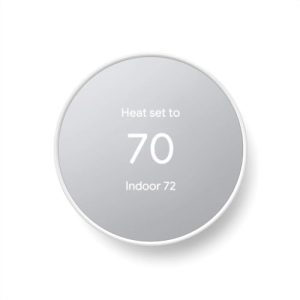
Google Nest Thermostat – Snow
- Best for: Renters in small units who want a simple schedule and an unobtrusive round design.
- Brand: Google
- Model name: Google Nest Thermostat
- Item model number: GA01334-CA
- Colour: Snow
Renters in small units who want a simple schedule and an unobtrusive round design.
Heating-only, cooling-only, zoned, and heat pump systems may still need a C wire or another compatible power accessory.
Renters who want straightforward scheduling without a learning curve will find this round Snow model easy to live with. Its Amazon page states that it is designed to work without a C wire in most homes, which suits older apartment wiring, and it turns itself down when the home is empty. Quick Schedule in the Google Home app builds a weekly plan, while HVAC monitoring can flag a system that does not seem right. Voice control through a compatible device adds convenience for small spaces where the thermostat sits across the room.
Sensi Smart Thermostat ST55
- Best for: Renters who want guided installation steps and a stated privacy position.
- Brand: Emerson
- Model name: Wi-Fi Thermostat for Smart Home, DIY Version
- Item model number: ST55
- Power source: Battery or C-wire
Renters who want guided installation steps and a stated privacy position.
Confirm your exact HVAC type in the Sensi app guidance, because the no-common-wire wording covers most applications, not every system.
Tenants who care about data privacy and a guided do-it-yourself swap should look closely at this rectangular Sensi model. The product page says personal data is not sold, a built-in level helps with mounting, and step-by-step app instructions walk through installation. It also states that a common wire is not required in most applications, which matters in older rentals where adding wiring is rarely an option. Flexible scheduling, geofencing, and usage reporting give apartment dwellers control over routines that change between workdays, weekends, and trips away without needing a large display.
Google Nest Learning Thermostat (4th Gen) – Polished Obsidian
- Best for: Larger apartments where a separate room sensor can balance a bedroom against the main living space.
- Brand: Google
- Model name: Google Nest Learning Thermostat (4th Gen)
- Item model number: CE911542
- Manufacturer part number: GA05169-US
Larger apartments where a separate room sensor can balance a bedroom against the main living space.
Setup uses the Google Home app, so confirm everyone who needs control is comfortable joining that household account.
Apartments with one room that always runs hot or cold are the natural audience for this polished obsidian model, because the box includes a second-generation Nest Temperature Sensor for another room. The Amazon page lists auto scheduling and an auto away mode, plus control through Alexa, HomeKit, and Google Assistant. It states that the thermostat works with most 24V systems, including gas, electric, oil, forced air, heat pump, and radiant equipment, and that no C wire is required for installation in most homes. That breadth helps in mixed-age buildings.
Sensi Lite Smart Thermostat ST25
- Best for: Compact rentals wanting a backlit LCD, wire labels, and broad voice-assistant support.
- Brand: Emerson
- Model name: Sensi Lite
- Item model number: ST25
- Colour: Black
Compact rentals wanting a backlit LCD, wire labels, and broad voice-assistant support.
Heat-only, cool-only, and heat pump systems need a C-wire on this model, so check your system type first.
Small apartments that need clear controls in a black finish are a good match for this Sensi Lite model. Its full Amazon title states that most systems do not require a C-wire, with a C-wire needed for heat-only, cool-only, and heat pump systems, so the exception is visible before purchase. The page lists an LCD display with backlight, Wi-Fi connectivity, and controllers including Alexa, Google Assistant, and SmartThings. Included wire labels and mounting hardware support a tidy swap, while the included AAA batteries match its battery-or-C-wire power listing for suitable systems.
Which One Fits Your Situation
Your Apartment Has No Common Wire
Begin with the models whose pages state no-C-wire operation most directly, then narrow the choice by system type. The standard Nest Thermostat and both Sensi models describe running without a common wire in most cases, while the learning Nest makes the same broad statement for most homes. Heating-only, cooling-only, zoned, and heat pump setups are the recurring exceptions, so a renter with one of those systems should confirm the power accessory route with a landlord before ordering anything.
You Need Permission and an Easy Reversal
Choose a model with clear labels, mounting hardware, and a trim solution, and keep every original part in a labelled bag. The Sensi ST55 emphasises guided steps and a built-in level, while the learning Nest includes a trim plate and steel plate. Photograph the finished wiring, save the app settings, and agree in advance how the thermostat will be handled at move-out. A tidy, reversible installation is usually easier for a landlord to approve than a long feature list.
One Room Is Always Too Warm or Too Cold
Pick the learning Nest with its included temperature sensor when a bedroom, nursery, or home-working corner feels different from the hallway where the thermostat sits. Place the sensor in the room that matters at the time of day that matters, such as the bedroom overnight, and let the schedule use that reading. Single-sensor planning still involves a trade-off, because improving one room can leave another less comfortable, so set expectations with everyone sharing the apartment before relying on it daily.
You Want the Simplest Daily Controls
Look for a clear display, a familiar app, and voice control that matches speakers or phones already in the apartment. The Sensi Lite offers a backlit LCD and several controller options, while the standard Nest Thermostat centres on the Google Home app and a simple schedule. Avoid features you will never open, such as advanced staging you do not have. In a small home, a schedule you understand and maintain saves more discomfort than a crowded settings menu.
Common Mistakes
- Swapping the thermostat without written landlord permission, then arguing about wiring or wall marks when the lease ends.
- Assuming no-C-wire wording covers every system, and skipping the heating-only, cooling-only, zoned, and heat pump exceptions stated on the page.
- Throwing away the old thermostat, screws, or wire labels before the new model has run through both heating and cooling calls.
- Buying for line-voltage baseboard or millivolt equipment without checking that the product page names that exact system type.
- Giving a departing roommate sole control of the thermostat account, leaving everyone else unable to change schedules or access.
Frequently Asked Questions
Do I need landlord permission to install a smart thermostat in an apartment?
Usually yes, because the thermostat controls building equipment and the wiring belongs with the property. Ask in writing, share the exact model and its wiring needs, and offer to keep the original unit for reinstatement. Some landlords prefer their own maintenance team to do the swap. A short written approval avoids deposit disputes and makes later repairs easier for everyone involved.
What if my apartment thermostat has no C wire?
Several models in this guide state that they work without a common wire in most homes, including both Nest models and both Sensi models. The exceptions matter: heating-only, cooling-only, zoned, and heat pump systems can still require one or a power accessory. Photograph your terminals, run the maker compatibility check, and confirm the result with your landlord before ordering a unit.
Can a smart thermostat work with electric baseboard heating?
Only a thermostat designed for line-voltage equipment should control electric baseboard heaters, and the low-voltage models in this guide should not be assumed suitable. Check the voltage and system type on the product page, and look for explicit baseboard or line-voltage wording. If that wording is absent, choose a model built for that equipment or ask an electrician and your landlord for guidance first.
How do I restore the original thermostat when I move out?
Switch off power, photograph the smart thermostat wiring before removal, and reconnect the original unit using the photo and labels saved at installation. Keep its screws, plate, and any batteries together in one bag from the start. Restore the earlier schedule where possible, then tell the landlord the swap back is complete. Testing one heating and one cooling call before handing over keys prevents surprises.
FAQ
Do I need landlord permission to install a smart thermostat in an apartment?
What if my apartment thermostat has no C wire?
Can a smart thermostat work with electric baseboard heating?
How do I restore the original thermostat when I move out?
More from Amazon
Programs that pair well with the guide above. Offers and eligibility are set by Amazon and may change.
Free shipping on eligible items, Prime Video and more. Eligible new members can start with a free trial.
Start a Prime free trialAd-free music streaming. Eligible new subscribers can start with a free trial.
Try Music Unlimited freeA Prime membership for ages 18-24 with a trial period. Eligibility is set by Amazon.
See Prime for Young AdultsAudiobooks and podcasts to listen to on the go. Eligible new members can start with a free trial.
Try Audible freeAs an Amazon Associate we earn from qualifying purchases.