Key takeaways
- Compare the best Android phones for kids with tamper-proof parental controls, GPS tracking, approved apps and parent-managed screen time limits.
Choosing a first Android phone for a child is really a decision about control: how much access your child gets on day one, and how easily that access can grow later. A regular handset handed over with good intentions can expose browsers, app stores, and contacts you never approved. The safer route is a phone built for kids, where parental controls, contact approval, and location tools are part of the system rather than an afterthought you bolt on.
This guide is for parents buying a first phone for a younger child, families who want monitoring that a child cannot simply switch off, and parents of older kids who need room to add freedom gradually. Every pick below was chosen from the names and specifications on its Amazon product page, and each page states kid positioning or parental controls directly.
Quick Picks
As an Amazon Associate we earn from qualifying purchases.
| Product | Best for | Key spec from title |
|---|---|---|
| Bark Phone A16 | Monitoring texts and social media | Tamper Proof Parental Controls |
| Troomi Safe Phone for Kids (Samsung Galaxy A16) | Parent-managed apps on newer hardware | Parent-Managed Apps, GPS & Text Monitoring |
| Troomi Kids Phone (Samsung Galaxy A15) | A curated app library on older hardware | Content Filtering, 10,000+ Apps |
| Teracube Thrive Kids Smart Phone | Blocking social media and spam calls | Parental Controls, Spam Blocker |
How to Choose
Parental Controls That Cannot Be Bypassed
The central question is whether the controls live at the system level or sit in an ordinary app your child could remove. Phones designed for kids describe tamper-proof controls, parent portals, and contact safelists, which means the rules survive curiosity and peer pressure far better than a single settings toggle. Read the product page wording closely: look for approval of contacts, app approval, and remote management from the parent’s own phone or browser. If a listing only promises a generic control app, treat that as a weaker safeguard and keep comparing before you commit.
App Access and Browsing Boundaries
Decide in advance how your child should encounter apps and the web. Some kids’ phones remove social media and open browsing entirely, while others offer a curated library where a parent picks each app and can approve new websites one domain at a time. A curated library suits younger children who need school and reading apps without an open store. A filtered browser suits older children who must research homework topics. Match the model to your child’s maturity, because loosening a permissive phone later is much harder than gradually opening a restricted one.
Location, Calls, and Message Monitoring
Most families buy the phone so a child can be reached and found, so judge the communication tools carefully. Useful pages state GPS tracking, contact safelisting, and spam blocking, so only approved people can call or text. Some systems also monitor message content and alert a parent about bullying or worrying language, rather than forcing a parent to read every conversation. Think about which level fits your family: simple location and approved contacts for a younger child, or message monitoring for an early teen entering group chats and wider social circles.
Plans, Carriers, and Growing Room
Nearly every purpose-built kids’ phone needs its own service plan or parent subscription, and the product page usually says so in the title itself. Confirm which network the plan uses, whether activation is required, and whether the phone can work with other carriers later. Also check the hardware underneath, such as storage, battery capacity, and screen size, because a child may keep this handset for years. The best choice is a system that starts tightly restricted, then lets a parent add apps, contacts, and browsing privileges as responsibility grows, without buying a replacement device.
The 4 Best Options
Bark Phone A16
The Bark Phone suits parents who want monitoring to be the headline feature rather than an optional extra. Its page presents it as the safest phone for kids and teens, with tamper-proof parental controls, monitoring of texts and social media, GPS tracking, and unlimited talk and text built into the offer. Because the handset is based on a Samsung Galaxy A16 running Android, children get a familiar smartphone shape while parents manage rules from the parent app. It fits families with early teens whose messaging and social activity are the main concern, rather than families seeking a bare-bones calling device.
Specs
- Brand: Bark
- Operating System: Android 14
- Model Name: Bark Phone A16
- Special features: Built-In GPS, Kids Phone, Water Resistant
- Parental controls: Tamper Proof Parental Controls stated in the title
Best for: Parents who want text and social media monitoring with GPS tracking
Watch out for: Confirm the Bark plan terms and coverage for your area before ordering, since the phone is sold with its own service
ASIN: B0F7LP2K5D
Troomi Safe Phone for Kids (Samsung Galaxy A16)
This Troomi model pairs Samsung Galaxy A16 hardware with a parent-managed system built around approval. The Amazon page describes parent-managed apps, GPS, and text monitoring, and its answers explain that controls are integrated at the operating system level, with no open app store by default. Parents run everything from the Parent Portal in a browser, setting time limits, approving contacts and apps, and checking location. It is a strong fit for a first smartphone because privileges can expand step by step: start with talk, text, and GPS, then add approved apps and websites as your child shows readiness.
Specs
- Brand: Troomi
- Operating System: Android 14
- Model Name: Galaxy A16
- Memory Storage Capacity: 128 GB
- Standing screen display size: 6.7 Inches
- Ram Memory Installed Size: 4 GB
- Battery Power Rating: 5000 Milliamp Hours
- Special features: Built-In GPS
Best for: A first phone where parents approve every app and contact
Watch out for: A Troomi service plan and activation are required, and service runs on the network named on the page
ASIN: B0F2TVRVTG
Troomi Kids Phone (Samsung Galaxy A15)
Built around the Samsung Galaxy A15, this earlier Troomi phone keeps the same parent-first philosophy with an emphasis on content filtering and a large approved app library. Its listing highlights parental controls, GPS tracking, content filtering, and access to a library described as ten thousand plus apps, with no contract wording in the title. The KidSmart OS positioning means social media is kept out while parents manage apps, contacts, and screen time. Choose it if the Galaxy A15 hardware meets your child’s needs and you prefer this model’s plan structure, feature mix, and curated library approach over the newer A16 version above.
Specs
- Brand: Troomi
- Model Name: Galaxy A15 5G
- Operating System: KidSmart OS
- Parental controls: Parental Controls, GPS Tracking, Content Filtering stated in the title
- App library: 10,000+ Apps stated in the title
Best for: Families who want a curated app library with content filtering and GPS tracking
Watch out for: An activation fee is required according to the title, so read the plan details on the page before buying
ASIN: B0DD1K6287
Teracube Thrive Kids Smart Phone
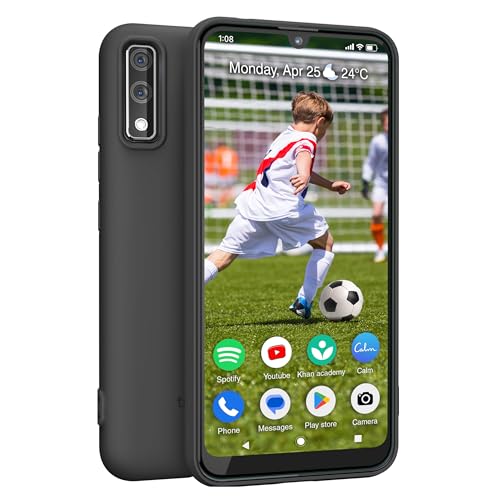
The Teracube Thrive is a purpose-built Android phone for kids and teens whose page leads with parental controls that block or limit social media and internet access. It adds GPS, talk and text, and a spam blocker, and the listing describes management through the Thrive Parent App, including app approvals, time limits for apps, blocking texts from unknown contacts, and safe search and browsing. With a smaller screen and modest storage, it reads as a starter device rather than a media powerhouse. It suits parents of children roughly in the seven to sixteen range who want tight default limits.
Specs
- Brand: Teracube
- Operating System: Android 14
- Model Name: THRIVE
- Memory Storage Capacity: 64 GB
- Screen Size: 6.1 Inches
- Resolution: 720 x 1560
- GPS: True
- Additional Features: Thrive Parent App, Safe Internet Search and Browsing
Best for: Younger children who need social media blocked and unknown contacts kept out
Watch out for: A monthly plan is required, as the title states, so verify plan and carrier details before purchase
ASIN: B0BQP48WP2
Which One Fits Your Situation
Your Child Is Getting a First Phone
Start with the most restricted setup you can manage comfortably day to day. The Troomi Galaxy A16 and the Teracube Thrive both begin with approved contacts, parent-selected apps, and no open store, which keeps the learning curve small. You can add privileges later from the parent portal instead of trying to claw back freedom from a phone that began fully open.
Your Teen Already Uses Social Apps
When messaging and social platforms are already part of your child’s life, monitoring matters more than simple blocking. The Bark Phone A16 is built for that stage, with text and social media monitoring, tamper-proof rules, and GPS tracking. It lets a parent receive alerts about worrying content while an older child keeps a recognisable smartphone experience, which can make the rules easier for a teenager to accept.
You Want One Phone That Grows Over Years
Look for a system whose permissions expand without new hardware. Both Troomi models are described as growing with the child, letting parents add apps, contacts, and websites gradually through the portal. The Bark Phone follows a similar idea through adjustable monitoring. Pick the ecosystem whose portal and plan you are happiest living with, because you will use that dashboard far longer than the handset’s setup screen.
Your Main Worry Is Strangers Making Contact
Prioritise safelisting and spam blocking above camera or storage details. The Teracube Thrive blocks texts from unknown contacts and includes a spam blocker, while Troomi phones rely on contact safelisting so only approved numbers get through. Either approach keeps unknown callers and message senders away from a younger child, which is often the risk parents care about most during the first year of phone ownership.
Common Mistakes
- Handing over a regular Android phone and assuming a single control app will hold, when a determined child can often remove or work around app-level limits.
- Ignoring the required service plan or subscription in the product title, then being surprised that the phone needs activation with one specific provider.
- Choosing based on camera and screen alone while skipping whether contacts, apps, and websites need parent approval before they reach the child.
- Setting every restriction at maximum for an older teen without a path to earn more freedom, which encourages workarounds instead of honest use.
- Forgetting to check network coverage for the plan the phone depends on, especially outside large cities and along school travel routes.
Frequently Asked Questions
Do kids’ Android phones need a special service plan?
Usually, yes. The Bark, Troomi, and Teracube listings all tie the phone to their own plan, subscription, or activation, because the parental controls and monitoring run through that service. Read the plan requirement printed in each product title before ordering, and confirm the underlying network covers your home, school, and regular travel routes well.
Can my child delete the parental controls?
On these purpose-built phones, the controls are described as tamper-proof or integrated at the operating system level, which is the main reason to choose them over a standard handset. A child should not be able to remove the parent portal rules, change approved contacts alone, or install an open app store without the parent’s involvement and approval.
What age are these phones designed for?
The listings position them for kids and teens rather than one exact age. The Teracube material describes children roughly from seven to sixteen, while Bark and Troomi address kids and teens more broadly. Match the model to maturity instead of birthday alone: younger children suit tighter blocking, while older teens usually need monitoring with gradually expanding privileges.
Can these phones grow with my child?
Yes, that gradual growth is a core selling point on several pages here. Troomi describes starting with talk, text, and GPS, then adding approved apps and websites through the Parent Portal as a child matures. Bark likewise promotes adjustable controls. Choosing a system that loosens step by step avoids replacing the phone at every stage of independence.
FAQ
Do kids’ Android phones need a special service plan?
Can my child delete the parental controls?
What age are these phones designed for?
Can these phones grow with my child?
More from Amazon
Programs that pair well with the guide above. Offers and eligibility are set by Amazon and may change.
Free shipping on eligible items, Prime Video and more. Eligible new members can start with a free trial.
Start a Prime free trialAd-free music streaming. Eligible new subscribers can start with a free trial.
Try Music Unlimited freeA Prime membership for ages 18-24 with a trial period. Eligibility is set by Amazon.
See Prime for Young AdultsAudiobooks and podcasts to listen to on the go. Eligible new members can start with a free trial.
Try Audible freeAs an Amazon Associate we earn from qualifying purchases.