Our Short List of 3

- Best for: 4K gaming, ray tracing, and creative work that needs the most memory and headroom.
- Graphics coprocessor: NVIDIA GeForce RTX 5090
- Memory: 32GB GDDR7, memory speed 2437 MHz
- Max screen resolution: 7680×4320 pixels
- Interface: PCIe 5.0 with HDMI and DisplayPort 2.1 outputs

- Best for: High-refresh 1440p gaming and 4K gaming without stepping up to the flagship.
- Graphics coprocessor: NVIDIA GeForce RTX 5080
- Memory: 16GB GDDR7
- Interface: PCIe 5.0 with HDMI and DisplayPort 2.1 outputs
- Cooling: vapor chamber and Axial-tech fans

- Best for: 1440p gaming in compact or small-form-factor builds.
- Graphics coprocessor: NVIDIA GeForce RTX 5070
- Memory: 12GB GDDR7
- Interface: PCIe 5.0 with HDMI and DisplayPort 2.1 outputs
- Design: SFF-ready, 2.5-slot
All 4 Picks at a Glance
| Product | Specs | Action |
|---|---|---|
| ASUS TUF Gaming GeForce RTX 5090 |
| Check price on Amazon |
| ASUS TUF Gaming GeForce RTX 5080 |
| Check price on Amazon |
| ASUS Prime GeForce RTX 5070 OC |
| Check price on Amazon |
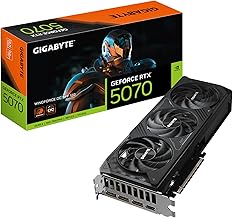
 GIGABYTE GeForce RTX 5060 WINDFORCE OC |
| Check price on Amazon |
Our Top Picks
- GIGABYTE GeForce RTX 5060 WINDFORCE OC 8G GraphicsRTX5060|OC|8GB7.83 x 4.57 x 1.57 inchesCheck on Amazon
The best NVIDIA GPU overall is the GeForce RTX 5090, because it is the fastest graphics card NVIDIA sells and its 32GB of GDDR7 memory handles 4K gaming, ray tracing, and large creative workloads without compromise. The ASUS TUF Gaming RTX 5090 is our top pick among current listings because it pairs that flagship chip with a vapor chamber cooler, military-grade components, and a durable 3.6-slot design. Most gamers do not need this much power, though, so the right card for you depends on your monitor resolution and the games you play.
The Best NVIDIA GPUs at a Glance
As an Amazon Associate we earn from qualifying purchases.
| Product | Best for | Key spec from title |
|---|---|---|
| ASUS TUF Gaming GeForce RTX 5090 | 4K gaming and heavy creative work | 32GB GDDR7, PCIe 5.0, vapor chamber |
| ASUS TUF Gaming GeForce RTX 5080 | High-refresh 1440p and 4K gaming | 16GB GDDR7, PCIe 5.0, vapor chamber |
| ASUS Prime GeForce RTX 5070 OC | 1440p gaming in compact builds | 12GB GDDR7, PCIe 5.0, Dual BIOS |
| GIGABYTE GeForce RTX 5060 WINDFORCE OC | 1080p gaming on a smaller budget | 8GB GDDR7, PCIe 5.0, WINDFORCE cooling |
The 4 Best NVIDIA GPUs
ASUS TUF Gaming GeForce RTX 5090
- Best for: 4K gaming, ray tracing, and creative work that needs the most memory and headroom.
- Graphics coprocessor: NVIDIA GeForce RTX 5090
- Memory: 32GB GDDR7, memory speed 2437 MHz
- Max screen resolution: 7680×4320 pixels
- Interface: PCIe 5.0 with HDMI and DisplayPort 2.1 outputs
4K gaming, ray tracing, and creative work that needs the most memory and headroom.
The card is large and heavy, so measure your case clearance and confirm the included graphics card holder fits your build.
The TUF Gaming RTX 5090 takes the fastest NVIDIA chip and wraps it in a cooler built for long, demanding sessions. Its vapor chamber and Axial-tech fans move heat away from the GPU while the 3.6-slot heatsink keeps temperatures steady under load, and the card supports a maximum resolution of 7680×4320 pixels for high-resolution displays. With 32GB of GDDR7 memory, it suits 4K gaming, ray tracing, and creative apps that load large scenes, textures, and video timelines.
Watch out for: The card is large and heavy, so measure your case clearance and confirm the included graphics card holder fits your build.
ASUS TUF Gaming GeForce RTX 5080
- Best for: High-refresh 1440p gaming and 4K gaming without stepping up to the flagship.
- Graphics coprocessor: NVIDIA GeForce RTX 5080
- Memory: 16GB GDDR7
- Interface: PCIe 5.0 with HDMI and DisplayPort 2.1 outputs
- Cooling: vapor chamber and Axial-tech fans
High-refresh 1440p gaming and 4K gaming without stepping up to the flagship.
Like the 5090 version, this is a thick 3.6-slot card, so check case space and airflow before you buy.
The TUF Gaming RTX 5080 is the step down from the flagship that still covers high-refresh 1440p and 4K gaming with room to spare. Its 16GB of GDDR7 memory handles detailed textures and ray tracing at high resolutions, while the same TUF formula of a vapor chamber, Axial-tech fans, and military-grade components keeps the card steady during long sessions. It is a strong choice when the flagship is more card than your monitor can use.
Watch out for: Like the 5090 version, this is a thick 3.6-slot card, so check case space and airflow before you buy.
ASUS Prime GeForce RTX 5070 OC
- Best for: 1440p gaming in compact or small-form-factor builds.
- Graphics coprocessor: NVIDIA GeForce RTX 5070
- Memory: 12GB GDDR7
- Interface: PCIe 5.0 with HDMI and DisplayPort 2.1 outputs
- Design: SFF-ready, 2.5-slot
1440p gaming in compact or small-form-factor builds.
12GB of memory is fine for 1440p today, but it leaves less headroom than the 16GB cards for future 4K textures.
The Prime RTX 5070 OC is the sensible middle of the RTX 50 lineup, built for gamers who play at 1440p and want a card that fits smaller cases. It is SFF-ready with a 2.5-slot design, and its 12GB of GDDR7 memory covers modern games at high settings without the bulk of the larger TUF cards. Dual BIOS lets you switch between performance and quiet operation, and the Axial-tech fans keep the compact cooler working hard during long sessions.
Watch out for: 12GB of memory is fine for 1440p today, but it leaves less headroom than the 16GB cards for future 4K textures.
GIGABYTE GeForce RTX 5060 WINDFORCE OC
- Best for: 1080p gaming and compact builds that need a small dual-fan card.
- Graphics coprocessor: NVIDIA GeForce RTX 5060
- Memory: 8GB GDDR7, memory speed 28000 MHz
- GPU clock: 2512 MHz
- Max screen resolution: 7680×4320 pixels
1080p gaming and compact builds that need a small dual-fan card.
8GB of memory limits how far you can push texture settings at higher resolutions, so stick to 1080p for the best experience.
The GIGABYTE RTX 5060 WINDFORCE OC is the entry point to the RTX 50 series, and it is the right call for 1080p gaming. Its 8GB of GDDR7 memory and 2512 MHz GPU clock cover modern games at high settings on a full HD monitor, while the compact dual-fan WINDFORCE cooler fits cases that cannot take a triple-fan card. The card measures 7.83 x 4.57 inches, so it suits smaller builds and upgrades where space is tight.
Watch out for: 8GB of memory limits how far you can push texture settings at higher resolutions, so stick to 1080p for the best experience.
How to Choose the Right NVIDIA GPU
Start with your monitor, because it decides how much GPU you actually need. A 1080p display is well served by the RTX 5060, while a 1440p high-refresh monitor is the natural home of the RTX 5070 and 5080. A 4K monitor, or a high-refresh ultrawide, is where the RTX 5090 earns its place, since it has the memory and the raw throughput to hold frame rates steady at that resolution. Buying more card than your monitor can show wastes the extra headroom, and buying less leaves you turning settings down in the games you play most.
Memory size matters more than it used to, because modern games load large textures and ray tracing adds to the demand. 8GB covers 1080p gaming at high settings, 12GB is a comfortable fit for 1440p, and 16GB or more suits 4K and creative apps that load large scenes. If you plan to keep the card for several years, step up a tier in memory rather than counting on lowering settings later, since texture quality is one of the first things you notice when it drops. Video editing timelines, 3D scenes, and AI workloads also benefit from the extra memory, so creators should weigh it just as heavily as gamers do.
Check the physical and electrical fit before you order. Flagship cards are long, thick, and heavy, with 3.6-slot coolers that need real case clearance and a graphics card holder to prevent sag, while the SFF-ready Prime and the compact dual-fan GIGABYTE card fit much smaller cases. Confirm your power supply has the right connectors and enough capacity for the card you choose, and measure the space from the back of the case to the front, including room for cables. A card that does not fit, or a supply that cannot feed it, turns an upgrade into a return.
Cooling design decides how loud a card gets and how steady it stays under load. Vapor chamber coolers and triple-fan designs handle long sessions at high settings, while compact dual-fan cards trade some thermal headroom for size. Features like fans that stop at low temperatures keep the desktop quiet during light work, and a dual BIOS gives you a quiet mode when you want it. Read the listed cooler details on the product page and match them to how long your sessions run, since a card that runs hot will hold back its own speed over time.
Frequently Asked Questions
Is the RTX 5090 worth it for most gamers?
No, not for most gamers. The RTX 5090 is the fastest NVIDIA GPU, but its strength only shows on a 4K or high-refresh ultrawide monitor, or in heavy creative work. If you play at 1080p or 1440p, the RTX 5070 or 5080 delivers the frame rates your monitor can actually show, and the money left over can go to a better display or more storage.
How much VRAM do I need for gaming?
8GB is enough for 1080p gaming at high settings, 12GB covers 1440p comfortably, and 16GB or more is the safer choice for 4K gaming and creative apps. Texture quality and ray tracing both consume memory, so a card with more VRAM stays useful longer as games grow more detailed. Match the memory to your monitor resolution first, then to how long you plan to keep the card.
Do I need a new power supply for an RTX 50-series card?
It depends on the card and the power supply you already own. Flagship cards draw more power and use a newer connector, so check the connector type and the wattage your supply can deliver before you buy. Mid-range and entry cards are lighter on power, but still confirm the connectors and the total capacity, and measure case clearance at the same time so nothing surprises you on install day.
What is DLSS 4 and does it matter?
DLSS 4 is NVIDIA’s AI upscaling and frame generation technology on RTX 50-series cards, and it matters most at high resolutions. It renders frames at a lower internal resolution and rebuilds them with AI, which lifts frame rates in demanding games with ray tracing. It does not replace raw GPU power, but it makes 4K gaming smoother on cards that would otherwise struggle.
FAQ
Is the RTX 5090 worth it for most gamers?
How much VRAM do I need for gaming?
Do I need a new power supply for an RTX 50-series card?
What is DLSS 4 and does it matter?
More from Amazon
Programs that pair well with the guide above. Offers and eligibility are set by Amazon and may change.
Free shipping on eligible items, Prime Video and more. Eligible new members can start with a free trial.
Start a Prime free trialAd-free music streaming. Eligible new subscribers can start with a free trial.
Try Music Unlimited freeA Prime membership for ages 18-24 with a trial period. Eligibility is set by Amazon.
See Prime for Young AdultsAudiobooks and podcasts to listen to on the go. Eligible new members can start with a free trial.
Try Audible freeAs an Amazon Associate we earn from qualifying purchases.