Our Top Picks

Short Answer
Start with your PC, not the headset: Meta’s published Link requirements ask for at least an Intel i5-4590 or Ryzen 5 1500X, 8 GB of RAM and a supported GPU, and the support list has traps — the desktop GTX 1060 6 GB qualifies while the 3 GB card and every laptop 1060 do not. Then check ports, because DisplayPort headsets such as the Pimax Crystal Light need a DisplayPort wired to your discrete GPU, while Quest headsets connect over a single USB-C cable or Wi-Fi. Match those two checks to the picks below and you will know which headsets your rig can actually run.


Comparison Table
As an Amazon Associate we earn from qualifying purchases
| Product | Best for | Key spec from title |
|---|---|---|
| Pimax Crystal Light | Sim racers with a strong GPU | 2880 x 2880 per eye |
| HTC VIVE Focus Vision | DisplayPort clarity plus standalone play | 2448 x 2448 per eye |
| Meta Quest 3 512GB | USB-C Link on mid-range PCs | 2064 x 2208 per eye |
| PlayStation VR2 | PS5 owners adding a gaming PC | 2000 x 2040 OLED per eye |
| Meta Quest 3S 128GB | The simplest PC compatibility check | 1832 x 1920 per eye |
The Best Options
Pimax Crystal Light
If your readiness check starts with “how much GPU do I need,” the Pimax Crystal Light is the headset that pushes the answer highest. It is a PC-only headset with no standalone mode, feeding 2880 x 2880 pixels per eye over a DisplayPort tether, so your graphics card renders every pixel with no streaming compression. That makes it the natural pick for flight and racing sims, where cockpit text has to stay readable. The readiness catch is real: Pimax’s own laptop guidance asks for a direct GPU output and a DP 1.4a path, so confirm your port wiring before ordering.
Specs
- 2880 x 2880 resolution per eye, QLED display with local dimming
- DisplayPort connection to PC, PC-only with no standalone mode
- Inside-out tracking, no base stations required
- Compatible with SteamVR and sim titles such as MSFS and iRacing
Best for: Sim players whose GPU clears high-end requirements and who want maximum clarity.
Watch out for: This Prime listing uses a two-step payment completed later in Pimax Play, and laptops need a verified direct GPU output.
ASIN: B0D49YV587
HTC VIVE Focus Vision
The HTC VIVE Focus Vision gives a PC two ways in, which makes it a forgiving second step after a compatibility check. Wireless streaming through VIVE Hub covers casual sessions, while the optional wired kit unlocks a true DisplayPort mode that sends an uncompressed signal from your GPU. Its 2448 x 2448 per-eye panels and 120-degree field of view sit between Quest and Pimax territory, and built-in eye tracking with an IPD adjustment dial removes one more fit variable. Check that your PC is VR-ready for streaming, then treat the DisplayPort kit as the upgrade path.
Specs
- 2448 x 2448 resolution per eye, 90 Hz refresh rate
- Up to 120-degree field of view
- DisplayPort mode compatible, plus USB and Wi-Fi streaming
- 128 GB storage, eye tracking and IPD adjustment dial
Best for: Players who want standalone freedom now and lossless DisplayPort PC VR later.
Watch out for: DisplayPort mode needs the VIVE Wired Streaming Kit, which is sold separately from the headset.
ASIN: B0DDRLX7V4
Meta Quest 3 512GB
For most gaming PCs, the Meta Quest 3 is the easiest headset to clear a readiness check with. It reaches your PC over one USB-C cable with Meta Horizon Link, or wirelessly through Air Link, so there is no DisplayPort requirement at all — the gate is Meta’s supported-GPU list instead. The 512 GB model pairs 2064 x 2208 per-eye panels and pancake lenses with the Snapdragon XR2 Gen 2, so it also runs a full standalone library when your PC is busy. Verify your exact GPU model against Meta’s list, including the desktop-versus-laptop distinction, before you buy.
Specs
- 2064 x 2208 resolution per eye with pancake lenses
- Snapdragon XR2 Gen 2 processor with 512 GB storage
- PC connection over USB-C Link cable or Air Link Wi-Fi
- Touch Plus controllers and full-colour passthrough included
Best for: Mid-range gaming PCs that pass Meta’s GPU list and lack a spare DisplayPort.
Watch out for: Link cable is a separate purchase for wired play, and unsupported GPUs such as Intel Arc will not connect.
ASIN: B0CD1JTBSC
PlayStation VR2
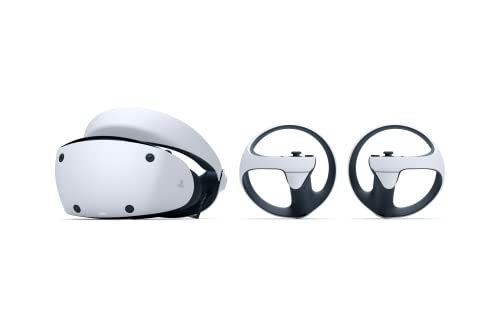
The PlayStation VR2 is the one headset here where the PC check includes an extra box. Sony’s official PC adapter is what unlocks SteamVR on a Windows PC, and the adapter in turn requires a DisplayPort 1.4 cable, sold separately, running from your graphics card. Clear those two items and you get 2000 x 2040 OLED panels per eye, a 110-degree field of view and eye tracking, driven entirely by your PC. It suits households that already own the headset for PS5 and are adding a gaming PC, rather than buyers starting from zero.
Specs
- 2000 x 2040 OLED resolution per eye, 4K HDR visuals
- 110-degree field of view with eye tracking
- PlayStation VR2 Sense controllers with haptic feedback and adaptive triggers
- PC use requires the PlayStation VR2 PC adapter, sold separately
Best for: PS5 owners whose new PC has a free DisplayPort 1.4 output on the GPU.
Watch out for: Budget for the adapter and a DisplayPort 1.4 cable, and note some PS5 features do not carry over to PC.
ASIN: B0C1QJ6VHY
Meta Quest 3S 128GB

The Meta Quest 3S runs the same PC check as the Quest 3 — same Snapdragon XR2 Gen 2, same Meta Horizon Link app, same supported-GPU list — so any PC that clears the bar for one clears it for the other. What changes is what your GPU has to draw: 1832 x 1920 pixels per eye behind Fresnel lenses is a lighter render target, which gives borderline PCs more frame-rate headroom in demanding games. The 128 GB model keeps standalone storage modest, but for a buyer whose library lives on the PC in SteamVR, that trade rarely matters.
Specs
- 1832 x 1920 resolution per eye with Fresnel lenses
- Snapdragon XR2 Gen 2 processor with 8 GB of RAM
- 128 GB storage, Touch Plus controllers included
- PC connection over USB-C Link cable or Air Link Wi-Fi
Best for: Borderline PCs that pass Meta’s minimum list and benefit from a lighter render target.
Watch out for: Fresnel lenses have a smaller sweet spot than the Quest 3’s pancake optics, and 128 GB fills quickly with standalone games.
ASIN: B0DDK1WM9K
How to Choose
Check your GPU against the maker’s support list
Do not rely on raw power rankings, because PC VR support is a whitelist, not a benchmark. Meta publishes an exact supported-GPU table for Link, and it excludes cards that look strong enough on paper, including the GTX 1060 3 GB, all mobile 1060 variants, the GTX 1650 and Intel Arc cards. Find your exact model, desktop or laptop, on the list for the headset you want. If your card is missing, no cable or setting fixes it — either the GPU or the headset choice has to change first.
Confirm the port your headset actually needs
Walk around your PC and look at the back of the graphics card before ordering anything. DisplayPort headsets and the PS VR2 adapter need a DisplayPort output wired directly to the discrete GPU; on laptops that output sometimes routes through the integrated graphics, which breaks the connection. Quest headsets sidestep this entirely with one USB port, wired or wireless. Count your free ports too, since a gaming monitor may already occupy the only DisplayPort your headset was counting on.
Match resolution to the PC you own today
Every headset above asks your GPU to render two high-resolution screens at once, and the workload scales fast. A Crystal Light pushes roughly twice the pixels per eye of a Quest 3S, so a PC that holds a smooth frame rate on the 3S can stumble badly on the Pimax. Use the makers’ recommended tier as your guide — Meta suggests an RTX 20-series or RX 6000-series card with 16 GB of system RAM — and pick the panel your current rig can feed, not the one you hope to upgrade into.
Run the free checks before spending anything
Three quick tests settle most readiness questions in minutes. Install the free Meta Horizon Link app and SteamVR, then run the SteamVR Performance Test to see whether your PC is rated VR-ready, capable or not ready. Plug in the cables you already own and confirm each port works with your monitor. Finally, measure your play space and check your router placement if you plan wireless streaming. A PC that passes these checks on paper and in person rarely surprises you later.
Frequently Asked Questions
What are the minimum PC specs for PC VR headsets?
For Meta Quest Link, the published minimum is an Intel i5-4590 or AMD Ryzen 5 1500X processor, 8 GB of RAM, Windows 10 or 11 and one USB port, plus a GPU from Meta’s supported list. DisplayPort headsets publish their own requirements, so always check the specific headset maker’s page rather than assuming one universal minimum applies to every model.
How do I check if my graphics card supports PC VR?
Compare your exact card against the headset maker’s supported-GPU list, because near-identical names differ: Meta supports the desktop GTX 1060 6 GB but not the 3 GB card, the mobile 1060 or the GTX 1650. The free SteamVR Performance Test gives a second opinion by benchmarking your system and rating it VR-ready, VR-capable or not ready.
Does my PC need a DisplayPort for PC VR?
Only for tethered DisplayPort headsets such as the Pimax Crystal Light, the VIVE Focus Vision in wired mode and the PlayStation VR2 through its PC adapter. Quest 3 and Quest 3S connect over USB-C or Wi-Fi instead. On laptops, confirm the DisplayPort or USB-C output is wired to the discrete GPU, not the integrated graphics.
Can a gaming laptop run these PC VR headsets?
Yes, provided the GPU is on the maker’s supported list and the video output routes to that discrete GPU. Meta explicitly excludes laptop versions of some cards, such as the GTX 1060M, even when the desktop equivalent is supported. Pimax additionally asks laptop owners to verify a direct GPU output over Mini DisplayPort or USB-C with a DP 1.4a adapter.
Is Wi-Fi streaming as good as a cable for PC VR?
It depends on your network. Air Link and VIVE Streaming need a strong, uncongested connection, ideally with the PC wired to the router by Ethernet and the headset on a clear 5 GHz or 6 GHz band. A USB-C cable removes Wi-Fi variables entirely, which is why a wired connection remains the safer first check when troubleshooting stutters.
FAQ
What are the minimum PC specs for PC VR headsets?
How do I check if my graphics card supports PC VR?
Does my PC need a DisplayPort for PC VR?
Can a gaming laptop run these PC VR headsets?
Is Wi-Fi streaming as good as a cable for PC VR?
More from Amazon
Programs that pair well with the guide above. Offers and eligibility are set by Amazon and may change.
Free shipping on eligible items, Prime Video and more. Eligible new members can start with a free trial.
Start a Prime free trialAd-free music streaming. Eligible new subscribers can start with a free trial.
Try Music Unlimited freeA Prime membership for ages 18-24 with a trial period. Eligibility is set by Amazon.
See Prime for Young AdultsAudiobooks and podcasts to listen to on the go. Eligible new members can start with a free trial.
Try Audible freeAs an Amazon Associate we earn from qualifying purchases.