Key takeaways
- Compare four extended gaming mouse pads by size, surface speed, thickness, and edge finish, so the mat you buy fits your desk and your aim style.
An extended mouse pad is a desk decision before it is a mouse decision. Once a mat covers the space under both the keyboard and the mouse, it sets where everything else sits: the monitor stand, the keyboard angle, and the room for a low-sensitivity flick. Buy one too small and the mouse still runs off the edge mid-fight; buy one too wide and it hangs over the desk edge or bunches against a monitor arm. What matters is not the logo on the corner but the footprint, the surface speed, the thickness under the wrist, and whether the edges survive months of daily use.

This guide is for low-sensitivity shooter players who need uninterrupted sweeps, for strategy and MMO players who want the keyboard and mouse on one surface, for people who work at the desk they play at, and for builders who want lighting in the setup. Each pad below was picked from its Amazon listing name and stated specifications, comparing size, surface, thickness, base, and edge finish.
Quick Picks
As an Amazon Associate we earn from qualifying purchases.
| Product | Best for | Key spec from title |
|---|---|---|
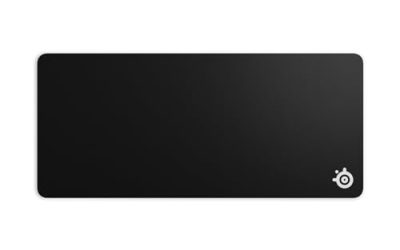
| SteelSeries QcK XXL | A full-desk cloth mat for low-sensitivity aim | XXL cloth, 900 x 400 mm, 2 mm thick |
| Razer Goliathus Extended Chroma | A lit desk setup built around one glowing mat | Micro-textured cloth, 36.3 x 11.6 in, Chroma RGB edge |
| Corsair MM300 Extended | A stitched-edge workhorse for daily play | Textile-weave cloth, 930 x 300 mm, 3 mm thick |
| Logitech G840 XL | A thin, flat mat shared between work and games | Performance-tuned cloth, 900 x 400 mm, 3 mm thick |
How to Choose
Measure the desk before the mat
Extended pads are sold by footprint, and the labels are not standard: one brand’s extended is 930 mm wide and 300 mm deep, another’s is 900 mm wide and 400 mm deep, and that 100 mm of depth decides whether a keyboard and a forearm both fit. Measure the flat, clear part of the desk, then subtract room for the monitor stand and any desk edge curve. A pad that overhangs the front edge will curl and lift under the wrist, while a pad wedged against a monitor arm will bunch at the back. Tape out the dimensions on the desk with painter’s tape before ordering, and check the depth twice if the keyboard sits at an angle.
Match the surface to the aim style
Cloth pads are not all the same speed. A tight micro-woven surface gives a smooth, even glide that suits low-sensitivity players who make long arm movements and need the mouse to stop exactly where the hand stops. A looser textile weave adds a little more friction, which suits players who anchor the wrist and make short, precise corrections. Think about the games in the rotation: fast shooters reward a quicker glide, while strategy and MMO sessions reward a surface that holds still under the palm for hours. If the current pad feels either slippery or draggy, name that feeling first, then pick the weave that moves in the opposite direction.
Pick a thickness for the wrist and the desk
Thickness changes how the mat feels under the wrist and how it handles an imperfect desk. A 2 mm pad sits nearly flat, keeps the keyboard at almost the same height as the bare desk, and suits players who rest the wrist lightly and want the least change to their hand position. A 3 mm pad adds a small cushion that softens long sessions and bridges minor desk unevenness, while a 4 mm pad turns the mat into a padded rest of its own. Thicker is not automatically better: a thick mat can raise the keyboard enough to change the wrist angle, so players with wrist discomfort should treat thickness as a comfort choice, not a quality marker.
Check the edges, the base, and the extras
The parts that fail first are the edges and the base, not the middle of the surface. Stitched edges resist fraying and peeling where the wrist rubs the same spot every day, and they matter most on pads that get rolled up and moved. A textured rubber base grips a smooth desk and stops the whole mat sliding during a hard flick, while a plain foam base can creep over a session. Extras should be judged on their own terms: an RGB edge needs a cable and a free port, a printed design hides wear better than plain black, and a cloth pad that cannot be washed will show dust and drink spills sooner.
The 4 Best Options
SteelSeries QcK XXL
The QcK XXL is the default answer for a reason: it takes the micro-woven cloth surface SteelSeries has sold for years and stretches it across the whole desk, so the keyboard and mouse share one consistent glide with no seam and no edge to cross mid-sweep. At 900 mm wide and 400 mm deep, it covers a full-size keyboard with room left for wide mouse movements, and the 2 mm profile keeps the setup close to the desk. It is the pad to buy when the goal is simply more room without changing how the mouse feels.
Specs
- Size: 900 x 400 mm (35.4 x 15.7 in), XXL
- Thickness: 2 mm
- Surface: micro-woven cloth, tuned for sensor tracking
- Base: non-slip rubber base
- Coverage: full desk, fits keyboard and mouse together
Best for: low-sensitivity players who need a long, uninterrupted sweep on a plain cloth surface.
Watch out for: the 400 mm depth needs a deep desk, so measure before ordering if the desk is under 40 cm front to back.
ASIN: B0D1T1HZCC
Razer Goliathus Extended Chroma
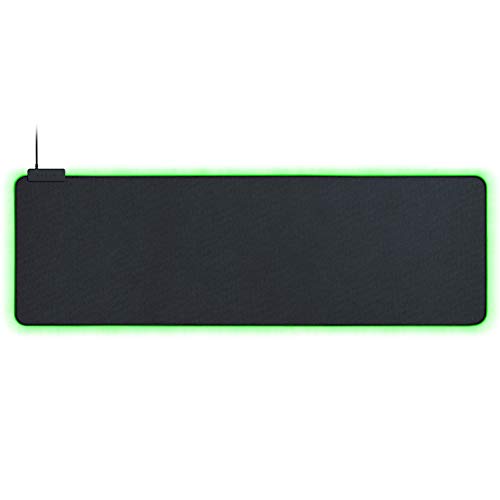
The Goliathus Extended Chroma is the pick when the desk setup is part of the point. The micro-textured cloth surface is tuned for a balance of control and speed, and the edge lighting runs around the whole perimeter, so the mat frames the keyboard and mouse instead of disappearing under them. At 36.3 inches wide and 11.6 inches deep, it is long enough for a full keyboard plus wide mouse travel, and the non-slip rubber base keeps it planted during fast movements. The lighting is the reason to choose it over a plain cloth mat, and it should be treated as a feature with its own cable and setup needs.
Specs
- Size: 36.3 x 11.6 in, extended
- Surface: soft micro-textured cloth, balanced for control and speed
- Lighting: customizable Chroma RGB edge lighting
- Base: non-slip rubber base
- Model: RZ02-02500300-R3U1, Classic Black
- Weight: 1.2 lb
Best for: a gaming setup where the mouse pad doubles as desk lighting and the keyboard and mouse need one shared surface.
Watch out for: the RGB edge needs a USB connection and software setup, so confirm a free port and a cable route before buying.
ASIN: B07DG64YL9
Corsair MM300 Extended
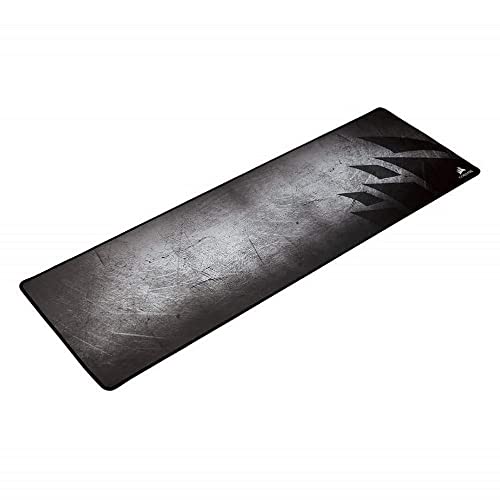
The MM300 Extended is the durable pick of this set. Its textile-weave cloth is made for low friction and precise tracking, and the anti-fray stitched edges are the detail that earns it a place here: the border is reinforced where the wrist rubs it every day, which is where unstitched pads start to peel first. At 930 mm wide and 300 mm deep with a 3 mm profile, it is long but shallower than the 400 mm-deep pads, so it fits desks where depth is tight while still giving the mouse a long runway. The anti-skid textured rubber base holds it in place without adhesive.
Specs
- Size: 930 x 300 mm (36.6 x 11.8 in), Extended
- Thickness: 3 mm
- Surface: textile-weave cloth for low friction and precise tracking
- Edges: anti-fray stitched edges
- Base: anti-skid textured rubber base
Best for: daily players who want stitched edges and a long, shallow mat for a desk that is wide but not deep.
Watch out for: the 300 mm depth leaves less room for the forearm than a 400 mm mat, so players who rest the whole forearm on the pad should measure first.
ASIN: B01798VS4C
Logitech G840 XL

The G840 XL is the quiet, practical option: a thin cloth pad that does its job without lighting, stitching, or branding that draws attention. Its performance-tuned surface offers moderate friction, which sits between a fast glide and a control surface, and the 900 x 400 mm footprint covers a keyboard and mouse with room to spare. At 3 mm thick it adds a small cushion without changing the hand height much, and the stable rubber base keeps it from creeping across the desk. It is the easiest pad here to live with on a desk that also serves as a workspace.
Specs
- Size: 900 x 400 mm (35.4 x 15.7 in), XL
- Thickness: 3 mm (0.12 in)
- Surface: performance-tuned cloth, moderate surface friction
- Base: stable rubber base
- Color: Black
Best for: a shared work-and-play desk where a thin, flat, unlit mat needs to disappear into the setup.
Watch out for: the plain cloth surface shows dust and wear sooner than a printed design, so it needs regular cleaning to keep its glide even.
ASIN: B0BHMN52LY
Which One Fits Your Situation
You play low-sensitivity shooters and run out of room
Pick the SteelSeries QcK XXL. Its 900 x 400 mm cloth gives the longest uninterrupted sweep of the plain pads here, and the 2 mm profile keeps the hand close to the desk during fast arm movements. The micro-woven surface tracks cleanly at low sensitivity, where a small edge or seam would break a flick. Measure the desk depth first, since the 400 mm footprint needs real room.
You want the keyboard and mouse on one surface for work and play
Pick the Logitech G840 XL. Its moderate-friction cloth suits both precise mouse work and long gaming sessions, and the thin 3 mm profile does not change the keyboard height enough to notice. The plain black finish looks at home in a workspace, and the stable rubber base means the mat stays put through a full day of switching between documents and games.
Your setup is built around lighting
Pick the Razer Goliathus Extended Chroma. It is the only pad here with edge lighting, and the Chroma strip turns the mat into the frame of the desk rather than a background detail. The micro-textured cloth balances control and speed for mixed game genres, and the extended length keeps the keyboard and mouse on one lit surface. Plan the cable route and a free USB port before it arrives.
You want a pad that survives years of daily use
Pick the Corsair MM300 Extended. The stitched anti-fray edges address the most common failure point of cloth pads, and the textile weave is built for steady tracking rather than a short-lived fast glide. Its long, shallow 930 x 300 mm shape fits wide desks that lack depth, and the textured rubber base keeps it anchored through daily sessions without needing to be repositioned.
Common Mistakes
- Buying by the label instead of the dimensions: extended, XL, and XXL mean different sizes at different brands, so compare the stated width and depth in millimeters before ordering.
- Forgetting the monitor stand and desk edge: a pad that fits the desk on paper can still bunch against a monitor arm or curl over a curved front edge.
- Choosing an RGB pad without a cable plan: a lit edge needs a USB port and a tidy cable route, or the cable becomes a snag point for the mouse.
- Ignoring the base: a pad with a weak base slides during hard flicks, which feels like a sensor problem when the real fault is the mat moving.
- Never cleaning a cloth pad: dust, skin oils, and spills change the glide over time, so a washable routine matters as much as the surface the pad started with.
Frequently Asked Questions
What size is an extended mouse pad?
An extended mouse pad is a desk mat sized to hold a keyboard and a mouse at once, usually around 900 mm wide and 300 to 400 mm deep. The pads in this guide range from 930 x 300 mm to 900 x 400 mm: wide, shallow desks suit the 300 mm depth, while deeper desks suit the 400 mm depth. Measure the clear desk space first.
Is a thicker mouse pad better for gaming?
Not always. A 2 mm pad keeps the hand closest to the desk and changes the keyboard height the least, which many aim-focused players prefer. A 3 mm pad adds cushioning for long sessions and smooths out desk bumps. A thicker pad can raise the wrist angle, so the best thickness is the one that feels comfortable after an hour of play, not the largest number on the listing.
Do extended mouse pads work with any mouse sensor?
Yes, in practice. The cloth pads in this guide are built around surfaces that optical and laser sensors track reliably, and the listings name sensor tracking as a design goal. The surface matters more than the sensor: a dirty or worn cloth pad causes tracking trouble far more often than a mismatch between sensor and material. Keep the surface clean and the base flat.
How do I clean an extended gaming mouse pad?
Start with the care notes on the listing, since RGB pads and stitched edges have their own limits. For a plain cloth pad, a gentle hand wash with mild soap and air drying flat restores the surface, while a damp cloth handles light dust between washes. Avoid harsh scrubbing, which roughs up the weave, and let the pad dry fully before use so the rubber base does not trap moisture.
FAQ
What size is an extended mouse pad?
Is a thicker mouse pad better for gaming?
Do extended mouse pads work with any mouse sensor?
How do I clean an extended gaming mouse pad?
More from Amazon
Programs that pair well with the guide above. Offers and eligibility are set by Amazon and may change.
Free shipping on eligible items, Prime Video and more. Eligible new members can start with a free trial.
Start a Prime free trialAd-free music streaming. Eligible new subscribers can start with a free trial.
Try Music Unlimited freeA Prime membership for ages 18-24 with a trial period. Eligibility is set by Amazon.
See Prime for Young AdultsAudiobooks and podcasts to listen to on the go. Eligible new members can start with a free trial.
Try Audible freeAs an Amazon Associate we earn from qualifying purchases.