Key takeaways
- Four keyboard and mouse sets whose listings name Nintendo Switch support, compared on connection route, key layout, mouse DPI, and dock setup needs.
The real decision with a Switch keyboard and mouse set is not the lighting or the key feel. It is how the set persuades a console built for controllers to accept keyboard input at all. Some sets carry a converter or a smart dongle that presents your keys and clicks as controller commands, while plainer sets only register in the limited places the system accepts a keyboard. Support also depends on the game: a title has to accept the input, and most sets connect through the dock, so handheld play is usually off the table.
This guide is for shooter players who want mouse aim on the TV, for players who split time between a Switch and a PC or another console, and for anyone short on desk space. Every set below was picked from its Amazon listing name and stated specifications, and each listing names Nintendo Switch support outright. They differ in layout, connection route, and how much setup they ask of you.
Quick Picks
As an Amazon Associate we earn from qualifying purchases.
| Product | Best for | Key spec from title |
|---|---|---|
| GameSir VX2 AimSwitch | Wireless one-hand play with app tuning | 36 TTC red switches, GM400 mouse to 12000 DPI |
| ZJFKSDYX C91 Pro | A full kit with headset in the box | Blue switch keys, mouse to 6000 DPI |
| IFYOO KMAX2 Plus | Macro and turbo tools for shooters | 4 macro keys, mapping software included |
| 7KEYS One Handed Keyboard and Mouse Gaming Combo | A compact wired starter set | 35 keys, mouse DPI from 800 to 2400 |
How to Choose
Start with how the set connects to the Switch
Look at the connection route before anything else, because it decides what the set can do. Converter and dongle sets translate your input into controller commands, which is what lets a mouse steer the camera in a shooter. Direct USB sets without that translation only work where the game or the system menu accepts raw keyboard input. Nearly every route runs through the dock and its USB ports, so plan on playing docked at a desk or TV rather than in handheld mode.
Be honest about game support before you buy
No set in this guide turns every Switch game into a keyboard game. Whether keys and mouse movement register depends on the individual title, and the listings aim these sets at shooter, strategy, and role-playing games that accept the input. Check the games you actually play first. If your favourite title ignores keyboard input entirely, even a converter set can only help where the game reads it as a controller, and some online titles restrict converted input by design or by their own published rules.
Pick a layout: one-hand keypad or fuller board
Three of the four sets here use one-hand keypads in the 35 to 36 key range, which cover movement, abilities, and a thumb stick or space bar while leaving your other hand free for the mouse. That is plenty for shooters and keeps the footprint tiny. What a keypad cannot do is type comfortably, so in-game chat and text fields stay slow. If typing matters as much as aiming, favour a set with more keys and accept the bigger desk footprint that comes with it.
Check the mouse ceiling and the tuning route
Mouse figures in these listings run from a modest 2400 DPI ceiling to 12000 DPI, and the steps between settings matter more than the headline number for dialling in aim. Also look at how customisation happens. One set here tunes through a phone app, one remaps on the device itself with no driver, and one needs mapping software on a Windows PC before the set ever reaches the console. Pick the route you will actually use, and note extras such as a headset jack on the keyboard.
The 4 Best Options
GameSir VX2 AimSwitch
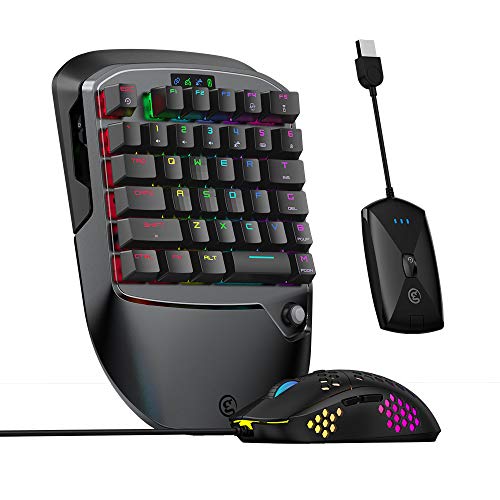
The VX2 AimSwitch is the most complete console-first set here. Its one-hand keypad carries 36 TTC red mechanical switches with 7-key rollover, an Alps 3D thumb stick, and an aluminium alloy panel, and it links to the console through the Agility X 2.4GHz dongle rather than a cable. The bundled GM400 mouse plugs into the keypad and reaches 12000 DPI through a PMW3360 sensor. Tuning happens in the G-Crux phone app, and the keypad battery is a rechargeable 3600 mAh cell. It suits players who want wireless freedom at the TV.
Specs
- Keypad with 36 TTC red mechanical switches, listed for 50 million keystrokes
- Agility X 2.4GHz wireless dongle, USB-C connectivity
- GM400 wired mouse with PMW3360 sensor, up to 12000 DPI in seven steps
- Alps ultra-thin 3D joystick on the keypad
- RGB backlighting with 16.8 million colours
- 3600 mAh built-in rechargeable battery
- Listing names Xbox Series X, Xbox One, PS4, Nintendo Switch, and Windows PC
Best for: Couch and TV players who want a wireless set with app-based tuning.
Watch out for: The 36-key pad is a game controller first, so typing and chat stay awkward.
ASIN: B07V8HCRRX
ZJFKSDYX C91 Pro
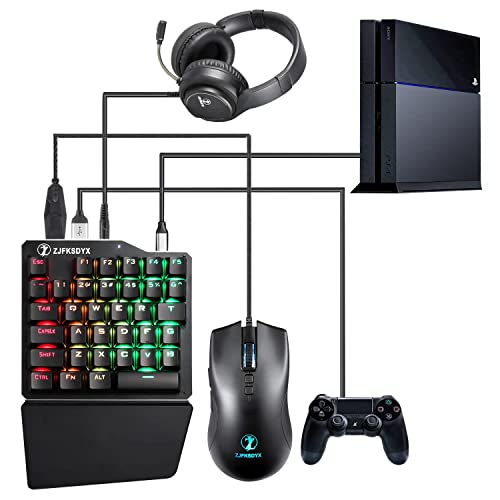
The C91 Pro takes the opposite approach to the GameSir: everything is wired, and the box reaches further. The listing describes a blue switch RGB mechanical keyboard paired with a mouse that runs to 6000 DPI, with a 3.5mm gaming headset included in the package. Button binding is reset on the set itself by following the included instructions, with no driver to install. Its Switch setup runs through the dock over a Type-C cable, and the manual asks for the Pro Controller Wired Communication setting to be switched on first. It fits players who want one box that covers keys, mouse, and voice.
Specs
- One-hand gaming keyboard with blue switches and RGB backlighting
- Gaming mouse with RGB backlight, up to 6000 DPI
- 3.5mm gaming headset included in the package
- Custom button binding with no driver required
- Connects to the Switch dock by Type-C cable
- Listing names PS5, PS4, Xbox Series consoles, Nintendo Switch, and Windows PC
Best for: Players who want keys, mouse, and headset from a single box.
Watch out for: The wired chain ties you to the dock, and the included headset is a basic pack-in.
ASIN: B07T6DZ3JW
IFYOO KMAX2 Plus
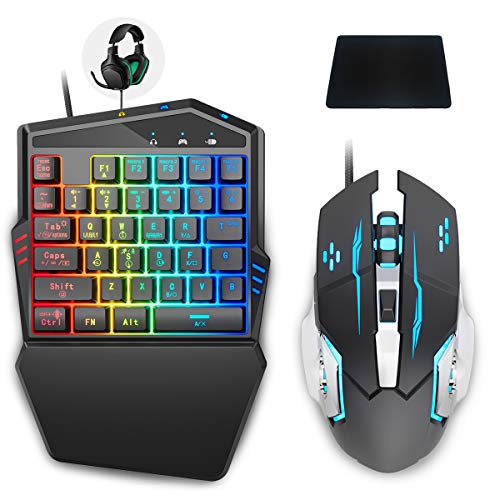
The KMAX2 Plus is a wired one-hand set built around its converter keyboard. The listing states console support for PS4, PS4 Pro and Slim, Xbox One, Xbox X and S, Switch, and Switch Lite, and the box adds a small mouse pad and a USB sync cable alongside the keyboard and mouse. Four macro keys each record up to 16 steps, turbo functions are built in, and IFYOO supplies key mapping software for Windows so layouts can be prepared on a PC. A 3.5mm headphone jack sits on the keyboard. It suits methodical shooter players who like recording sequences.
Specs
- One-hand keyboard and gaming mouse set with built-in converter
- 4 macro keys, each recording up to 16 steps, plus turbo functions
- Key mapping software for Windows 10, 8, 7, and XP
- RGB backlighting and an ergonomic palm rest
- 3.5mm headphone jack on the keyboard
- Package: keyboard, mouse, user manual, mouse pad at 220 by 180 mm, USB sync cable
- Model IFYOO-KMAX2-Plus, item weight listed at 1.5 pounds
Best for: Shooter players who want macros and turbo without a phone app.
Watch out for: An official console controller must be connected to the keyboard for the set to work.
ASIN: B08CSBP117
7KEYS One Handed Keyboard and Mouse Gaming Combo
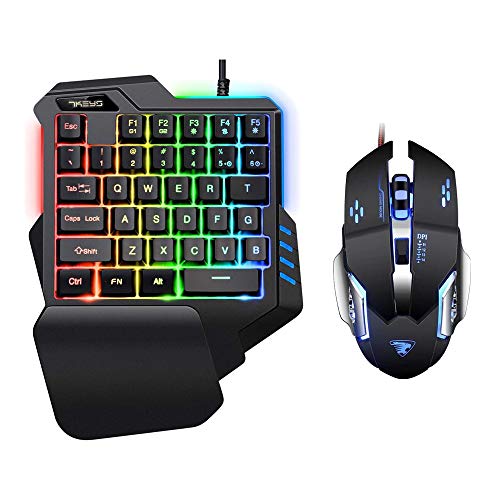
This 7KEYS set is the simplest route in: two wired devices, no converter box, no software. The keypad holds 35 closely spaced keys with RGB backlighting, and the listing is upfront that the keys are not mechanical, which keeps them quieter than the switch-based sets above. The mouse is a six-button wired model with four DPI steps at 800, 1600, 1800, and 2400, a braided cable, and a colour LED breathing light that can be turned off. The listing title names PC, laptop, Switch, PS4, and Xbox ONE. It fits small desks and first-time buyers.
Specs
- 35-key one-hand mini keyboard with RGB backlighting
- Membrane keys, described in the listing as quieter than mechanical switches
- Six-button wired mouse with braided USB cable
- Four DPI steps: 800, 1600, 1800, and 2400
- ABS plastic mouse body with colour LED breathing light
- Model G30 and G3 set, item weight listed at 1.5 pounds
- Listing names PC, laptop, Switch, PS4, and Xbox ONE
Best for: Small desks and first-time buyers who want plug-in simplicity.
Watch out for: The 2400 DPI ceiling is low for fast, flick-heavy shooter play.
ASIN: B0893812C9
Which One Fits Your Situation
You play shooters docked at a desk
Choose between the IFYOO KMAX2 Plus and the ZJFKSDYX C91 Pro. Both are wired, both are built for shooter layouts, and both sit happily next to a docked console. The IFYOO adds macros, turbo, and PC-prepared mapping, while the C91 Pro adds the headset and driver-free binding. Either way, confirm your main games accept the input before settling in.
You play from the couch in front of a TV
The GameSir VX2 AimSwitch is the natural pick. Its 2.4GHz dongle leaves the keypad untethered, the mouse plugs into the keypad rather than the console, and the built-in battery removes the last cable from the coffee table. The thumb stick helps in games that mix stick movement with mouse aim. Remember the dock still anchors the setup, so the console stays by the TV.
You split time between Switch, PC, and another console
Every set here lists several platforms, but the GameSir and the IFYOO make the strongest multi-console case, with Xbox and PlayStation named alongside Switch and PC. Expect to redo your key mapping per platform rather than carrying one profile across. Keep the cables, dongle, and sync lead for each set together, because converter sets stop working when one small piece goes missing.
You have a small desk or a tight setup
The 7KEYS combo takes the least room and asks the least of you: plug in two braided cables and play. Its 35 keys cover movement and abilities for most shooters, and the quieter membrane keys suit shared rooms. The trade is real, though. The mouse tops out at 2400 DPI and there is no mapping software, so treat it as a starter set rather than a final one.
Common Mistakes
- Assuming every Switch game accepts keyboard and mouse input. Support depends on the game, and many titles ignore these sets completely or only accept a keyboard for text entry. Check your own library first, especially before buying a set for one favourite title.
- Trying to play in handheld mode. These sets route through USB connections on the dock, and the Switch Lite has no dock at all. Plan on docked play at a desk or TV, and keep a clear surface for the mouse.
- Skipping the system setting some sets need. Converter-style sets may require Pro Controller Wired Communication to be switched on in the console settings before anything registers. Five minutes in the settings menu saves an evening of swapping cables.
- Buying a PC-only combo because it looks similar. If the listing never names Nintendo Switch, treat support as absent, however standard the USB plug looks. The four sets here were chosen because their listings state Switch support outright.
- Forgetting the extras a converter set needs. Some sets require an official controller connected to the keyboard, mapping prepared on a Windows PC, or the original sync cable. Losing track of any one piece can leave the whole set idle.
Frequently Asked Questions
Do all Nintendo Switch games work with a keyboard and mouse?
No. Support depends on the game itself. Some titles accept keyboard input for text or menus only, some accept full play, and many ignore it entirely. Converter sets present your input as controller commands, which widens what works, but a game can still restrict or ignore converted input. Always check your specific games first.
Do I need the Switch dock to use one of these sets?
Usually, yes. The sets here connect through USB ports or a Type-C link on the dock, and the mouse needs a flat surface beside it. Handheld play is not the intended setup, and the Switch Lite, which has no dock, only works with sets whose listings name it, such as the IFYOO KMAX2 Plus.
Can I type messages and chat with a one-hand keypad?
Only slowly. A 35 or 36 key pad covers movement and ability keys, not a full alphabet layout, so composing messages is painful. These sets aim at gameplay, not correspondence. If chat matters, keep a controller nearby for text fields, or choose the set time on a PC where the same pad handles light typing between matches.
Will these sets also work on my PC?
Yes, according to their listings. All four name Windows PC support, and the PC is where some of them do their setup work: the IFYOO mapping software runs on Windows, and the GameSir tunes through its phone app instead. A set bought for the Switch can double as a compact PC gaming pad between console sessions.
FAQ
Do all Nintendo Switch games work with a keyboard and mouse?
Do I need the Switch dock to use one of these sets?
Can I type messages and chat with a one-hand keypad?
Will these sets also work on my PC?
More from Amazon
Programs that pair well with the guide above. Offers and eligibility are set by Amazon and may change.
Free shipping on eligible items, Prime Video and more. Eligible new members can start with a free trial.
Start a Prime free trialAd-free music streaming. Eligible new subscribers can start with a free trial.
Try Music Unlimited freeA Prime membership for ages 18-24 with a trial period. Eligibility is set by Amazon.
See Prime for Young AdultsAudiobooks and podcasts to listen to on the go. Eligible new members can start with a free trial.
Try Audible freeAs an Amazon Associate we earn from qualifying purchases.