Key takeaways
- Only three verified couch setups exist: the Razer Turret lapboard, a Corsair K63 lapboard combo to spot-check, and an honest media-keyboard option.
Here is the honest starting point: the couch gaming pool is thin, and this guide has three products instead of five because only three setups could be verified as real, buyable listings that genuinely work from a sofa. Most keyboard and mouse combos are built for a desk, and most lapboards from the last hardware cycle have quietly disappeared from sale. What remains is one purpose-built lapboard combo, one older lapboard bundle that needs a careful availability check, and one media keyboard that is not gaming gear at all but solves casual couch play better than pretending otherwise.
Each pick below is framed exactly as its listing presents it. The Razer Turret is the true lapboard, designed for living-room play and listed for PC and Xbox. The Corsair bundle pairs a wireless mechanical keyboard with a cushioned lapboard, but it is a 2018-era product, so its listing needs confirming before money moves. The Logitech K400 Plus is a TV keyboard with a touchpad, included openly as the casual option rather than dressed up as something it is not.
Quick Picks
As an Amazon Associate we earn from qualifying purchases.
| Product | Best for | Key spec from title |
|---|---|---|
| Razer Turret | Purpose-built couch play on PC or Xbox | Wireless mechanical keyboard, retractable mouse mat |
| Corsair K63 Wireless + Lapboard | Mechanical keys on a cushioned lapboard | Cherry MX Red switches, memory-foam lapboard |
| Logitech K400 Plus | Casual couch control of a TV-connected PC | Wireless touch keyboard with built-in touchpad |
How to Choose
Start with how you will actually sit
Couch gaming fails on ergonomics before it fails on hardware. A keyboard balanced on a cushion twists your wrists, and a mouse on a sofa arm tracks unevenly and slides off. A lapboard solves both problems by giving the keyboard a fixed dock and the mouse a flat, stable surface at a consistent height. Before choosing anything in this guide, picture your actual sofa, your viewing distance and where your arms rest. The right product is the one that matches that posture, not the one with the most gaming features listed on the box.
Platform support is stated on the listing, so read it
Console support for keyboards and mice is narrower than most buyers assume, and it is decided by the listing wording, not by hope. The Razer Turret listing names PC, Xbox One and the Xbox Series consoles, and does not name PlayStation at all, so it is a PC and Xbox pick only. Support also varies by game even on a supported console. If you are buying for a specific console and a specific title, confirm both on the listing and in the game’s own settings before ordering, because a wireless dongle that works on one platform may do nothing on another.
Wireless range and connection type
Your keyboard will sit metres from the screen rather than centimetres, so connection stability matters more than at a desk. The picks here use 2.4 GHz wireless receivers, and the Corsair keyboard additionally lists Bluetooth and a wired USB option. A receiver-based connection is generally the dependable choice for gaming response across a room, provided nothing blocks the path to the console or PC. Think about where the receiver will live, whether a USB port faces the room, and whether other wireless devices nearby might compete. A wired fallback, where the listing offers one, is cheap insurance for firmware updates and troubleshooting.
Be honest about how competitive the play is
A lapboard with mechanical switches and a proper mouse surface supports genuinely competitive play from the sofa. A touchpad keyboard does not, and no framing changes that. The K400 Plus in this guide is a media keyboard for controlling a TV-connected PC, browsing, launching games and playing relaxed titles where a touchpad is enough. If your couch sessions are ranked matches, it is the wrong tool and the lapboards are the answer. If your couch sessions are films, strategy games and party titles, the simpler and cheaper-feeling option may honestly serve you better every day.
The 3 Best Options
Razer Turret

The Turret is the one product in this guide designed from the start for exactly this job: a wireless mechanical gaming keyboard with an integrated, retractable magnetic mouse mat, sold with a gaming mouse, and built to sit on your lap. The magnetic mat matters more than it sounds, because it keeps the mouse from sliding off the board when you shift on the sofa. Battery life is listed at up to 40 hours. Razer’s listing targets PC, Xbox One and Xbox Series X and S, so this is the couch pick for those platforms specifically, and the guide will not pretend it covers anything else.
Specs
- Type: wireless mechanical keyboard and mouse lapboard combo
- Mouse surface: integrated retractable magnetic mouse mat
- Battery: up to 40 hours as listed
- Platform wording as listed: PC, Xbox One, Xbox Series X and S
- Mouse: gaming mouse included
Best for: PC and Xbox players who want a real lapboard built for the couch.
Watch out for: The listing does not state PlayStation support, so PS4 and PS5 players should not buy it expecting console compatibility.
ASIN: B07QXLC24V
Corsair K63 Wireless + Lapboard
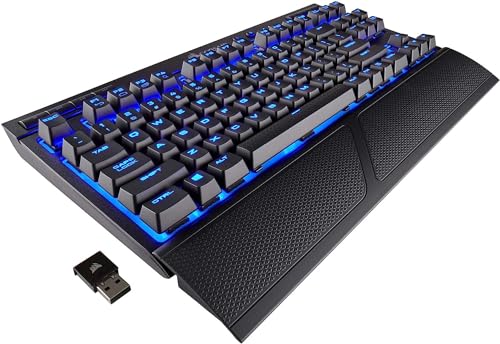
Corsair’s bundle takes the modular route: a K63 Wireless tenkeyless mechanical keyboard with Cherry MX Red switches and blue LED backlighting, docked into a Gaming Lapboard with a memory-foam cushion and a full-size cloth mouse pad surface. The keyboard connects by 2.4 GHz wireless, Bluetooth or wired USB, which gives it the widest connection list in this guide, and the tenkeyless layout keeps the whole board compact on your lap. The catch is age. This is a 2018-era combo, trackers last followed its Amazon listing some time ago, and current availability is genuinely uncertain, so treat it as a find-it-if-you-can pick rather than a guaranteed listing.
Specs
- Keyboard: K63 Wireless, tenkeyless
- Switches: Cherry MX Red
- Backlighting: blue LED
- Connections: 2.4 GHz wireless, Bluetooth, wired USB
- Lapboard: memory-foam cushion, full-size cloth mouse pad surface
- Layout: keyboard docks into the lapboard
Best for: Players who want mechanical keys and connection flexibility on a cushioned lapboard.
Watch out for: Confirm the live Amazon listing is actually selling before you buy, because this discontinued-era combo may only surface through residual or third-party stock.
ASIN: B078233TKB
Logitech K400 Plus

The K400 Plus is included with its identity stated plainly: it is a wireless media keyboard with a built-in touchpad, designed for TV-connected PCs, and it is neither gaming gear nor a keyboard and mouse combo. What it does well is everything casual about couch computing. The touchpad replaces the mouse entirely, media keys handle playback, and the 2.4 GHz USB receiver keeps setup to a single plug. For launching games, browsing, chat, and relaxed titles that never ask for fast mouse aim, it is the simplest object in this guide to live with, and for many sofas that is the real requirement.
Specs
- Type: wireless media/HTPC keyboard with built-in touchpad
- Connection: 2.4 GHz USB receiver
- Controls: media keys, integrated touchpad
- Intended use as listed: TV-connected PCs
- Mouse: none, touchpad only
Best for: Casual couch sessions, media control and relaxed games on a TV-connected PC.
Watch out for: A touchpad cannot replace a mouse for shooters or fast aim, so competitive players should choose a lapboard instead.
ASIN: B014EUQOGK
Which One Fits Your Situation
You play shooters from the sofa on PC or Xbox
The Razer Turret is the only pick here built for that exact scenario. Its retractable magnetic mouse mat gives your mouse a stable surface, the mechanical keyboard sits fixed in the lapboard, and its listing names PC and the Xbox consoles directly. The listed 40-hour battery covers long sessions without a cable trailing across the room.
You want mechanical keys and a softer, cushioned board
Look at the Corsair K63 and Lapboard bundle, with the availability warning kept firmly in mind. Cherry MX Red switches, three connection modes and a memory-foam cushion make it the most desk-like setup in this guide once you confirm a live listing. If the combo cannot be found selling, the lapboard concept still shows what to look for elsewhere.
Your couch PC is mostly a media and casual-games machine
The Logitech K400 Plus fits your evenings better than any lapboard. One light keyboard with a touchpad handles films, browsing, game launchers and gentle titles without a separate mouse to lose between the cushions. It is not gaming gear and does not claim to be, which is exactly why it works for this job.
Common Mistakes
- Assuming a keyboard and mouse combo works on your console because it works on PC, when the listing names its platforms and yours is not among them.
- Balancing a standard keyboard on a cushion and blaming your aim, when the unstable surface was the problem a lapboard exists to solve.
- Buying a touchpad media keyboard for competitive shooters, then discovering a touchpad cannot do the job of a mouse.
- Ordering a discontinued-era lapboard bundle without confirming the live listing is selling, and ending up with residual stock or no order at all.
- Forgetting the viewing distance: a setup that works at a desk can fail across a living room if the wireless path to the receiver is blocked.
Frequently Asked Questions
Does the Razer Turret work on PlayStation?
No, not on the evidence of its listing. Razer lists the Turret for PC, Xbox One and Xbox Series X and S, and PlayStation is not named. PS4 and PS5 players should not buy it expecting support, and should check any alternative’s listing for explicit PlayStation wording before ordering.
Why are there only three products in this guide?
Because only three couch setups could be verified as real listings that fit the keyword. Several well-known lapboards from earlier years are no longer selling on Amazon US, and desk combos do not become couch products by wishful thinking. A short honest guide serves you better than a padded one.
Can I just use a normal wireless keyboard and mouse on the couch?
You can, and many players rest the keyboard on a cushion or tray. The weakness is the mouse: sofa arms and cushions are uneven, unstable surfaces, so tracking suffers and the mouse slides. A lapboard exists specifically to give the mouse a flat, fixed surface, which is the difference between coping and playing properly.
Is a touchpad keyboard enough for couch gaming?
For casual play, yes; for aim-driven games, no. The K400 Plus handles media, menus, browsing and relaxed titles comfortably from the sofa, and its listing positions it for TV-connected PCs. Anything that asks for fast, precise mouse movement needs a real mouse on a real surface, which means one of the lapboards above.
FAQ
Does the Razer Turret work on PlayStation?
Why are there only three products in this guide?
Can I just use a normal wireless keyboard and mouse on the couch?
Is a touchpad keyboard enough for couch gaming?
More from Amazon
Programs that pair well with the guide above. Offers and eligibility are set by Amazon and may change.
Free shipping on eligible items, Prime Video and more. Eligible new members can start with a free trial.
Start a Prime free trialAd-free music streaming. Eligible new subscribers can start with a free trial.
Try Music Unlimited freeA Prime membership for ages 18-24 with a trial period. Eligibility is set by Amazon.
See Prime for Young AdultsAudiobooks and podcasts to listen to on the go. Eligible new members can start with a free trial.
Try Audible freeAs an Amazon Associate we earn from qualifying purchases.