Key takeaways
- Choosing a black and white laser printer is mostly a decision about what you will stop buying: ink cartridges that dry out.
Choosing a black and white laser printer is mostly a decision about what you will stop buying: ink cartridges that dry out, photo-quality color you never print, and pages that smear when a coffee cup touches them. A monochrome laser gives you crisp text, toner that sits for months without clogging, and a cost per page that favors anyone printing invoices, worksheets, shipping labels, or class handouts every week.
This guide is for home offices, students, and small businesses that want a dependable text machine in 2026 rather than an all-purpose color device. The real questions are whether you need scanning and faxing built in, whether automatic two-sided printing matters, and whether the printer should join Wi-Fi or plug into Ethernet. The eight models below cover single-function compact units, duplex workhorses, and all-in-one machines.
Quick Picks
Our top picks




As an Amazon Associate we earn from qualifying purchases at no extra cost to you.
| Product | Best for | Key spec from the title |
|---|---|---|
| Brother HL-L2405W | Small desks, light printing | Wireless compact monochrome laser with mobile printing |
| HP LaserJet M207dw | Paper-saving home offices | Automatic two-sided printing, wireless |
| HP LaserJet Pro 3101sdw | Print, copy and scan in one | All-in-one with duplex and wireless |
| Brother MFC-L2820DW | Offices that still fax | Copy, scan and fax with duplex |
| HP LaserJet Pro 4001dn | Wired office networks | Ethernet connectivity, mobile printing |
| HP LaserJet M110w | Occasional personal use | Wireless printing, mobile printing |
| Canon imageCLASS LBP6030w | Print-only buyers | 19 PPM, wireless, single-function |
| HP LaserJet Pro 3001dw | Busy small offices | Wireless black and white, office-oriented |
How to Choose
Single-function or all-in-one
A print-only laser is smaller, simpler, and usually the cheapest to own. If you scan a few pages a month, a phone scanning app handles it. Step up to an all-in-one when you copy contracts, scan receipts in batches, or need an automatic document feeder; the extra scanner glass and mechanics add footprint and more parts that can fail.
Also think about paper handling. A scanner with an automatic document feeder lets you copy a ten-page contract in one pass, while a flatbed alone means lifting the lid ten times. If your documents are mostly single sheets, that detail barely matters.
Duplex and speed
Look for the letters “d” in the model name or the words “two-sided” in the spec list. Automatic duplex halves paper use on reports and school packets. For speed, a listed rate near 19 pages per minute is fine for one or two users, while anyone printing 50-page batches should favor office-class models and check the first-page-out time on the spec sheet.
Connectivity
Wi-Fi matters if the printer sits across the room from the router or if phones and tablets print directly. A wired Ethernet port is steadier for shared printers on a desk network, and the spec sheet should say it outright. Do not assume wireless exists on a model that lists only Ethernet, and confirm mobile printing support if you print from a phone.
Mobile printing is worth a quick compatibility check. Many buyers print from a phone more than from a laptop, so confirm that the printer works with the phone platform your household uses before you commit, and keep the router and printer within one room of each other during setup.
Where budget models cut corners
Entry-level lasers often ship with starter toner that yields fewer pages than a full cartridge, lack duplex, and use smaller paper trays. Ignore marketing phrases like “fast” when no page rate is given. Ignore bundled software trials unless you want a subscription. Check the replacement toner yield and the warranty length, because those decide the real running cost.
The 8 Best Options
Brother HL-L2405W
This wireless compact monochrome laser is built for people who want a small, single-purpose printer on a shelf or corner desk. The title highlights mobile printing, so sending a boarding pass, a recipe, or a school form straight from a phone is part of the pitch. It suits a student apartment or a spare room where space is tight and the print queue is short.
- Strength: compact footprint with wireless setup, so it can sit anywhere the signal reaches.
- Strength: mobile printing support keeps it flexible for phone and tablet users.
- Trade-off: the listing does not mention automatic duplex, so two-sided jobs are manual.
Skip it if you need scanning, copying, or heavy daily volume from several people.
HP LaserJet M207dw
The M207dw pairs wireless printing with automatic two-sided output, the combination most home offices actually want from a text printer. Freelancers who print drafts, statements, and client reports will notice the paper savings quickly, and the monochrome-only design keeps the machine focused on documents instead of graphics.
- Strength: automatic two-sided printing cuts paper use on long documents.
- Strength: wireless connection keeps cables off the desk and lets the printer live away from the router.
- Trade-off: it is print-only, so copying and scanning need another device or a phone app.
Skip it if you want a scanner on the same machine.
HP LaserJet Pro 3101sdw
This model moves into all-in-one territory with print, copy, and scan alongside duplex and wireless. It suits a household, a bookkeeping desk, or a small studio that wants one machine to handle paperwork from start to finish, turning a signed page into a file without a trip to the library or a second gadget.
- Strength: print, copy and scan in a single monochrome unit.
- Strength: duplex and wireless are both listed, which covers most daily needs.
- Trade-off: a multifunction body takes more desk space than a compact print-only model.
Skip it if you only print and want the smallest, simplest option.
Brother MFC-L2820DW
The MFC-L2820DW adds fax to copy and scan, which still matters for clinics, legal offices, and anyone dealing with agencies that insist on it. Duplex and wireless round it out as a full small-office package, and the compact label suggests it will not swallow a whole desk. Think of it as the paperwork hub for a practice with a handful of staff.
- Strength: copy, scan and fax in one compact monochrome body.
- Strength: automatic two-sided printing with wireless connectivity.
- Trade-off: the listing mentions a bundled subscription trial, which some buyers will not want.
Skip it if you never fax or copy and would rather pay for a simpler printer.
HP LaserJet Pro 4001dn
This is the wired choice. The title lists Ethernet connectivity and mobile printing alongside fast black-and-white output, pointing to a shared office printer that stays plugged into a network switch rather than hopping on Wi-Fi. Wired connections avoid the dropped-printer problem that plagues busy wireless networks, which matters when five people print at once.
- Strength: Ethernet connectivity suits shared, always-on setups.
- Strength: described as fast black-and-white printing with mobile printing support.
- Trade-off: wireless is not listed in the title, so a cable run to the printer is likely.
Skip it if your printer must sit far from any network jack.
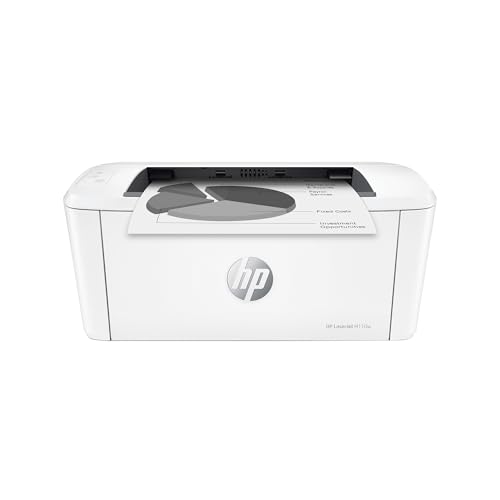
HP LaserJet M110w
The M110w targets light, personal use with wireless and mobile printing. It is the kind of printer for a dorm room, a hobby desk, or a spare-bedroom setup where a few pages a day is typical. The simple monochrome laser output handles forms, tickets, and homework without fuss.
- Strength: wireless and mobile printing for phone-first households.
- Strength: simple monochrome laser output for text and forms.
- Trade-off: no duplex is listed, so double-sided pages take extra manual steps.
Skip it if you share the printer with several people or print large batches.
Canon imageCLASS LBP6030w
Canon’s compact unit is a print-only wireless laser with a stated 19 pages per minute and a one-year limited warranty named right in the title. It is a straightforward choice for a single user who wants clear numbers rather than a long list of features, and the white body fits a bright home office.
- Strength: wireless print-only design keeps the machine small and uncomplicated.
- Strength: a stated 19 PPM and one-year warranty give clear expectations.
- Trade-off: the title does not mention duplex or mobile apps, so check support before buying.
Skip it if you need two-sided printing or scanning.
HP LaserJet Pro 3001dw
The 3001dw is a wireless black and white printer labeled for office use. The “dw” suffix signals duplex and wireless, which fits a small team sharing documents such as invoices, packing slips, and meeting handouts. It is positioned as the practical middle of the HP lineup rather than a specialist machine.
- Strength: office-oriented positioning with wireless connectivity.
- Strength: duplex implied by the model name, which saves paper across a week of reports.
- Trade-off: the title offers few stated specs, so check the page rate and toner yield before buying.
Skip it if you want built-in scanning or fax.
Which One Fits Your Situation
You print mostly from a phone
Start with the Brother HL-L2405W, which pairs a compact body with wireless and mobile printing. It keeps the setup simple for a student or a renter with limited shelf space, and the single-purpose design means fewer menus to learn.
You run a home office with contracts
The HP LaserJet Pro 3101sdw gives you duplex plus copy and scan, so signed pages go from paper to PDF without a second machine. That is the scenario where the larger body earns its desk space.
You still send faxes
The Brother MFC-L2820DW is the only model here that lists fax, along with copy, scan, and duplex. A small clinic or accounting practice is the natural home for it.
You share a printer over a wired network
The HP LaserJet Pro 4001dn lists Ethernet and suits a shared desk network better than the Wi-Fi-only compact units. Pick it when reliability for several users beats the convenience of placing the printer anywhere.
Common Mistakes
- Buying an all-in-one when you only print, then paying for a scanner you never open.
- Assuming every “w” model has two-sided printing; check for duplex separately.
- Ignoring the toner yield on the starter cartridge versus the replacement.
- Forgetting that a color model costs more to run when you only need black text.
- Skipping the warranty length, which varies between brands and is spelled out in some titles.
- Placing a laser in a cramped cabinet; the exit tray and rear panel need clearance for paper and airflow.
Related guides
- Logitech G Pro X Superlight 2 Vs Razer Viper V3 Pro
- Motherboard Io Panel And Back Connectors Explained
- How To Record Your Computer Screen With Audio
Frequently Asked Questions
Is a black and white laser cheaper than inkjet?
For text-heavy printing it usually is, because toner lasts and does not dry out between jobs. Light, occasional printers can still make an inkjet reasonable.
Do I need duplex?
If you print reports, school packets, or manuals, automatic duplex saves paper and time. For single-page forms, it matters less.
Wi-Fi or Ethernet?
Wi-Fi is easier for homes and phone printing. Ethernet is steadier for shared office use, so choose based on where the printer will sit. Models that offer both give you a fallback when the wireless network misbehaves, and the spec sheet will say which connections are included.
Can these print photos?
Monochrome lasers print text and simple graphics well, but they are not meant for photos. Look at a color or photo-focused printer for pictures. If you need only the occasional color page, printing it at a library or shop is often simpler than owning a color laser.