Key takeaways
- Best budget laptop for working from home: seven picks compared on RAM, SSD vs eMMC and Windows 11 edition, plus a workday spec table and day-one checklist.
A budget laptop for a home office succeeds or fails on memory and storage, not on the badge next to the processor. For video calls, a crowded browser and a spreadsheet open together, 8GB of RAM is the practical floor, and 16GB with a real SSD is the comfortable tier. This guide covers seven listings, from a 4GB eMMC machine that only suits light email days to a 16GB, 1TB Windows 11 Pro configuration built for a full-time remote worker. Every specification below is the seller’s wording from the listing title, so verify it on the product page. Start with the quick picks, scan the comparison table, then run the day-one checklist later in the guide to catch problems while the return window is open.
The short list
Our top picks





As an Amazon Associate we earn from qualifying purchases at no extra cost to you.
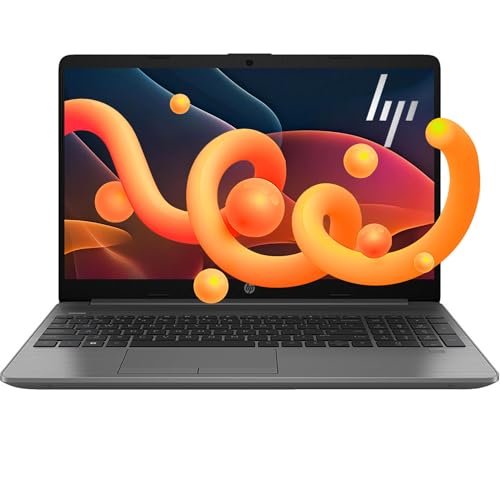
- HP 255 G10 (Ryzen 3 7330U, 16GB, 1TB) – best all-round choice for full-time remote work
- KINOBUC 15.6-inch (16GB, 256GB SSD) – most memory on paper for the least outlay
- Aurant 15.6-inch (Core i3, 8GB, 128GB SSD) – backlit keys for evening work
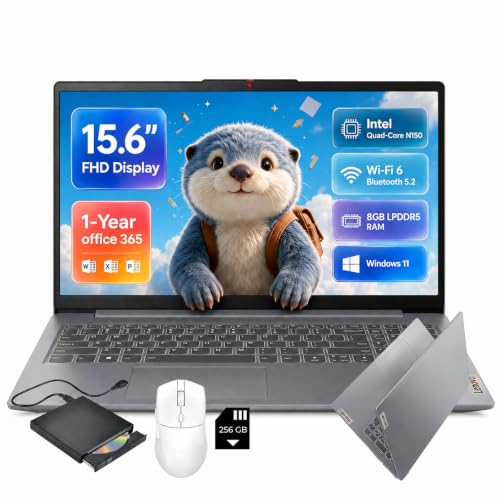
- Lenovo IdeaPad Slim-3i (N150, 8GB) – familiar brand with a webcam shutter
- TRHRO 15.6-inch (12GB, 128GB SSD) – a middle step up from 8GB
- HP 14-inch reseller listing (N4500, 4GB) – email and web only
- PADIX 15.6-inch (N4020, 4GB, eMMC) – the bare minimum
Side by side
| Model | Type | Key specs (from the title) | Best for |
|---|---|---|---|
| HP 255 G10 | 15.6-inch laptop | Ryzen 3 7330U, 16GB, 1TB SSD, Windows 11 Pro | Full-time remote work |
| KINOBUC | 15.6-inch laptop | Pentium 6500Y, 16GB, 256GB SSD | Budget multitasking |
| Aurant | 15.6-inch laptop | Core i3 (model not stated), 8GB, 128GB SSD | Late-night typing |
| Lenovo IdeaPad Slim-3i | 15.6-inch laptop | N150, 8GB LPDDR5, 128GB UFS plus SD card | Light office use |
| TRHRO | 15.6-inch laptop | Pentium Gold 6500Y, 12GB, 128GB SSD | Documents and browsing |
| HP 14-inch (reseller) | 14-inch laptop | Celeron N4500, 4GB, 64GB eMMC plus SD card | Email and web |
| PADIX | 15.6-inch laptop | N4020, 4GB DDR4, 128GB eMMC | Basic tasks |
The seven picks, one by one
HP 255 G10 (Ryzen 3 7330U, 16GB RAM, 1TB SSD)
This is the only listing in the group that pairs 16GB of RAM with a 1TB SSD and Windows 11 Pro, which is what a full day of calls, cloud documents and a crowded browser actually asks for. The processor is a Ryzen 3 7330U, an entry-level Ryzen U-series chip aimed at office work. The title says it beats an Intel Core i5-1135G7; that is a seller comparison we cannot confirm. The screen is 15.6-inch Full HD, and HDMI and USB-C are named for connecting a monitor.
Windows 11 Pro adds BitLocker drive encryption, which matters if an employer asks for an encrypted device. Because a business-line model at these memory and storage sizes is sometimes configured by the seller, check who ships it, who honours the warranty, and whether the RAM and SSD are the original parts.
Pros
- 16GB RAM and 1TB SSD, both well above the rest of the group
- Windows 11 Pro with BitLocker available
- HDMI and USB-C named in the title
Cons
- Battery life, weight and webcam quality are not stated
- The i5-1135G7 comparison is an unverified seller claim
Who it’s for: Remote workers who sit in meetings most of the day and want one machine to last several years.
Who should skip it: People who only check email a couple of times a day, since most of the memory and storage would sit idle.
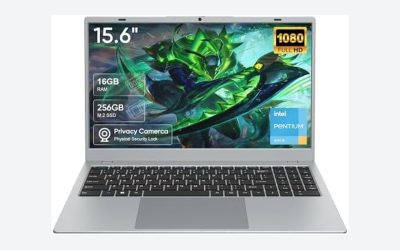
KINOBUC 15.6-inch (16GB RAM, 256GB SSD)
KINOBUC lists 16GB of RAM and a 256GB SSD behind a 15.6-inch Full HD IPS panel, more memory than the Core i3 or Lenovo listings here. The limit is the processor. The Pentium 6500Y is a low-power Y-series part designed for thin machines, so it copes with documents, tabs and a video call but may slow when a large spreadsheet recalculates during a meeting. The ‘up to 3.4GHz’ figure is a short-burst peak, not a sustained speed.
The ‘2026’ in the name is marketing wording rather than a specification. KINOBUC is a small brand, so read the seller’s return and warranty terms before ordering. USB-C and USB 3.2 are named, but the title does not say whether USB-C carries charging or video.
Pros
- 16GB RAM stated in the title
- Internal SSD rather than eMMC
- Full HD IPS panel
Cons
- Low-power Y-series chip limits heavy multitasking
- 256GB fills quickly if you keep local files
- Warranty path from a smaller brand is unclear
Who it’s for: Budget shoppers whose work lives in a browser and cloud documents.
Who should skip it: Anyone running large spreadsheets, data tools or constant screen sharing.
Aurant 15.6-inch (Core i3, 8GB DDR4, 128GB SSD)
Aurant suits people who work late. The title lists a backlit keyboard, a Full HD IPS screen and a 180-degree lay-flat hinge, handy for turning the screen toward a colleague across a desk. The weak spot is the processor, named only as ‘Core i3’ without a model number. Generation decides speed and Windows 11 support, so ask the seller or read the listing’s detail section before buying.
Memory is 8GB DDR4 and storage is a 128GB SSD, enough for a browser-centred day but tight once Windows updates and a few apps accumulate. The TF card slot adds file space, though a memory card is slower than the internal drive and should not hold your work apps. Wi-Fi 5 and Bluetooth 4.2 are older standards: fine on home broadband, less so in a crowded building.
Pros
- Backlit keyboard named in the title
- 8GB RAM with an SSD
- Lay-flat hinge for sharing the screen
Cons
- CPU model and generation are not stated
- 128GB of internal storage is small
- Wi-Fi 5 and Bluetooth 4.2 are dated
Who it’s for: Evening and shared-desk workers who want a keyboard they can see in dim light.
Who should skip it: Buyers whose employer requires a specific processor generation or whose files are large.
Lenovo IdeaPad Slim-3i (N150, 8GB LPDDR5)
This is the best-known brand in the group, and the title adds work-friendly touches: Wi-Fi 6, USB-C, a privacy shutter for the webcam and one year of Office 365. The Intel N150 is listed as quad-core, an efficient entry-level processor that fits email, web apps and calls. LPDDR5 is the memory type used when RAM is soldered to the board, so assume you cannot add more later and confirm on the listing.
Read the storage line carefully. The 128GB is UFS flash, and the 256GB ‘SD card’ is removable media, not an internal drive, so you do not have 384GB of fast space. Keep Windows and applications on the internal part and use the card for archives. Because the chip tier is entry level, a higher price here pays for brand and extras rather than speed.
Pros
- Wi-Fi 6 and USB-C named
- Webcam privacy shutter
- 8GB of LPDDR5 memory
Cons
- The SD card is not internal storage
- Memory is probably not upgradable
- Entry-level processor tier
Who it’s for: Privacy-minded workers with light office needs who prefer a recognisable brand.
Who should skip it: Anyone needing more than 128GB internal space or looking for the lowest outlay.
TRHRO 15.6-inch (12GB RAM, 128GB SSD)
TRHRO sits between the 8GB and 16GB listings in this guide, with 12GB of RAM and a 128GB SSD on another Pentium Gold 6500Y. The claim that it ‘outperforms the N4020’ compares it to the weakest chip in this group, probably fair for a newer, higher-clocked part but a low bar. A 12GB total is an unusual capacity and can point to a mixed memory arrangement; the title does not say, so check the product page.
Bluetooth 5.2 is newer than the Aurant’s 4.2, which helps with wireless headsets on calls. The 128GB drive leaves little headroom after Windows updates, so plan to keep files in cloud storage or on an external drive, and treat the machine as a browser-first laptop. Confirm the USB-C port’s function on the product page too.
Pros
- 12GB RAM, a step above the 8GB listings
- Bluetooth 5.2 for headsets
- SSD rather than eMMC
Cons
- 128GB internal storage is limited
- Wi-Fi 5 only
- The N4020 comparison is a seller claim
Who it’s for: Someone who wants more than 8GB without paying for a large drive.
Who should skip it: People who store big local libraries of documents, video or design files.
HP 14-inch reseller listing (Celeron N4500, 4GB RAM)
The title says HP, but the brand field names a reseller, ‘ist computers’, which suggests a third-party configuration. That matters for warranty, so ask who honours it. The configuration is modest: Celeron N4500, 4GB RAM and 64GB eMMC, with a further 64GB SD card folded into the headline storage. Windows 11 Home in S mode limits installs to the Microsoft Store until you switch out, a free, one-way change that some VPN and accounting tools require.
The 12-hour battery figure is a seller claim; video calls will cut into it. Wi-Fi 6, a webcam and fast charging are named, which suits light use. The 4GB of RAM is the real ceiling, since Windows, a browser and a call app will consume most of it.
Pros
- Wi-Fi 6 and webcam named
- One year of Office 365 included
- Compact 14-inch body
Cons
- 4GB RAM is tight for calls
- 64GB eMMC leaves little room
- S mode blocks some work apps until switched
Who it’s for: Light email, web forms and document viewing, or a second laptop.
Who should skip it: Anyone who uses a VPN client, desktop apps or many browser tabs all day.
PADIX 15.6-inch (N4020, 4GB RAM, 128GB eMMC)
PADIX is the floor of this group: an N4020 processor, 4GB DDR4 and 128GB eMMC storage. eMMC is soldered flash that is slower than an SSD, most visibly while Windows installs updates, so the laptop can feel sluggish even at light loads. The title says ‘FHD LCD’ without IPS, so expect an ordinary panel and check the photos for viewing angles.
Support for a 1TB TF card helps with file storage but does not make the system faster. Windows 11 officially needs 4GB of RAM, so this meets the minimum, which is not the same as comfortable. For a remote job, think of it as a backup or travel machine for browser tasks, not a main workstation, and compare it with the 8GB options before buying.
Pros
- Lowest entry point in the group
- Windows 11 stated
- TF card expansion for files
Cons
- 4GB RAM and eMMC storage
- Weakest processor named here
- Panel type is plain LCD, not IPS
Who it’s for: A basic second laptop for email, forms and web apps.
Who should skip it: Anyone joining video calls with screen sharing, or keeping more than a few tabs open.
How these were chosen
We started from the listings supplied for this keyword and kept laptops whose titles name a screen size, RAM, storage type and Windows version. We then ranked them on what matters in a home office: RAM, whether storage is an SSD or eMMC, and whether the processor is named. Prices, ratings and review counts are left out because they change. Information comes from published specifications, manufacturer documentation and buyer reviews. Nobody on the team used or measured these units. Battery life, speakers and webcam sharpness are therefore unknowns unless a listing states them. Comparison claims inside titles are flagged as seller claims.
Buying a home-office laptop: what actually matters
Memory first, processor second
Windows 11 officially requires 4GB of RAM, but a call app, a browser with a dozen tabs and a chat client will push a 4GB machine into constant slowdowns. For a working day, 8GB is a workable floor and 16GB is the comfortable tier. Check whether the memory is soldered (LPDDR chips almost always are) or in a slot. If it cannot be upgraded later, buy the larger amount now rather than hoping to add it.
SSD, eMMC and the SD-card trap
An SSD is faster and more consistent than eMMC or UFS flash, and the gap shows during Windows updates and app launches. Many listings add a memory card’s capacity to the headline number, but a removable card is not a system drive. Count only the internal drive and leave a good share free for updates. Cloud sync through OneDrive or Google Drive reduces how much local space you need.
Screen and webcam for long days
Full HD at 15.6 inches gives room for two windows side by side. IPS panels keep colour and brightness better from an angle than basic LCDs. Brightness in nits is rarely stated on budget listings, so a desk near a window is a gamble. Webcam resolution is also usually missing, and many budget laptops carry a basic 720p camera, so a separate USB webcam can be the cheaper fix.
Windows 11 edition and S mode
Home in S mode restricts you to Microsoft Store apps; leaving S mode is free but cannot be undone. Windows 11 Pro adds BitLocker and Remote Desktop hosting, which Home lacks. Older processors can fall outside Microsoft’s supported CPU list, so when a title says only ‘Core i3’, ask for the exact model.
Ports, Wi-Fi and warranty
An HDMI or USB-C video output lets you run an external monitor, the biggest productivity upgrade for a home desk. Wi-Fi 6 helps in crowded buildings; Wi-Fi 5 is adequate with a router in the same room. Confirm whether the manufacturer or the reseller covers repairs, and whether the listing is new or refurbished. A laptop used at a desk all day also benefits from a USB-A port for a mouse or dongle.
Battery, weight and charging
Hours of battery life in a title are the seller’s number, usually measured on a light task such as video playback at low brightness. Calls, a bright screen and Wi-Fi shorten that. Weight is often missing on budget listings, so look at the specification table on the product page. Whether the charger is a barrel plug or USB-C also changes how easily you can use one cable between desk and travel bag.
Keyboard and trackpad
If you type for hours, a backlit keyboard, a full-size layout and a trackpad that registers clicks cleanly matter more than a few hundred megahertz of processor speed. Photos help, but buyer reviews that mention flex, key travel or a sticky trackpad are more telling than the title. A numeric keypad appears mostly on 15.6-inch bodies.
Match the spec to the workday
| Workday | RAM | Internal storage |
|---|---|---|
| Light: email, web apps, documents | 8GB | 128GB SSD |
| Meetings: calls, many tabs, chat | 8GB minimum, 16GB comfortable | 256GB SSD |
| Heavy: spreadsheets, VPN, several apps | 16GB | 512GB SSD or more |
Day-one acceptance checklist
- Open Settings, System, About and confirm the processor and RAM match the listing.
- Open File Explorer and confirm the internal drive size, ignoring any SD card.
- Finish every Windows update before judging speed.
- Join a 15-minute call with screen sharing and watch for stutter or fan noise.
- Connect an external monitor over HDMI or USB-C.
- Keep the order record and serial number until the return window closes.
Eight ways home-office shoppers go wrong
- Counting an SD card as storage. Only the internal drive holds Windows and apps, and a card can be slow or fail.
- Accepting 4GB of RAM because Windows 11 ‘runs’. Starting up and coping with a call plus a browser are different things, and the gap shows by mid-morning.
- Ignoring S mode until a VPN client refuses to install. Check the Windows edition in the title before you pay.
- Trusting ‘beats’ and ‘outperforms’ wording in titles; those comparisons are seller claims.
- Skipping the processor model. ‘Core i3’ alone hides the generation, and generation decides speed and Windows 11 support.
- Forgetting the monitor. A second screen helps more than a faster chip, so favour a listing with HDMI or video-capable USB-C.
- Overlooking who sells it. Reseller listings can complicate warranty claims, so find out where repairs would go.
- Ignoring the return window. Most problems with a budget laptop show up in the first two weeks, which is why the checklist above exists.
Final call
If you work from home full time, the HP 255 G10 listing is the sensible choice: 16GB, a 1TB SSD and Windows 11 Pro cover every row of the workday table. On a tighter budget, KINOBUC and TRHRO offer 16GB and 12GB, with the trade-off of a low-power Y-series chip. Aurant is the pick for late-night typing, and Lenovo suits privacy-minded light users. Keep the 4GB machines for email-only roles or as spares, and confirm the specifications, warranty and seller on the product page before ordering. Prices move, so compare the current figure against the spec you actually need.
Questions buyers ask
How much RAM does a work-from-home laptop need?
Plan on 8GB as the practical minimum for calls, a browser and a chat app together, since that trio is the standard remote-work load. 16GB is more comfortable if you also keep spreadsheets or a VPN client open. A 4GB machine meets the Windows 11 minimum but tends to slow down quickly once several tabs and a meeting window are running.
Is 128GB of storage enough for a home office?
It can be, if your files live in cloud storage and you keep few local apps. Windows and its updates take a large share of a 128GB drive, and a work profile with Teams, Outlook caches and downloads grows over time. A removable SD card does not count toward system storage, so judge the internal drive only and consider 256GB when it costs little extra.
Is an eMMC laptop good enough for video calls?
Light calls usually run, because the work falls on memory and the processor rather than the drive. The drawback is general sluggishness during updates, app launches and sign-in after a restart. With 4GB RAM and eMMC together, expect slowdowns when you share your screen or open many tabs, so test a long call early.
Do I need Windows 11 Pro for working from home?
Not always. Home covers email, office apps and calls. Pro adds BitLocker encryption and Remote Desktop hosting, and it joins company domains, so choose it if your employer requires encryption or device management for remote staff. Ask your IT team before buying if you are unsure, because some employers require specific editions.
Can these laptops drive an external monitor?
Several titles name HDMI or USB-C, but they do not always say whether USB-C carries video. Check the listing’s port description or the manufacturer’s page before relying on it, and confirm any adapter you need. A monitor connected through HDMI is the simplest setup for a home desk, and a basic cable costs little.
Related guides
- Motherboard Io Panel And Back Connectors Explained
- Motherboards For Intel Core I7 14700K
- How To Reset Cmos On A Motherboard