
Key takeaways
- PCL or proprietary low-melt plastic: safer for beginners, usually easier to handle, and often removable from smooth surfaces. It may be softer and less durable than PLA.
- PLA: relatively easy to print and suitable for rigid shapes, but it requires a hot nozzle. It can become brittle and may soften in high heat.
- ABS: tougher and more heat-resistant than PLA, but it needs higher temperatures and can produce an unpleasant smell. It is not the best first material for a child.
- Wood-filled, glitter, and specialty filament: attractive for projects but more likely to clog a small pen nozzle. Use them only when the manufacturer explicitly supports them.
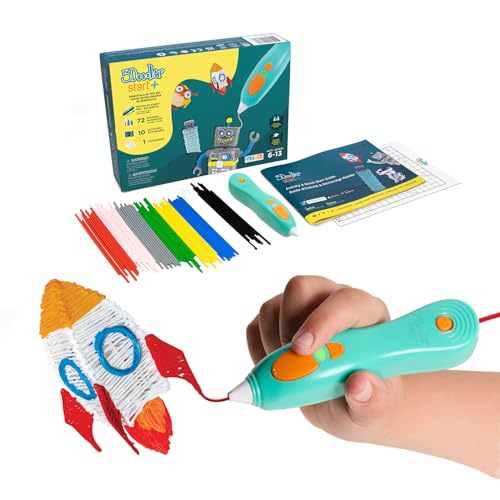
The best 3D printing pen for kids is usually a low-temperature model using purpose-made PCL or proprietary low-melt filament—most families should start with the 3Doodler Start+ or MYNT3D Junior 2 rather than a full-temperature PLA pen.
Our top picks

As an Amazon Associate we earn from qualifying purchases at no extra cost to you. Ratings are shown as listed on Amazon.
Quick picks
| Pen | Best for | Filament | Temperature approach | Typical age fit | Usual market range |
|---|---|---|---|---|---|
| 3Doodler Start+ | Young beginners and supervised family projects | 3Doodler Start plastic | Low-temperature, child-focused system | About 6–13 | Usually $50–$80 |
| MYNT3D Junior 2 | Children who want a simple PCL pen | PCL low-temperature filament | Low-temperature operation | About 6–12 | Usually $40–$70 |
| 3Doodler Create+ | Older children making stronger, more detailed models | PLA, ABS, and compatible higher-temperature plastics | Hot nozzle with selectable material settings | About 14+ | Usually $70–$120 |
| Standard PLA 3D pen | Teens who already understand hot-tool safety | 1.75 mm PLA, sometimes ABS or wood-filled filament | High-temperature nozzle, often above 180°C | Typically 14+ | Usually $30–$80 |
Age guidance is a starting point, not a substitute for supervision. A child who can follow instructions carefully may manage a pen earlier, while a distracted or very young child may need an adult to load filament, clear jams, and control the power switch.
What makes a 3D pen suitable for children?
Temperature control matters more than a low price
There are two broad categories. Low-temperature pens use specially formulated filament that softens at a much lower temperature than ordinary 3D-printer plastic. Their nozzles can still feel hot, but the burn risk is reduced compared with PLA or ABS pens. They are the sensible first choice for younger users.
Full-temperature pens heat plastic to roughly 180–230°C, depending on the material. That is hot enough to cause a serious burn quickly. These pens can produce firmer, more durable parts and finer lines, but they should be treated like a soldering iron or hot-glue tool, not like a toy.
Temperature adjustment is useful only when it is paired with clear material presets. A pen with a dial marked “low” and “high” can be harder for a child to use safely than a pen with dedicated PCL, PLA, and ABS buttons. Look for a visible heating indicator, automatic sleep or shutoff, an insulated grip, and a nozzle guard where available.
Filament type changes the whole experience
- PCL or proprietary low-melt plastic: safer for beginners, usually easier to handle, and often removable from smooth surfaces. It may be softer and less durable than PLA.
- PLA: relatively easy to print and suitable for rigid shapes, but it requires a hot nozzle. It can become brittle and may soften in high heat.
- ABS: tougher and more heat-resistant than PLA, but it needs higher temperatures and can produce an unpleasant smell. It is not the best first material for a child.
- Wood-filled, glitter, and specialty filament: attractive for projects but more likely to clog a small pen nozzle. Use them only when the manufacturer explicitly supports them.
Do not assume that every 1.75 mm filament is interchangeable. Diameter is only one requirement. The pen also needs the correct melting range, feed geometry, and filament hardness. For a low-temperature pen, ordinary PLA may fail to melt properly or may damage the feed system if forced through.
Head-to-head: the two best first-pen choices
3Doodler Start+
The Start+ is aimed at children who need a guided, low-temperature introduction. Its strongest advantage is the complete ecosystem: compatible filament, project templates, activity ideas, and a pen designed around simple operation rather than maximum material variety. That reduces the number of decisions a child has to make.
Choose it when safety and ease of use matter more than part strength. It is well suited to flat drawings, simple decorations, name plates, basic geometric shapes, and joining pre-made pieces. The trade-off is consumable cost and limited compatibility with ordinary 1.75 mm PLA. Families should budget for the correct Start filament instead of buying generic refills.
MYNT3D Junior 2
The MYNT3D Junior 2 is another low-temperature option, using PCL-style filament. It can be a good fit when a family wants a straightforward pen without moving immediately to hot PLA printing. Its attraction is the simpler material concept: buy compatible low-temperature PCL refills and concentrate on learning control, speed, and shape-building.
Check the exact refill specification before purchasing because low-temperature filament compatibility is not universal. It is also worth checking whether replacement filament is easy to obtain in your region. A cheaper pen becomes frustrating if the child cannot use it after the included material runs out.
When an older child should use a hot PLA pen
A pen such as the 3Doodler Create+ makes sense for a teenager who wants stronger models, a wider range of colors, or material settings that resemble desktop 3D printing. It offers more creative freedom than a low-temperature system, but the extra control creates extra failure points: incorrect temperature, feeding too quickly, a blocked nozzle, and accidental contact with molten plastic.
Use a hot pen only at a clear workspace with an adult-established routine:
- Wear closed shoes and keep loose sleeves, hair, and cables away from the work area.
- Use a silicone mat or another heat-resistant surface, never bare furniture.
- Keep the pen in its stand whenever it is not actively drawing.
- Allow the nozzle to cool fully before changing material or attempting a blockage fix.
- Use ventilation with ABS and stop if anyone develops a headache or throat irritation.
For most children under 14, a low-temperature pen is the more manageable choice even if a hot pen has more impressive specifications.
Decision matrix for choosing the right model
| Your situation | Recommended class | Why | What to avoid |
|---|---|---|---|
| Child is 6–8 and has never used a 3D pen | Low-temperature proprietary system | Fewer heat and material decisions | Hot PLA or ABS pens |
| Child wants to draw quickly on paper or cardboard | Low-temperature PCL or Start-type pen | Fast learning curve and easier cleanup | Specialty abrasive filament |
| Family wants inexpensive, widely available filament | Hot pen supporting standard 1.75 mm PLA | More refill choices and colors | Buying generic filament for a proprietary low-melt pen |
| Teen wants rigid functional parts | Temperature-controlled PLA pen | Higher-temperature plastic produces firmer results | Expecting PCL to behave like structural PLA |
| Several children will share one pen | Low-temperature model with automatic idle protection | Less setup and lower risk between users | Pen with exposed hot nozzle and manual-only controls |
How much filament will a child use?
Filament consumption is easy to underestimate. Suppose a refill pack contains 10 strands, each 2.5 meters long. That is 25 meters of material. If a beginner’s project feeds filament at an average of 6 centimeters per minute and the child draws for 20 minutes, the calculation is:
6 cm × 20 minutes = 120 cm, or 1.2 meters per session.
That theoretical pack would provide about 20 sessions, but real use is lower because of failed starts, trimming, jams, and discarded practice pieces. Planning for 12–16 short sessions is more realistic. This is why refill availability and price can matter more than the initial pen price.
Settings and technique that make the first projects easier
Start with a flat template under a transparent sheet or a non-stick craft surface approved by the pen maker. Use a slow feed setting and draw short lines, roughly 3–5 centimeters at a time. Short strokes let the child pause without creating a large blob at a corner.
For a hot PLA pen, begin with the manufacturer’s PLA preset rather than guessing from a generic chart. If the line breaks apart, the plastic is probably too cool or the feed is too fast. If the line is excessively runny and curls behind the nozzle, reduce the temperature slightly or increase movement speed. Make only one adjustment at a time.
For a low-temperature pen, pressing harder does not improve the result. Keep the nozzle close to the surface, move steadily, and wait a few seconds for each section to firm up before lifting it. Trying to build a tall object in one pass usually causes sagging; make separate panels and join them after cooling.
Common problems and practical fixes
The filament will not feed
Check that the filament is straight, the correct diameter, and inserted in the feed direction shown in the manual. Confirm that the pen has reached its ready state. If the motor clicks, stop pressing the feed button: continued force can grind a notch into the filament. Reverse it if the model supports reverse feed, cut off the damaged section, and reload.
The line is weak or uneven
Clean the work surface, use the correct material setting, and slow the drawing motion. A child moving faster than the pen can melt or extrude leaves gaps. On a hot pen, incorrect temperature is the usual cause; on a low-temperature pen, the usual cause is excessive speed or lifting the nozzle too far from the surface.
The finished shape will not release
Wait until it is completely cool, then flex the approved mat rather than pulling upward on the model. Avoid knives and metal picks around children. If the pen’s filament is designed to peel from a particular surface, use that surface consistently.
Bottom line
For most families, the 3Doodler Start+ is the safest, most guided starting point, while the MYNT3D Junior 2 is a sensible alternative for low-temperature PCL projects. Choose a hot PLA model such as the 3Doodler Create+ only when the child is old enough to follow hot-tool rules and genuinely needs stronger, more configurable prints. The best 3D printing pens for kids are not the ones with the highest temperature or the most features; they are the ones whose filament, controls, cleanup, and safety routine match the child using them.




