Key takeaways
- Using Metal Tools: Sewing needles, safety pins, and paperclips are highly abrasive. They will scratch the gold plating off the contact pins, leading to rapid oxidation (rusting) and permanent connection failure. They also carry a high risk of shorting out live circuits if there is any residual power in the system.
- Blowing with Your Mouth: It is tempting to simply blow into the port like an old game cartridge. Do not do this. Human breath contains moisture and tiny droplets of saliva that introduce corrosive elements directly onto the sensitive copper and gold contacts.
- Using the Wrong Solvents: Never use water, window cleaner, WD-40, or household detergents. Only use high-purity isopropyl alcohol (91% or higher). Lower concentrations, like 70% rubbing alcohol, contain 30% water, which takes too long to dry and can cause rust.
- Applying Too Much Force: The center tongue inside the PS5’s USB-C port is incredibly thin. Pushing a tool in too hard can snap this plastic tongue, rendering the entire port useless.
A dusty console is the silent enemy of smooth gaming. While most players remember to wipe down the exterior of their consoles or vacuum the main fan vents, the small connectivity inputs often get overlooked. Over time, household dust, pet hair, and ambient lint settle deep into the console’s front and rear connection points. Knowing how to clean dust out of playstation 5 charging port areas is essential to keep your controllers powered up and your external accessories running at peak performance.
As we head into 2026, the PlayStation 5 remains a central hub for home entertainment, but its ports are highly sensitive to debris. If you approach this maintenance task carelessly, you can easily cause permanent damage. Using the wrong tools—such as metal needles, excessive moisture, or brute force—can bend the internal gold-plated contact pins, scratch the delicate circuit board pads, or create a static discharge that permanently shorts out the port. What started as a simple five-minute maintenance task can quickly turn into an expensive repair bill.
Our top picks
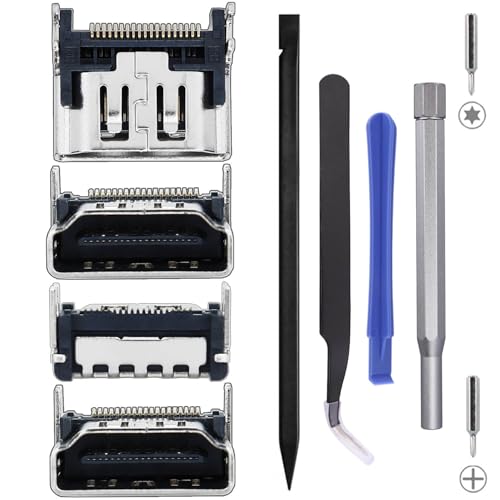 Ikpek 4 Pack Replacement Port for Sony
- 【Compatible model】- Compatible with Sony Playstation 5 console…
- 【Premium Quality】- The port replacement are made of…
- 【Install】- This product will require moderate soldering to…
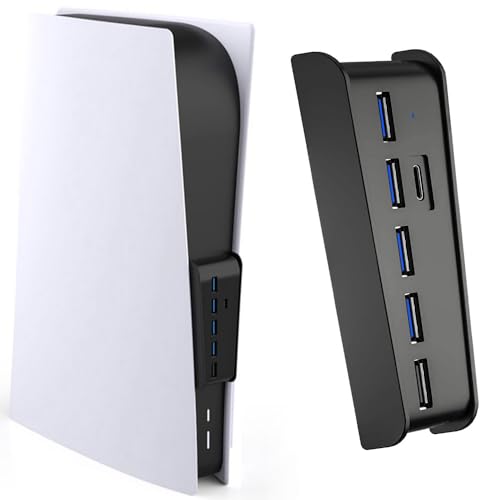 Megadream 6 Port USB Hub for PS5
- This usb hub is designed for PS5 console,…
- Just Plug and Play, NO extra driver needed
- Megadream ps5 usb c hub can be expanded…
As an Amazon Associate we earn from qualifying purchases at no extra cost to you.
This guide will walk you through the safe, professional editor-approved method to clear out debris from your PS5’s USB-C and USB-A ports without risking a hardware failure.
What You Need
Before you begin, gather the correct tools. Never use whatever is lying around in your junk drawer. The internal pins of a USB-C port are incredibly small (the port opening is only about 8.24 mm by 2.4 mm) and require precision instruments to clean safely.
| Item | Why You Need It | Optional? |
|---|---|---|
| Compressed Air Can | Blows out loose dust and micro-debris without physical contact. | No |
| Wooden or Plastic Toothpick | Gently scrapes out compacted lint without conducting static electricity. | No |
| 91% or 99% Isopropyl Alcohol | Cleans sticky residue and evaporates almost instantly. Do not use 70% alcohol. | Yes (Only for stubborn grime) |
| Anti-Static Brush or Clean Toothbrush | Sweeps away loosened dust particles from the outer edges. | No |
| LED Flashlight or Headlamp | Provides high-visibility illumination inside the dark, narrow port. | No |
Step-by-Step Cleaning Guide
Follow these steps in order. Take your time, work under bright lighting, and never force any tool into the ports.
Step 1: Power Down and Unplug (Time Estimate: 2 Minutes)
Never attempt to clean any electrical port while the console is receiving power. Turn off your PlayStation 5 completely (do not leave it in Rest Mode). Unplug the main power cable from the back of the console. Press the power button on the front of the PS5 two or three times after unplugging it to drain any residual electricity stored in the internal capacitors. Place the console on a clean, flat, well-lit surface like a dining table or workbench.
Step 2: Illuminate and Inspect (Time Estimate: 1 Minute)
Position your LED flashlight directly into the front USB-C and USB-A ports. Look closely inside. You are looking for grey clumps of dust, pocket lint, or pet hair pressed against the back wall of the port. A clean port will show shiny, straight gold pins. A dirty port will look dull, fuzzy, or have visible blockages that prevent a charging cable from seating fully with a satisfying “click.”
Step 3: Clear Loose Dust with Compressed Air (Time Estimate: 2 Minutes)
Hold the can of compressed air completely upright. Never shake the can or tilt it sideways, as this can spray freezing liquid propellant directly into your console. Position the nozzle straw about 2 inches away from the port opening. Administer three to four short, controlled bursts of air. Avoid holding the trigger down for continuous blasts, as this creates condensation. This step should dislodge the majority of loose, dry dust bunnies.
Step 4: Manually Extract Stubborn Lint (Time Estimate: 5 Minutes)
If compressed air did not clear the blockage, you will need to manually extract the compacted debris. Take a wooden or plastic toothpick. Using a utility knife, carefully shave the tip of the toothpick to make it even thinner and flatter. Gently insert the modified toothpick into the port, keeping it parallel to the center tongue of the port. Carefully sweep around the center plastic tongue, pulling outward. Do not scrape hard against the gold contact pins. You will be surprised at how much compressed lint can be fished out of the deep corners this way.
Step 5: Perform a Chemical Clean for Sticky Grime (Time Estimate: 3 Minutes)
If beverage spills or sticky hands have left residue inside the port, dry tools won’t cut it. Lightly dampen the bristle tips of an anti-static brush or a brand-new toothbrush with 91% or 99% isopropyl alcohol. Do not soak the brush; it should be barely damp. Gently insert the bristles into the port and wiggle them to scrub the contact pins. The high-concentration alcohol will dissolve grease and oil while evaporating rapidly without leaving water behind.
Step 6: Dry and Test (Time Estimate: 10 Minutes)
Allow the console to sit untouched for at least 10 minutes to ensure any trace amounts of isopropyl alcohol have completely evaporated. Once dry, plug the power cable back in and turn on the console. Connect your DualSense controller using a high-quality USB cable. The controller’s light bar should immediately pulse orange, indicating that power is flowing correctly through the clean port at its standard 5V, 1.5A rating.
Mistakes to Avoid
- Using Metal Tools: Sewing needles, safety pins, and paperclips are highly abrasive. They will scratch the gold plating off the contact pins, leading to rapid oxidation (rusting) and permanent connection failure. They also carry a high risk of shorting out live circuits if there is any residual power in the system.
- Blowing with Your Mouth: It is tempting to simply blow into the port like an old game cartridge. Do not do this. Human breath contains moisture and tiny droplets of saliva that introduce corrosive elements directly onto the sensitive copper and gold contacts.
- Using the Wrong Solvents: Never use water, window cleaner, WD-40, or household detergents. Only use high-purity isopropyl alcohol (91% or higher). Lower concentrations, like 70% rubbing alcohol, contain 30% water, which takes too long to dry and can cause rust.
- Applying Too Much Force: The center tongue inside the PS5’s USB-C port is incredibly thin. Pushing a tool in too hard can snap this plastic tongue, rendering the entire port useless.
How Often Should You Clean?
The frequency of your cleaning routine depends heavily on your home environment.
- Standard Homes: A quick inspection and dust-off every 6 months is usually sufficient to prevent accumulation.
- Homes with Pets or High Dust: If you have shedding dogs or cats, or if your console sits close to the floor or on a carpeted surface, you should clean the ports every 2 to 3 months.
A good rule of thumb is to check the ports every time you clean your entertainment center or wipe down your television screen.
When to Call a Pro or Replace
Sometimes, a simple cleaning won’t fix your connectivity issues. If you look inside the port with a flashlight and see that the gold pins are bent out of shape, flattened, or missing entirely, cleaning will not help. You have physical hardware damage.
If you are comfortable with micro-soldering, you can purchase DIY repair parts. For instance, packages like the Ikpek 4 Pack Replacement Port for Sony PlayStation 5 (typically priced around $9.99) provide replacement interface connectors, though installing them requires dismantling the console and soldering components onto the motherboard. For most players, this level of repair should be left to a professional console technician.
If you have one broken port on the front of your console but want to avoid an expensive motherboard repair, a practical workaround is to expand your remaining working ports. An accessory like the Megadream 6 Port USB Hub for PS5 (priced around $16.99) plugs directly into the console’s front jacks, converting them into four USB-A 2.0 ports, one dedicated charging port, and one Type-C port. This allows you to bypass a single damaged input and keep all your accessories connected easily.
Frequently Asked Questions
Can I use a vacuum cleaner to suck dust out of the PS5 ports?
No, you should avoid using standard household vacuums on or near your console’s ports. Vacuum plastic nozzles generate massive amounts of static electricity as air flows through them. Touching a vacuum nozzle to a sensitive USB port can discharge static directly into the console’s motherboard, instantly frying delicate chips.
Why is my PS5 controller still not charging after I cleaned the port?
If the port is completely clean and your controller still won’t charge, the issue could be a degraded USB cable, a failed battery inside the DualSense controller, or a blown fuse on the PS5’s motherboard. Try using a different, high-quality cable, or plug the controller into a wall adapter to isolate the issue.
Can I use WD-40 Specialist Contact Cleaner?
Yes, quick-drying electronic contact cleaners are safe to use on PS5 ports, provided they are designed specifically for sensitive electronics and leave no residue. However, high-purity isopropyl alcohol remains the cheapest and most reliable option for home maintenance.
Is the USB-C port harder to clean than the USB-A port?
Yes, the USB-C port is significantly more difficult to clean because it is smaller and features a delicate center tongue with pins on both sides. You must be extremely gentle when cleaning a USB-C port to avoid snapping that central tongue. The older, larger USB-A ports are much more robust and easier to clear out.