Key takeaways
- Where will the dock live, and what is your height clearance? If your dock is going inside a media console shelf, you must measure the vertical clearance. A vertical “tower” style dock might require 8 to 10 inches of clearance once the top controller is docked. Conversely, a horizontal “cradle” design has a larger footprint (often 7 to 9 inches long) but requires only 4 to 5 inches of vertical clearance.
- Direct-contact or dongle-based charging? Some docks require you to plug a tiny USB-C adapter (dongle) into the top of your controller permanently, which then connects magnetically to the dock. This saves wear and tear on the controller’s main port but can ruin the ergonomics of the controller or get lost easily. Direct-contact docks utilize the controller’s native bottom ports (like the EXT port on PlayStation controllers or copper contact plates on custom controllers) for a cleaner, dongle-free look.
- Console-powered vs. wall-powered? Docks that plug directly into your console’s USB ports rely on the console being left in “Rest Mode” or active standby to charge. If you prefer to turn your console completely off to save energy, you need a dock that comes with a dedicated AC wall adapter so it can charge independently from any outlet.
Few things disrupt a weekend gaming session faster than picking up a controller only to realize the battery is completely drained. While a dual charging dock seems like a simple, straightforward utility, it is actually a critical piece of interactive media furniture. It sits prominently on your TV stand, desk, or shelving unit, serving as both an organizational anchor and an electrical hub.
Unfortunately, many buyers treat this purchase as an afterthought, grabbing the cheapest generic plastic stand available. This approach leads to several common, frustrating mistakes. Cheap docks often slide across your desk every time you try to mount a controller, require precise, microscopic alignment to actually begin charging, or worse, lack intelligent overcharge protection, slowly degrading your controller’s expensive internal lithium-ion battery. As we look at the landscape of gaming setups in 2026, cord clutter is out, and seamlessly integrated, highly functional power hubs are in. Choosing the right dock requires looking past marketing buzzwords and focusing on physical footprint, weighted stability, electrical output, and long-term battery safety.
Decide These 3 Things First
Before diving into specific product specs, you must narrow down your search by defining how the dock will fit into your physical space and daily routine. Answering these three fundamental questions will instantly eliminate half of the options on the market, saving you time and preventing return hassle.
- Where will the dock live, and what is your height clearance? If your dock is going inside a media console shelf, you must measure the vertical clearance. A vertical “tower” style dock might require 8 to 10 inches of clearance once the top controller is docked. Conversely, a horizontal “cradle” design has a larger footprint (often 7 to 9 inches long) but requires only 4 to 5 inches of vertical clearance.
- Direct-contact or dongle-based charging? Some docks require you to plug a tiny USB-C adapter (dongle) into the top of your controller permanently, which then connects magnetically to the dock. This saves wear and tear on the controller’s main port but can ruin the ergonomics of the controller or get lost easily. Direct-contact docks utilize the controller’s native bottom ports (like the EXT port on PlayStation controllers or copper contact plates on custom controllers) for a cleaner, dongle-free look.
- Console-powered vs. wall-powered? Docks that plug directly into your console’s USB ports rely on the console being left in “Rest Mode” or active standby to charge. If you prefer to turn your console completely off to save energy, you need a dock that comes with a dedicated AC wall adapter so it can charge independently from any outlet.
Factor 1: Size, Footprint, and Layout
The physical space your dock occupies dictates how clean your setup looks. Dual charging docks generally fall into two layout designs: inline (horizontal) and stacked (vertical tower).
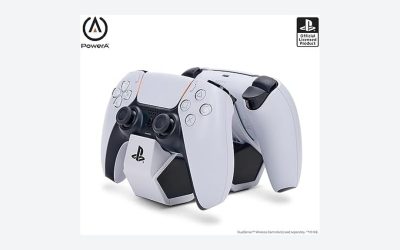
Horizontal docks place controllers back-to-back or side-by-side. These units typically measure between 6.5 and 8.5 inches in length and 2.2 to 3.2 inches in width. Because they distribute weight horizontally, they are inherently more stable and less prone to tipping over. However, they demand significant flat surface area on your desk or media console.
Vertical tower docks stack one controller directly above the other. These models have a remarkably small footprint, usually measuring just 2.5 by 3 inches at the base. The trade-off is height. A vertical tower with two controllers docked can easily stand 7.5 to 9.5 inches tall. If you plan to place the dock on an open desk, this is a great space-saver, but it is highly impractical for tight entertainment center shelving where your hands need room to drop the top controller into place.
Factor 2: Material and Build Quality
The materials used in a dock affect both its visual appeal and its longevity. Cheap docks are made of thin, single-layer ABS plastic (under 1.2 mm thick) that feels hollow, squeaks under pressure, and scratches easily. These lightweight units often weigh less than 100 grams (3.5 ounces), meaning they will slide around your desk whenever you try to dock or undock a controller.
Premium docks utilize heavy-duty, double-walled polycarbonate or high-impact ABS plastic with a thickness of 2.0 mm to 3.0 mm. Many premium models integrate weighted metal plates (often steel or zinc alloy) inside the base, bringing the total weight up to 250 to 400 grams (8.8 to 14.1 ounces). This added mass is crucial: it allows you to pick up a controller with one hand without lifting the entire dock off the table.
Additionally, pay close attention to the bottom of the dock. Look for thick, high-density silicone or rubberized feet. Budget docks often use cheap foam pads that lose their grip and disintegrate over time, whereas high-quality silicone pads (at least 1.5 mm thick with a textured surface) ensure the dock stays anchored on wood, glass, or metal surfaces.
Factor 3: Docking and Alignment Construction
A charging dock is useless if you have to spend 30 seconds wiggling the controller around to get the charging pins to align. The construction of the docking cradle determines how easy it is to use in the dark.
Look for docks that feature molded, form-fitting guide cradles. These are physical plastic grooves shaped to match the exact contours of your specific controller’s grips and triggers. When designed correctly, gravity does the work: you drop the controller in, and the physical shape of the cradle naturally slides the controller’s charging port directly onto the charging pins.
Spring-loaded gold-plated pogo pins are the gold standard for contact-based charging. These pins retract slightly under the weight of the controller, ensuring a firm, consistent electrical connection without scratching the controller’s ports. Avoid docks with rigid, non-flexible USB-C male plugs sticking straight up out of the plastic; forcing a controller onto a stiff plug at the wrong angle will eventually bend the plug or damage your controller’s female USB-C port.
Factor 4: Charging Performance, Wattage, and Safety
To charge two controllers quickly and simultaneously, the dock must have adequate power input and smart power distribution. You must look closely at the wattage and voltage ratings printed on the bottom of the dock or listed in the technical specifications.
A standard dual dock should support an input of at least 5V/2A (10 watts). If a dock only runs on a 5V/1A (5 watts) input, it will either charge your controllers at a painfully slow crawl (taking 4 to 5 hours to fully charge) or fail to charge both controllers at the same time. High-performance docks utilize USB-C Power Delivery (PD) inputs of 9V/2A or 5V/3A (up to 15-18 watts), which can fully charge two modern controllers simultaneously in 2 to 2.5 hours.
Equally important is the internal circuitry. High-quality docks feature intelligent microchips that monitor battery levels and temperature. Once a controller reaches 80% capacity, the dock should automatically transition from fast charging to “trickle charging” to protect the lithium-ion battery from heat degradation. Look for explicitly stated safety features, including over-charge protection, over-voltage protection, over-current protection, and short-circuit prevention.
Factor 5: Price Tiers
Understanding what you get at different price points helps prevent overpaying for basic features or underpaying for unreliable hardware.
- Budget ($12 – $20): These docks are almost exclusively made of lightweight, unweighted plastic. They usually rely on a basic USB-A to USB-C cable plugged into the console and lack dedicated wall adapters. They often use generic slots rather than custom-molded cradles, requiring manual alignment. Safety chips are minimal, and charging times for two controllers can exceed 4 hours.
- Mid-Range ($20 – $40): This is the sweet spot for most users. In this tier, you get custom-molded cradles, spring-loaded pogo pins, and a weighted base (around 200-300 grams) with high-quality silicone feet. Many include smart LED charging indicators that change color (e.g., orange/red to blue/green) to show charge status. They charge dual controllers in 2.5 to 3 hours and feature solid overcharge protection.
- Premium ($40 – $65+): Premium docks feature high-end materials such as weighted metal bases, fabric accents, or soft-touch matte finishes. They often include a dedicated AC wall adapter, allowing for rapid charging (under 2 hours) independent of your console. They have advanced safety certifications, dimmable or auto-off LED indicator lights (so they don’t blind you at night), and extended multi-year warranties.
Factor 6: Warranty and Safety Certifications
Because a charging dock is an electrical device left plugged in 24/7, you should never overlook safety certifications and warranty coverage. Uncertified electronics pose a genuine risk of short-circuiting, melting, or damaging the expensive batteries inside your controllers.
Always verify that the dock holds recognized safety certifications. Look for the UL (Underwriters Laboratories), FCC, CE, and RoHS marks. A UL-listed device has undergone rigorous thermal and electrical testing to ensure it will not pose a fire hazard under normal operating conditions.
Warranty length is a direct reflection of a manufacturer’s confidence in their hardware. Budget docks typically offer a bare-minimum 90-day warranty or none at all. Reliable mid-range and premium brands will provide a standard 1-year or 2-year limited warranty, which covers mechanical failure of the charging pins, LED malfunction, and internal circuit failures.
Spec Checklist
Use this quick-reference table to compare target specifications across the three main market tiers before making your final purchase decision.
| Feature / Spec | Budget Tier | Mid-Range Tier | Premium Tier |
|---|---|---|---|
| Price Range | $12 – $20 | $20 – $40 | $40 – $65+ |
| Power Input | 5V / 1A to 1.5A | 5V / 2A | 5V / 3A or 9V / 2A (USB-PD) |
| Dual Charge Time | 4.0 to 5.0+ hours | 2.5 to 3.5 hours | 1.5 to 2.5 hours |
| Dock Weight | Under 120 grams (4.2 oz) | 150 to 250 grams (5.3 to 8.8 oz) | 300 to 450+ grams (10.5 to 15.8+ oz) |
| Power Source | Console USB port only | Console USB or basic USB brick | Included dedicated AC Wall Adapter |
| Safety Certifications | Basic CE / RoHS (unverified) | FCC, CE, RoHS | UL Listed, FCC, CE, RoHS |
| Warranty | 90 days or none | 1 Year Limited | 2 to 3 Years Limited |
Red Flags
When shopping, be on high alert for these common manufacturing shortcuts. If a product exhibits any of these warning signs, it is best to leave it on the shelf:
- Ultra-lightweight construction (under 100 grams): If the manufacturer does not list the physical weight of the dock, it is likely made of cheap, hollow plastic. You will end up needing two hands to pry your controller off the dock every single time.
- Blinding, non-adjustable LEDs: Many cheap docks feature massive, bright LED strips that glow constantly. If you keep your dock in a bedroom, these poorly designed lights can illuminate the entire room at night, and budget docks rarely offer a switch to turn the lights off.
- Required proprietary dongles that aren’t sold separately: If a dock requires a tiny USB-C adapter to be plugged into the controller to function, ensure the box comes with extras or that the manufacturer sells replacements. If you lose one of those tiny adapters and cannot buy a replacement, the entire dock becomes e-waste.
- No listed safety protections: If the product listing or manual does not explicitly state that it has overcharge, overcurrent, and thermal protection, do not buy it. Constant trickle charging at high temperatures will permanently ruin your controller’s battery health within a few months.
FAQ
Can I leave my controllers on the charging dock overnight?
Yes, provided you purchase a dock with an integrated smart chipset that features overcharge protection. High-quality docks will fast-charge your controllers to about 80%, slow down the current for the remaining 20%, and then completely shut off power delivery once the battery is full, preventing heat damage and battery degradation.
Do I need a separate wall adapter, or can I plug the dock directly into my console?
You can plug most docks into your console’s USB ports, but you must ensure your console is set to supply power to its USB ports while in rest or standby mode. If you completely power down your console to save energy, the dock will not charge your controllers. In that scenario, a dock with a dedicated AC wall adapter is required.
Why does my controller stop charging at 80% or 90% on the dock?
This is actually a safety feature, not a defect. Many modern first-party controllers have built-in battery protection systems that communicate with intelligent docks. If the controller’s internal temperature is too high, or if the battery is already near full capacity, the system will pause charging to prevent overheating and prolong the lifetime of the lithium-ion cells.
Will a dual charging dock work if I have protective grips or skins on my controllers?
In most cases, no. Form-fitting, direct-contact docks are engineered with incredibly tight tolerances to ensure the controller’s charging pins line up perfectly. Even a thin 1 mm silicone skin or protective grip case can alter the controller’s outer dimensions enough to prevent it from seating properly in the cradle or making contact with the charging pins. If you use grips, look for a flat, magnetic dongle-based dock instead.