Key takeaways
- Elimination of Cable Clutter: Instead of having multiple cords draped across your TV stand or floor, a dock uses a single power cable tucked neatly behind your media console.
- Port Protection: Repeatedly plugging and unplugging a USB-C or micro-USB cable can loosen or damage the controller’s internal female port over time. Charging docks often use drop-and-charge metal contacts or spring-loaded pins that eliminate this mechanical stress.
- Dedicated Storage: A dock ensures your controllers have a designated home. This prevents them from being stepped on, lost between couch cushions, or knocked off end tables.
- Intuitive Charging Indicators: Most docks feature clear LED lights (often changing from red to blue or green) to tell you at a glance if a controller is ready to use, saving you from picking up a dead controller right when you want to play.
- Simultaneous Multi-Device Charging: Standard consoles only have a couple of USB ports. A single dock can easily charge up to four Joy-Cons or a mix of pro controllers simultaneously using just one console port.
The Short Answer
Yes, a charging dock is better than standard cables for controllers, but only if your priority is maintaining an organized, clutter-free living room and protecting your controller ports from long-term wear and tear. If you are a solo gamer on a tight budget who does not mind dangling wires, or if you frequently play while charging, standard cables remain the more practical and cost-effective choice.
What You Actually Get
To understand whether a charging dock is worth the investment, it helps to look at what these accessories actually bring to your living room or gaming setup. As we look at the modern home media landscape in 2026, living rooms have transitioned into clean, minimalist spaces where exposed wires are increasingly viewed as visual clutter. A charging dock acts as both a functional utility and a piece of organizational furniture.
Our top picks
 FASTSNAIL Switch Controller Charging Dock for Nintendo
- FastSnail Charging Stand Compatible with Joy Cons is…
- Made of high quality materias, lightweight, portable, solid…
- Easy slide-in design & plug and play
 Switch Controller Charger for Nintendo Switch JoyCon/Pro
- Charging Dock for Nintendo - The Joycon charger…
- Ideal Accessories for Switch - The charging station…
- More Way to Charge Joycons - The joy-con…
As an Amazon Associate we earn from qualifying purchases at no extra cost to you.
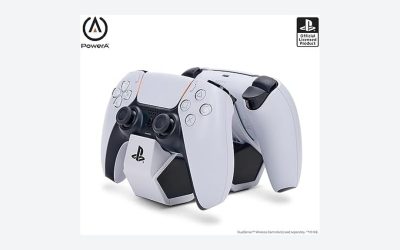
When you purchase a charging dock, you are buying a dedicated home base for your controllers. Physically, these devices are relatively compact. A typical multi-controller dock occupies a footprint of roughly 5 x 3 inches on your media console and weighs between 6 and 10 ounces. Many manufacturers add internal metal plates to give the docks weight, ensuring they do not slide around or lift off the table when you grab a controller.
Functionally, a charging dock consolidates your power needs. Instead of plugging three or four separate cables into the USB ports of your gaming console or wall adapters, a dock uses a single USB-C cable connected to a power source—typically requiring a 5V/2A (10W) or 5V/3A (15W) input. It then intelligently splits this power among the docked controllers.
In terms of pricing, options are highly affordable. For example, specialized docks like the FASTSNAIL Switch Controller Charging Dock for Nintendo Switch Joy-Cons retail for around $15.99, while multi-system hybrids like the Switch Controller Charger for Nintendo Switch Joy-Con/Pro and PS5 Controllers cost around $19.99. These entry-level prices make the transition from loose cables to a dedicated station very accessible.
Pros
- Elimination of Cable Clutter: Instead of having multiple cords draped across your TV stand or floor, a dock uses a single power cable tucked neatly behind your media console.
- Port Protection: Repeatedly plugging and unplugging a USB-C or micro-USB cable can loosen or damage the controller’s internal female port over time. Charging docks often use drop-and-charge metal contacts or spring-loaded pins that eliminate this mechanical stress.
- Dedicated Storage: A dock ensures your controllers have a designated home. This prevents them from being stepped on, lost between couch cushions, or knocked off end tables.
- Intuitive Charging Indicators: Most docks feature clear LED lights (often changing from red to blue or green) to tell you at a glance if a controller is ready to use, saving you from picking up a dead controller right when you want to play.
- Simultaneous Multi-Device Charging: Standard consoles only have a couple of USB ports. A single dock can easily charge up to four Joy-Cons or a mix of pro controllers simultaneously using just one console port.
Cons
- Zero “Play-While-Charging” Capability: Unlike a long 10-foot USB cable that allows you to play from the couch while drawing power, a controller must remain physically seated on the dock to charge.
- Physical Space Requirements: While small, a dock still requires flat real estate on your media console, shelf, or desk, which can be at a premium in tight setups.
- Compatibility Restrictions: Many docks are molded to fit specific controller shapes. If you use custom silicone grips, protective skins, or back-button attachments, your controller likely will not fit into the dock without removing those accessories first.
- Added Cost: While standard charging cables are usually included in the box with your console or controller, a dock requires an extra out-of-pocket purchase of $15 to $30.
Who Should Buy It
You should buy a charging dock if you share your gaming space with family or roommates, own more than two controllers, or take pride in a clean, interior-designed living room. It is also an excellent purchase for Nintendo Switch households, as keeping track of tiny Joy-Cons is notoriously difficult without a centralized station. If you find yourself constantly untangling cords or hunting for a free USB port behind your console, the small investment in a dock will instantly upgrade your daily routine.
Who Should Skip It
You should skip the charging dock if you are a solo gamer who owns only one controller and prefers to play marathon sessions while plugged in. It is also unnecessary for those who store their controllers out of sight in drawers or cabinets when not in use. Additionally, if you use bulky third-party ergonomic grips or custom shells on your controllers, the tight physical tolerances of a charging dock will cause more frustration than convenience.
Cheaper Alternatives
If you are not ready to commit to a dedicated charging dock, there are several budget-friendly alternatives that can help manage your power needs. The table below outlines these options, their estimated costs, and what you sacrifice by choosing them.
| Option | Estimated Cost | Trade-off |
|---|---|---|
| In-Box OEM USB-C Cable | $0 (Included with controller) | Charges only one controller at a time; leaves cables dangling across your furniture; subjects ports to wear and tear. |
| Multi-Head Splitter Cable (3-in-1) | $8.00 – $12.00 | Splits power from a single USB port, resulting in significantly slower charge times; still leaves messy cords on display. |
| Multi-Port USB Wall Charger | $10.00 – $15.00 | Clears up console ports but still requires you to buy and run multiple separate cables to your seating area. |
| Magnetic USB Charging Cables | $10.00 – $14.00 | Protects the controller’s port via a magnetic breakaway tip, but does not solve the issue of cable clutter or provide a storage stand. |
FAQ
Do charging docks ruin controller batteries by overcharging them?
No. Modern, high-quality charging docks feature built-in smart chipsets that regulate power delivery. Once your controller reaches 100% capacity, the dock automatically switches to a trickle-charge or standby mode, preventing battery degradation, overheating, or overcharging.
Can I use a fast-charging mobile phone block to power my dock?
Yes, but with caution. Most controller docks require a standard 5V/2A input. While many modern phone blocks can scale down their power delivery to match what the dock requests, using an uncertified, cheap high-wattage fast-charger can occasionally overwhelm the dock’s simple circuitry. Always check the manufacturer’s input specifications.
Do controllers charge faster on a dock than they do with a standard cable?
Generally, no. Charging speed is limited by the controller’s internal power management system, not the delivery method. A standard PS5 or Switch Pro controller will take approximately 2.5 to 3 hours to charge completely, whether it is plugged into a high-quality cable or resting on a matching dock.
Will a charging dock work if I have a protective skin on my controller?
In most cases, protective silicone skins or wraps will prevent the controller from seating properly in a dock. Docks are engineered with incredibly tight physical tolerances to ensure the charging pins make precise contact with the controller’s ports. Even a millimeter of extra silicone thickness can prevent a successful charge.