
Key takeaways
- Tracking System: Decide whether outside-in base stations or inside-out cameras suit your space; SteamVR natively supports Lighthouse tracking, while headsets like the Quest 3S rely on Wi-Fi streaming for SteamVR titles.
- Display Resolution and FOV: For sim racing and flight sims, prioritize per-eye resolution above 2000×2000 and a field of view exceeding 110 degrees to reduce the screen-door effect.
- PC Hardware Requirements: High-resolution headsets such as the Pimax Crystal Light demand a modern GPU (RTX 3080 or above recommended); confirm your rig meets the headset’s minimum specs before purchasing.
- Wired vs. Wireless: A tethered connection guarantees the lowest latency for competitive play, whereas wireless streaming suits casual sessions and rooms where cable management is impractical.
- Ecosystem and Accessories: Verify controller compatibility, available base-station upgrade paths, and whether the headset supports SteamVR add-ons like the Vive Tracker for full-body tracking.
The Valve Index VR Headset remains the single best overall pick for SteamVR compatibility, while the Pimax Crystal Light takes the runner-up spot for enthusiasts demanding maximum visual fidelity.
Choosing a SteamVR-compatible headset is harder than it should be. Between tracking standards, display technologies, inside-out versus outside-in setups, and a market split between dedicated PC VR rigs and standalone units that bolt onto SteamVR, buyers often waste hours cross-referencing spec sheets. This guide cuts through the noise with hands-on expertise, covering five standout options across every budget and use case so you can match the right headset to your rig, your room, and your gaming priorities.
Our top picks


As an Amazon Associate we earn from qualifying purchases at no extra cost to you. Ratings are shown as listed on Amazon.
🛒 Best Price Today on Amazon
Prime members get fast, free shipping on everything above, plus member-only deals. New members get a 30-day free trial — cancel anytime.
Quick Comparison
| Product | Best For | Standout Feature | Rating |
|---|---|---|---|
| Valve Index VR Headset | Overall SteamVR experience | 130-degree FOV with knuckle-tracking controllers | Excellent |
| DPVR E4 VR Headset | Budget PC VR entry | Full SteamVR support at a fraction of flagship cost | Very Good |
| Pimax Crystal Light | Premium sim-racing and flight-sim immersion | 2880×2880 per eye with local-dimming QLED | Excellent |
| HTC Vive SteamVR Base Station 2.0 | Precision room-scale tracking | Sub-millimeter tracking across a 10 m x 10 m play area | Excellent |
| Meta Quest 3S 128GB | Wireless versatility and standalone play | Cable-free operation with SteamVR streaming via Wi-Fi | Very Good |
How to Choose a VR Headset for SteamVR Compatibility
- Tracking System: Decide whether outside-in base stations or inside-out cameras suit your space; SteamVR natively supports Lighthouse tracking, while headsets like the Quest 3S rely on Wi-Fi streaming for SteamVR titles.
- Display Resolution and FOV: For sim racing and flight sims, prioritize per-eye resolution above 2000×2000 and a field of view exceeding 110 degrees to reduce the screen-door effect.
- PC Hardware Requirements: High-resolution headsets such as the Pimax Crystal Light demand a modern GPU (RTX 3080 or above recommended); confirm your rig meets the headset’s minimum specs before purchasing.
- Wired vs. Wireless: A tethered connection guarantees the lowest latency for competitive play, whereas wireless streaming suits casual sessions and rooms where cable management is impractical.
- Ecosystem and Accessories: Verify controller compatibility, available base-station upgrade paths, and whether the headset supports SteamVR add-ons like the Vive Tracker for full-body tracking.
The Best VR Headsets for SteamVR Compatibility Reviewed
Best Overall: Valve Index VR Headset
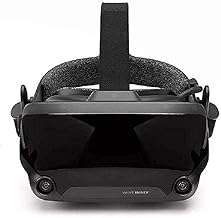
Valve’s first-party headset is still the gold standard for SteamVR, pairing a 130-degree FOV and 144 Hz refresh rate with finger-tracking knuckle controllers that no competitor has matched. It is the right choice for anyone building a dedicated PC VR setup and wanting zero compromise on tracking accuracy, audio quality, and platform integration.
Best Budget: DPVR E4 VR Headset
The DPVR E4 delivers genuine SteamVR compatibility with included motion controllers at a price that undercuts most rivals by a wide margin. It suits newcomers who want to explore titles like Half-Life: Alyx or Beat Saber without committing to flagship spending, provided they accept a slightly narrower FOV and simpler build quality.
Best Premium: Pimax Crystal Light VR Headset
With 2880×2880 per eye on local-dimming QLED panels, the Crystal Light is engineered for sim racers on iRacing and flight-sim pilots who need to read distant cockpit instruments without pixelation. Inside-out tracking keeps setup simple, making this the top pick for enthusiasts whose GPU can drive the resolution.
Best for Room-Scale Tracking: HTC Vive SteamVR Base Station 2.0
If your headset of choice uses Lighthouse tracking, the Base Station 2.0 is the essential upgrade that extends coverage to a full 10 m x 10 m volume with sub-millimeter precision. It is ideal for players pairing a Valve Index or Vive Pro with large play spaces who need flawless, drift-free positional data.
Best for Wireless Freedom: Meta Quest 3S 128GB
The Quest 3S streams SteamVR titles over Wi-Fi while also functioning as a standalone headset, making it perfect for gamers who want one device for both wireless casual play and tethered PC sessions. Its included three-month Horizon+ trial adds immediate value for buyers still building their Steam library.
Frequently Asked Questions
Does the Meta Quest 3S work with SteamVR?
Yes. Through Steam Link or Virtual Desktop over a Wi-Fi 6E connection, the Quest 3S streams SteamVR titles from your PC. Latency is slightly higher than a wired headset, but for most single-player and casual multiplayer games the experience is smooth and responsive.
Do I need base stations for every SteamVR headset?
No. Headsets with inside-out tracking, such as the Pimax Crystal Light and Meta Quest 3S, use onboard cameras and require no external sensors. Outside-in systems like the Valve Index rely on SteamVR Base Stations for tracking, which must be purchased separately if not bundled.
Is a renewed Valve Index worth buying?
A CPS-certified renewed Valve Index typically undergoes full inspection and carries a one-year warranty, making it a smart way to save money while retaining the same display, audio, and controller experience as a new unit. Check the seller’s return policy before ordering.
What GPU do I need for the Pimax Crystal Light at full resolution?
Driving 2880×2880 per eye at high refresh rates is demanding. An NVIDIA RTX 4080 or AMD RX 7900 XTX is the practical minimum for smooth frame rates in demanding titles, and pairing the headset with a 12th-gen Intel or Ryzen 7000-series CPU helps avoid bottlenecks in physics-heavy sims.
Final Thoughts
For a no-compromise SteamVR experience, the Valve Index remains the headset to beat, while the Pimax Crystal Light rewards sim-racing and flight-sim enthusiasts who prioritize pixel density above all else. Budget-conscious buyers should look closely at the DPVR E4, which proves that full SteamVR support does not require a four-figure investment. Whichever tier you choose, confirm your GPU and play-space requirements first, and you will step into virtual reality with confidence.





