
Key takeaways
- Refresh Rate: Prioritize 180Hz or higher for esports; 240Hz to 280Hz offers noticeably smoother motion and lower input lag, while 144Hz is the minimum for competitive consistency.
- Response Time & Motion Clarity: Look for 1ms or faster (0.3ms is ideal) and features like ELMB or MBR to reduce ghosting and blur during fast camera movements.
- Adaptive Sync: Ensure G-SYNC Compatible or FreeSync Premium support to eliminate screen tearing without adding lag, especially when frame rates fluctuate.
- Panel Type & Ergonomics: Fast-IPS delivers the best mix of speed and color (99% sRGB) for spotting enemies, and a height-adjustable, VESA-mountable stand helps you lock in an optimal viewing angle for long tournaments.
- Connectivity & Eye Care: Check for DisplayPort and dual HDMI for PC and console flexibility, plus Flickerless and Bluelight Filter tech to reduce eye strain during extended sessions.
What's inside
Best overall for competitive esports is the Acer Nitro KG251Q 24.5in 280Hz Gaming Monitor for its tournament-grade speed and 1ms response, while the ASUS TUF Gaming VG249QML5A 23.8in 240Hz is the runner-up with its ultra-fast 0.3ms Fast-IPS panel and Gaming AI features. Both deliver the fluid motion and low latency that give you a real edge in fast-paced shooters and MOBAs without the GPU demands of 1440p.
Choosing a 1080p monitor for esports is tricky because not all high-refresh panels are equal — response time, adaptive sync, color accuracy, and ergonomics can vary wildly and directly affect aiming, tracking, and fatigue during long sessions. This guide cuts through the specs to compare the top 1080p options for competitive play, breaking down who each monitor is best for and what to prioritize before you buy.
As an Amazon Associate we earn from qualifying purchases.





🛒 Best Price Today on Amazon
Prime members get fast, free shipping on everything above, plus member-only deals. New members get a 30-day free trial — cancel anytime.
Quick Comparison
| Product | Best For | Standout Feature | Rating |
|---|---|---|---|
| Acer Nitro KG251Q 24.5″ 280Hz | Competitive Purists | 280Hz Refresh + 1ms + FreeSync Premium | 4.9/5 |
| Sceptre E225W-FW144 22″ 144Hz | Budget-Conscious Players | 144Hz + Built-in Speakers + Compact 22in | 4.5/5 |
| ASUS TUF Gaming VG249QML5A 23.8″ 240Hz | Feature-Focused Enthusiasts | 0.3ms Fast-IPS + Gaming AI + DisplayWidget | 4.8/5 |
| ASUS TUF Gaming VG249QL3A 23.8″ 180Hz | Balanced Value & Comfort | 180Hz + ELMB + Height Adjustable Stand | 4.7/5 |
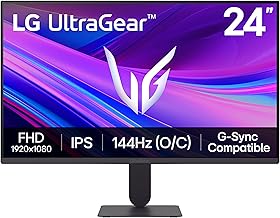
| LG Ultragear 24G411A-B 24″ 144Hz | Everyday Esports Reliability | HDR10 IPS + 1ms MBR + G-Sync Compatible | 4.6/5 |
How to Choose a/an 1080p Gaming Monitors for Competitive Esports
- Refresh Rate: Prioritize 180Hz or higher for esports; 240Hz to 280Hz offers noticeably smoother motion and lower input lag, while 144Hz is the minimum for competitive consistency.
- Response Time & Motion Clarity: Look for 1ms or faster (0.3ms is ideal) and features like ELMB or MBR to reduce ghosting and blur during fast camera movements.
- Adaptive Sync: Ensure G-SYNC Compatible or FreeSync Premium support to eliminate screen tearing without adding lag, especially when frame rates fluctuate.
- Panel Type & Ergonomics: Fast-IPS delivers the best mix of speed and color (99% sRGB) for spotting enemies, and a height-adjustable, VESA-mountable stand helps you lock in an optimal viewing angle for long tournaments.
- Connectivity & Eye Care: Check for DisplayPort and dual HDMI for PC and console flexibility, plus Flickerless and Bluelight Filter tech to reduce eye strain during extended sessions.
The Best 1080p Gaming Monitors for Competitive Esportss Reviewed
Best Overall: Acer Nitro KG251Q 24.5in 280Hz Gaming Monitor
Ideal for serious competitors who want every possible advantage, the Acer Nitro KG251Q combines a blistering 280Hz refresh rate with a 1ms response time, AMD FreeSync Premium, and 99% sRGB coverage on a 24.5-inch FHD panel. It is the top choice for Valorant, CS2, and Apex players who prioritize raw speed, fluid tracking, and VESA mounting flexibility.
Best Budget: Sceptre E225W-FW144 22-Inch 144Hz Gaming Monitor
Perfect for beginners or secondary setups on a tight budget, the Sceptre 22-inch delivers reliable FHD 1080p performance up to 144Hz with HDMI and DisplayPort plus built-in speakers in a compact Machine Black design. It is best for students, dorm setups, and casual competitive players who need low latency and VESA compatibility without overspending.
Best Premium: ASUS TUF Gaming VG249QML5A 23.8in 240Hz Monitor
Built for enthusiasts who want elite speed plus smart features, the VG249QML5A pairs a 0.3ms Fast-IPS panel with 240Hz, G-SYNC Compatible and FreeSync Premium, 99% sRGB, and ASUS Gaming AI and DisplayWidget. It is best for dedicated esports players who also stream and want height adjustability and a 3-year warranty.
Best for Balanced Performance: ASUS TUF Gaming VG249QL3A 23.8in 180Hz Monitor
Great for players seeking a sweet spot between price, performance, and comfort, the VG249QL3A offers 180Hz, 1ms Fast IPS with ELMB, FreeSync Premium and G-SYNC Compatibility, plus integrated speakers and a fully height-adjustable stand. It is best for all-around competitors who want smooth gameplay for both ranked grinding and daily use.
Best for Everyday Reliability: LG Ultragear 24G411A-B 24-inch 144Hz Monitor
Suited to players who value proven reliability and color quality for long sessions, the LG Ultragear 24G411A-B features a 144Hz IPS panel (overclockable), 1ms MBR, HDR10, and NVIDIA G-Sync Compatible and AMD FreeSync support in a slim, clean design. It is best for consistent everyday esports practice with accurate colors and low eye fatigue.
Frequently Asked Questions
Is 1080p still best for competitive esports?
Yes. 1080p at 24 to 24.5 inches lets you run the highest frame rates with lower GPU requirements, keeps the entire screen in your field of view for faster reactions, and remains the standard resolution for most esports tournaments and pro setups.
Do I need 240Hz or 280Hz, or is 144Hz enough?
144Hz is fully competitive and a huge upgrade from 60Hz, but 240Hz and 280Hz further reduce motion blur and input lag, making tracking and flick shots feel more responsive. If your PC can consistently push 240+ fps in your main titles, the higher refresh is worth it.
What matters more: response time or refresh rate?
Both matter, but they work together. Refresh rate determines how many frames you see per second, while response time determines how cleanly each frame transitions. For esports, aim for at least 180Hz combined with 1ms or faster, ideally with ELMB or MBR to minimize ghosting.
Are G-SYNC and FreeSync important for esports?
Yes for smooth, tear-free play, especially when your frame rate dips below max refresh. G-SYNC Compatible and FreeSync Premium keep gameplay fluid without the input lag penalty of traditional V-Sync, so leave them enabled for ranked matches.
Final Thoughts
For pure competitive advantage, the Acer Nitro KG251Q 280Hz stands out as the best overall pick, with the ASUS TUF Gaming VG249QML5A 240Hz offering premium tech and the Sceptre E225W-FW144 providing an affordable entry point. Choose based on your frame-rate targets and desk space, and you will get a fast, reliable 1080p panel built for esports.





