Key takeaways
- Four 2.5G LAN ports plus 2.5G WAN, a rarity at this price
- Internal antennas give a clean, shelf-friendly look
- Genuine Wi-Fi 7 features including 6GHz and multi-link operation
- EasyMesh support for painless future expansion
What's inside
The TP-Link Archer BE550 is a tri-band Wi-Fi 7 router built around the BE9300 class, pairing a full set of 2.5G Ethernet ports with six internal antennas and a six-stream design. It sits in the affordable end of the Wi-Fi 7 market, aiming to bring 6GHz spectrum, 320MHz channels, and multi-link operation to households that don’t want to pay flagship money for the privilege.
It’s a sensible pick for anyone with a gigabit or faster internet plan who has already started collecting Wi-Fi 7 or Wi-Fi 6E devices, and for people who want wired 2.5G links to a NAS, a work desktop, or a gaming PC without buying a separate switch. Casual users on a 300Mbps plan will not see most of what it offers, so this is a router that rewards a fast pipe and modern client hardware.
As an Amazon Associate we earn from qualifying purchases.





⚡ Save on Your Next PC — Amazon Prime
Prime members get fast free shipping on the systems above, plus early access to Prime Day & Black Friday PC deals. New members get a 30-day free trial.
Watch: TP-Link Archer BE550 Review — Video Review
Design & Build
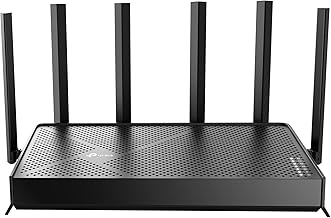
Physically the BE550 keeps its antennas tucked inside a matte black tower rather than sprouting the usual spider of external whips, which makes it far easier to live with on a shelf or desk. The chassis runs warm but not hot thanks to generous venting, and the footprint is compact for a six-stream unit. The rear layout is the real selling point: alongside the 2.5G WAN port you get four 2.5G LAN ports and a USB 3.0 connector, so every wired link can exceed gigabit without an add-on switch. Build quality feels solid, though the glossy top panel is a fingerprint magnet.
Performance
On the 6GHz band with a Wi-Fi 7 client, the BE550 delivers the kind of low-latency, high-throughput link that makes wired connections feel less essential, and multi-link operation helps hold speeds steady as you move between rooms. Coverage lives up to the roughly 2,000 square foot claim in a typical two-story home, with the 5GHz band doing the heavy lifting for older devices at range.
The honest caveat is that raw peak numbers depend heavily on your clients: with Wi-Fi 6 phones and laptops you’re essentially buying a very good Wi-Fi 6E router with headroom for the future. The HomeShield security suite covers the basics for free, but the more advanced parental and threat features sit behind a subscription. EasyMesh expansion works cleanly if you later add nodes.
Pros & Cons
- Four 2.5G LAN ports plus 2.5G WAN, a rarity at this price
- Internal antennas give a clean, shelf-friendly look
- Genuine Wi-Fi 7 features including 6GHz and multi-link operation
- EasyMesh support for painless future expansion
- Best-case throughput requires Wi-Fi 7 client devices you may not own yet
- Advanced HomeShield features need a paid subscription
- No 10G port, so the fastest NAS or multi-gig plans will bottleneck
Alternatives to Consider
If you want a 10G port for a faster internet plan or a high-speed NAS, the TP-Link Archer BE550 Pro (BE9700) and the Archer BE600 both add one while keeping the same family software. Budget-focused buyers who can live with dual-band Wi-Fi 7 should look at the TP-Link BE6500 (BE400), and anyone not ready to move off Wi-Fi 6 can save considerably with the Archer AX55, which still offers solid coverage and VPN support.
Frequently Asked Questions
Do I need Wi-Fi 7 devices to benefit from the BE550?
Not entirely. It works as an excellent Wi-Fi 6/6E router today, but the headline 6GHz and multi-link gains only appear with Wi-Fi 7 clients. Think of it as future-proofing.
Can it replace a separate 2.5G switch?
For most homes, yes. Four 2.5G LAN ports let you wire a desktop, NAS, and console at multi-gig speeds directly, though heavy wired setups may still want a dedicated switch.
Is a subscription required to use it?
No. Routing, VPN, and basic HomeShield protection are free. Only the advanced parental controls and threat-detection extras require a paid plan.
How large a home will it cover?
TP-Link rates it for around 2,000 square feet, which matches most two-bedroom to three-bedroom homes. Larger or multi-floor houses can add an EasyMesh node for full coverage.
Verdict
The Archer BE550 is one of the easiest Wi-Fi 7 routers to recommend for the mainstream buyer: it brings genuine next-gen wireless and an unusually generous set of 2.5G ports at a price that undercuts most rivals. As long as you understand that the biggest speed gains arrive alongside Wi-Fi 7 client devices, it’s a smart, forward-looking upgrade that won’t feel outdated for years.