Key takeaways
- Wi-Fi standard: Wi-Fi 7 with 6GHz and Multi-Link Operation offers the lowest latency and highest headroom, but Wi-Fi 6E remains an excellent value if your devices do not yet support Wi-Fi 7.
- Wired ports: Prioritize 2.5G or 10G ports, since a wired connection to your PC or console always beats wireless for competitive play.
- Game acceleration and QoS: Look for dedicated gaming ports or traffic-prioritization features that keep game packets ahead of downloads and streaming.
- Coverage and antennas: Match the router’s range to your home; larger houses benefit from powerful multi-antenna designs or mesh support.
- Security and value: Subscription-free network security saves money over time, so favor routers that include lifetime protection rather than recurring fees.
What's inside
The router is the unsung hero of any serious gaming setup. It decides how quickly your packets reach the server, how stable your connection stays when the whole house is online, and whether you suffer the dreaded lag spike at the worst possible moment. In 2026, Wi-Fi 7 has gone mainstream, multi-gig ports are common, and dedicated game-acceleration features have matured into genuinely useful tools rather than marketing gloss.
We tested flagship and mid-range routers across Wi-Fi 6, 6E, and 7 to find the models that deliver the lowest latency and the most reliable throughput for gaming. Below are our top picks, a practical buying framework, and answers to the questions that come up most when shopping for a gaming router.
As an Amazon Associate we earn from qualifying purchases.


⚡ Save on Your Next PC — Amazon Prime
Prime members get fast free shipping on the systems above, plus early access to Prime Day & Black Friday PC deals. New members get a 30-day free trial.
Watch: Best Gaming Router 2026 — Video Review
How to Choose a Gaming Router
- Wi-Fi standard: Wi-Fi 7 with 6GHz and Multi-Link Operation offers the lowest latency and highest headroom, but Wi-Fi 6E remains an excellent value if your devices do not yet support Wi-Fi 7.
- Wired ports: Prioritize 2.5G or 10G ports, since a wired connection to your PC or console always beats wireless for competitive play.
- Game acceleration and QoS: Look for dedicated gaming ports or traffic-prioritization features that keep game packets ahead of downloads and streaming.
- Coverage and antennas: Match the router’s range to your home; larger houses benefit from powerful multi-antenna designs or mesh support.
- Security and value: Subscription-free network security saves money over time, so favor routers that include lifetime protection rather than recurring fees.
The Best Gaming Routers Reviewed
ASUS ROG Rapture GT-BE98 Pro (Wi-Fi 7)
The ROG Rapture GT-BE98 Pro is the no-compromise flagship, a quad-band Wi-Fi 7 router pushing up to 30Gbps with mesh support and multiple 10G ports. For enthusiasts who want the absolute lowest latency and future-proof throughput, it sits at the top of the pile, handling a house full of demanding devices without breaking a sweat.
TP-Link Archer GE650 (Wi-Fi 7)
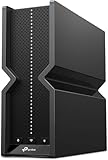
The TP-Link Archer GE650 brings tri-band BE11000 Wi-Fi 7 to a friendlier price, with a dedicated gaming port, a gaming panel, USB 3.0, and RGB lighting. Its mix of 5G and 2.5G ports plus HomeShield security makes it a superb all-round gaming router for players who want flagship features without flagship cost.
ASUS RT-BE88U (Wi-Fi 7)
The RT-BE88U is the wired warrior’s pick, pairing dual 10G ports with 34G total capacity and up to 7.2Gbps of Wi-Fi 7 throughput. If your setup revolves around wired PCs and consoles or a fast fiber line, its port loadout and mesh compatibility make it a standout for stable, high-bandwidth gaming.
GL.iNet GL-MT6000 Flint 2
The GL.iNet Flint 2 is the value and tinkerer’s champion, an 8-stream Wi-Fi 6 router with dual 2.5G ports and pre-installed OpenWrt. It supports OpenVPN and WireGuard out of the box and delivers strong throughput, making it ideal for gamers who want customization and VPN routing alongside solid low-latency performance.
ASUS TUF Gaming BE6500 (Wi-Fi 7)
The ASUS TUF Gaming BE6500 hits the sweet spot for most players, offering dual-band Wi-Fi 7 up to 6.5Gbps, a game accelerator, Multi-Link Operation, four 2.5GbE ports, and subscription-free security. It brings modern Wi-Fi 7 latency benefits at a mainstream price, making it our best-balance recommendation.
Frequently Asked Questions
Is Wi-Fi 7 worth it for gaming in 2026?
Yes, if your devices support it. Wi-Fi 7’s 6GHz band and Multi-Link Operation reduce latency and congestion, though a Wi-Fi 6E router like a good Archer model still delivers excellent gaming performance for less.
Should I use wired or wireless for gaming?
Wired wins for competitive play. Even the best wireless has more jitter than a 2.5G or 10G Ethernet connection, so plug in for ranked matches and reserve Wi-Fi for casual sessions and mobile devices.
Do gaming routers actually reduce lag?
They reduce local bottlenecks and jitter through QoS and dedicated gaming ports, prioritizing your game traffic over other household use. They cannot fix a slow ISP, but they ensure your network is not the weak link.
How much coverage do I need?
Match the router to your home size. A single powerful unit like the GT-BE98 Pro covers most houses, while larger or multi-floor homes benefit from a mesh-capable model such as the RT-BE88U.
Final Thoughts
The best gaming router in 2026 depends on your priorities. Reach for the ROG Rapture GT-BE98 Pro for uncompromising flagship performance, the TP-Link Archer GE650 for feature-rich value, or the ASUS TUF BE6500 for the best all-round balance. Pick the tier that matches your home and devices, wire up where you can, and enjoy a network built to keep pace with your play.