Key takeaways
- The best gaming setup starts with the right prebuilt PC. Compare five ready-to-play towers with RTX graphics, 16GB or 32GB of memory, and 1TB SSDs.
The best gaming setup for most people is one complete prebuilt gaming PC with a current graphics card, 16GB of memory or more, and a 1TB SSD, because it arrives with Windows installed and ready to play. The CyberPowerPC Gamer Master (GMA2900A) is the strongest all-round pick here, pairing a Ryzen 7 8700F with an RTX 4060 Ti, 16GB of DDR5, and a 1TB PCIe Gen4 SSD. If you stream or keep many apps open while you play, the iBUYPOWER TraceMesh with 32GB of DDR5 is the better fit.

As an Amazon Associate we earn from qualifying purchases
| Product | Best for | Key spec from title |
|---|---|---|
| Skytech Gaming Nebula 2, Ryzen 5 5500, RTX 5050 | A first ready-to-play setup for 1080p gaming | AMD Ryzen 5 5500, NVIDIA RTX 5050 8GB, 1TB NVMe SSD, 16GB DDR4 |
| Skytech Gaming Nebula, Ryzen 5 5500, RTX 4060 | 1080p gaming with a stronger graphics card | AMD Ryzen 5 5500, NVIDIA RTX 4060 8GB, 1TB SSD, 16GB DDR4 |
| CyberPowerPC Gamer Master GMA2900A, Ryzen 7 8700F, RTX 4060 Ti | Balanced AMD gaming with DDR5 memory | AMD Ryzen 7 8700F, GeForce RTX 4060 Ti 8GB, 16GB DDR5, 1TB PCIe Gen4 SSD |
| CyberPowerPC Gamer Xtreme VR GXiVR8040A14, i7-13700F, RTX 4060 Ti 16GB | VR play and higher-resolution gaming | Intel Core i7-13700F, GeForce RTX 4060 Ti 16GB, 16GB DDR5, 1TB NVMe SSD |
| iBUYPOWER TraceMesh TMI7N46T01, i7-14700F, RTX 4060 Ti | Gaming plus streaming and heavy multitasking | Intel Core i7 14700F, RTX 4060 Ti 8GB, 32GB DDR5 5600, 1TB NVMe SSD |
The Best Options
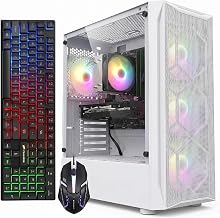
Skytech Gaming Nebula 2, Ryzen 5 5500, RTX 5050
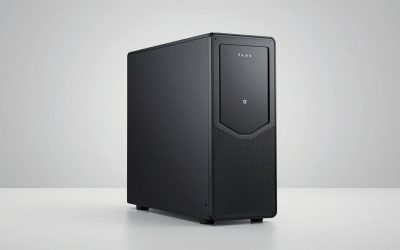
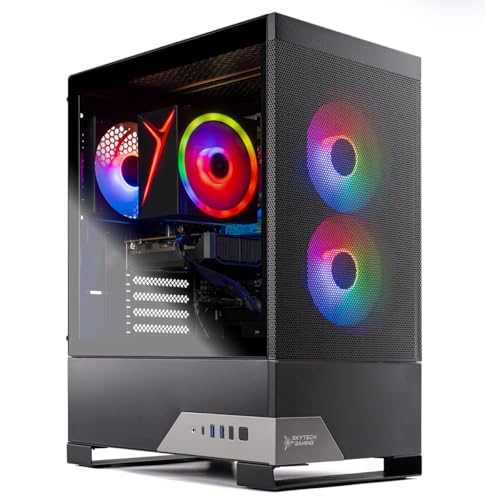
The Nebula 2 is the simplest way into a complete setup, with a Ryzen 5 5500 and an RTX 5050 inside a black mesh-front case that keeps air moving. It ships with 16GB of DDR4 memory, a 1TB NVMe SSD, and Windows 11 Home, plus a gaming keyboard and mouse in the box, so a new player only needs a monitor to start. ARGB fans and 802.11AC Wi-Fi round out a tower built for straightforward 1080p play.
Specs
- AMD Ryzen 5 5500 3.6 GHz (4.2GHz) CPU
- NVIDIA GeForce RTX 5050 8GB GDDR6 graphics card
- 16GB DDR4 RAM 3200 gaming memory with heat spreader
- 1TB NVMe M.2 SSD
- 650W Gold PSU
- 802.11AC Wi-Fi
- Windows 11 Home 64-bit
- Skytech Nebula 2 Case Black Edition with Front Mesh
- ARGB fans
- Keyboard, mouse, power cord, start guide included
Best for: A first-time buyer who wants a ready-to-play 1080p setup with keyboard and mouse included.
Watch out for: The listing notes the graphics card brand may vary, and 16GB of DDR4 leaves less headroom than the DDR5 systems below.
Skytech Gaming Nebula, Ryzen 5 5500, RTX 4060
The original Nebula steps up the graphics card to an RTX 4060 with 8GB of GDDR6X memory while keeping the same Ryzen 5 5500 processor, 16GB of DDR4 memory, and 1TB NVMe SSD. That combination suits 1080p play with higher detail settings than the entry card allows, and the 650W Gold power supply supports the card properly. ARGB fans, 802.11AC Wi-Fi, and an included keyboard and mouse keep the setup simple from unboxing to first game.
Specs
- AMD Ryzen 5 5500 3.6 GHz (4.2GHz Turbo Boost) CPU
- NVIDIA GeForce RTX 4060 8GB GDDR6X graphics card
- 16GB DDR4 RAM 3200 gaming memory with heat spreader
- 1TB NVMe M.2 SSD
- 650W Gold PSU
- 802.11AC Wi-Fi
- Windows 11 Home 64-bit
- ARGB fans
- Keyboard, mouse, power cord, start guide included
Best for: A 1080p gamer who wants stronger graphics than the entry-level card without moving to a new platform.
Watch out for: The listing notes component brands may vary and product images may not match the exact parts shipped.
CyberPowerPC Gamer Master GMA2900A, Ryzen 7 8700F, RTX 4060 Ti

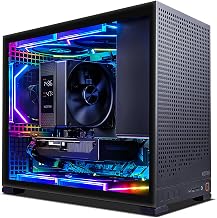
The Gamer Master moves the setup onto AMD’s AM5 platform, pairing a Ryzen 7 8700F with an RTX 4060 Ti and 16GB of DDR5 memory. The 1TB PCIe Gen4 SSD keeps load times short, and the custom RGB lighting and air cooling give the black tower a finished look without liquid cooling to maintain. A gaming keyboard and mouse are included, and the listing carries a one-year parts and labor warranty with free lifetime tech support.
Specs
- AMD Ryzen 7 8700F 4.1GHz 8-core processor
- NVIDIA GeForce RTX 4060 Ti 8GB GDDR6 graphics card
- 16GB DDR5 memory, 5200 MHz
- 1TB PCIe Gen4 NVMe SSD
- AMD B650 chipset
- Custom RGB lighting
- Air cooling
- Wi-Fi ready
- Windows 11 Home 64-bit
- Keyboard and mouse included
Best for: A gamer who wants a balanced AMD build on DDR5 with an upgrade-friendly AM5 platform.
Watch out for: The 16GB of memory is the base configuration, so heavy multitaskers should plan a future memory upgrade.
CyberPowerPC Gamer Xtreme VR GXiVR8040A14, i7-13700F, RTX 4060 Ti 16GB
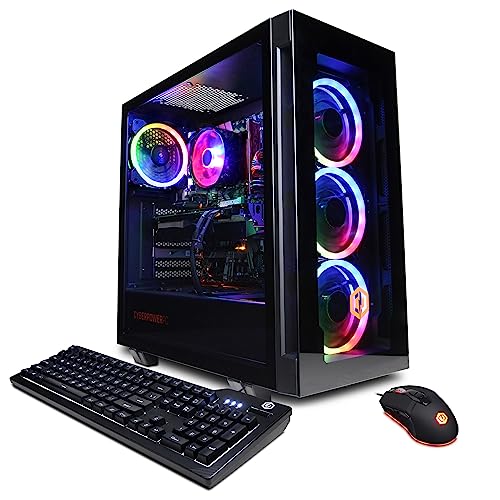
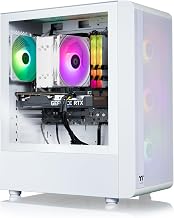
The Gamer Xtreme VR is the pick for players who own a VR headset or play at higher resolutions, thanks to its RTX 4060 Ti with 16GB of graphics memory. An Intel Core i7-13700F with 8 performance cores and 8 efficient cores sits on an Intel B760 chipset, backed by 16GB of DDR5 and a 1TB PCIe Gen4 NVMe SSD. A tempered glass side panel, custom RGB case lighting, and a gaming keyboard and mouse complete a tower built for demanding sessions.
Specs
- Intel Core i7-13700F 2.1GHz 8+8 cores
- NVIDIA GeForce RTX 4060 Ti 16GB video card
- 16GB DDR5 memory
- 1TB PCIe Gen4 NVMe SSD
- Intel B760 chipset
- 802.11AC Wi-Fi
- Tempered glass side case panel
- Custom RGB case lighting
- Windows 11 Home 64-bit
- Keyboard and mouse included
Best for: A VR headset owner or a gamer who wants the extra graphics memory for higher-resolution play.
Watch out for: The listing names one HDMI port and two DisplayPorts on the graphics card, so confirm your monitor cable matches before ordering adapters.
iBUYPOWER TraceMesh TMI7N46T01, i7-14700F, RTX 4060 Ti

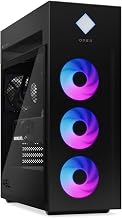
The TraceMesh is the multitasking pick, pairing an Intel Core i7-14700F that boosts up to 5.4GHz with 32GB of DDR5 RGB memory running at 5600 MHz. The RTX 4060 Ti handles modern games while the extra memory keeps a stream, browser, and chat apps open at the same time, and the 1TB NVMe SSD holds the main library. A Trace 7 Mesh chassis with tempered glass, RGB fans, and an included gaming keyboard and mouse finish a setup built to run hard.
Specs
- Intel Core i7 14700F processor, up to 5.4GHz
- NVIDIA GeForce RTX 4060 Ti 8GB GDDR6 graphics card
- 32GB DDR5 5600 RGB memory
- 1TB NVMe SSD
- Wi-Fi ready
- Tempered glass RGB gaming case
- Tower air fan and RGB fans
- Windows 11 Home
- Keyboard and mouse included
Best for: A streamer or multitasker who wants 32GB of memory in the box.
Watch out for: The 1TB drive fills up fast once several large games are installed, so check how much space your library needs.
Frequently Asked Questions
What is the best gaming setup for a beginner?
A prebuilt PC is the easiest start, because it arrives assembled with Windows installed and only needs a monitor, keyboard, and mouse connected. Look for a current graphics card, 16GB of memory, and a 1TB SSD, which covers popular games without forcing an upgrade in the first year. The Skytech Nebula 2 in this guide is the most straightforward first setup.
How much RAM should a gaming setup have?
16GB of memory covers most games played on their own, and four of the five systems here ship with exactly that amount. If you stream, record, or keep a browser and chat apps open while playing, 32GB gives you far more breathing room. The iBUYPOWER TraceMesh is the only pick here with 32GB included, while the others can take a memory upgrade later.
Is a prebuilt gaming PC better than building one yourself?
A prebuilt tower is better when you want to play right away, since it arrives assembled, tested, and covered by the maker’s warranty and support. Building yourself gives you full control over every part, but it needs assembly, driver setup, and troubleshooting if something does not work. For a first setup, the ready-to-play route removes the most common mistakes.
Do these gaming setups include a monitor?
No, all five picks are desktop towers only, and a monitor, headset, and chair are separate purchases. Each tower does include a gaming keyboard and mouse in the box, according to its Amazon listing. Before ordering, check that your monitor cable matches the graphics card outputs, since these cards mix HDMI and DisplayPort connections.
FAQ
What is the best gaming setup for a beginner?
How much RAM should a gaming setup have?
Is a prebuilt gaming PC better than building one yourself?
Do these gaming setups include a monitor?
More from Amazon
Programs that pair well with the guide above. Offers and eligibility are set by Amazon and may change.
Free shipping on eligible items, Prime Video and more. Eligible new members can start with a free trial.
Start a Prime free trialAd-free music streaming. Eligible new subscribers can start with a free trial.
Try Music Unlimited freeA Prime membership for ages 18-24 with a trial period. Eligibility is set by Amazon.
See Prime for Young AdultsAudiobooks and podcasts to listen to on the go. Eligible new members can start with a free trial.
Try Audible freeAs an Amazon Associate we earn from qualifying purchases.