Key takeaways
- New to gaming monitors? Compare four beginner-friendly 1080p displays with fast refresh rates, smooth sync and simple setup, picked from Amazon listings.
A beginner should start with a 24-inch 1080p gaming monitor with a refresh rate of 144Hz or higher, an IPS or VA panel, and adaptive sync support. That combination keeps motion smooth, text sharp, and setup simple on almost any modern graphics card. The four monitors below all meet that bar, and they differ mainly in panel type, refresh rate, and the extras built into the stand and ports.

This guide is for first-time buyers setting up a starter gaming desk, students adding a screen to a laptop, and console players moving to a desk setup. Every monitor here was chosen from its Amazon listing title and stated specifications, so each pick below lists only what Amazon shows for that model: screen size, resolution, refresh rate, response time, panel type, and connections.
Quick Picks
As an Amazon Associate we earn from qualifying purchases
| Product | Best for | Key spec from title |
|---|---|---|
| ASUS TUF Gaming VG249Q1A | A first monitor that covers gaming and everyday use | 23.8-inch IPS, 165Hz, 1ms |
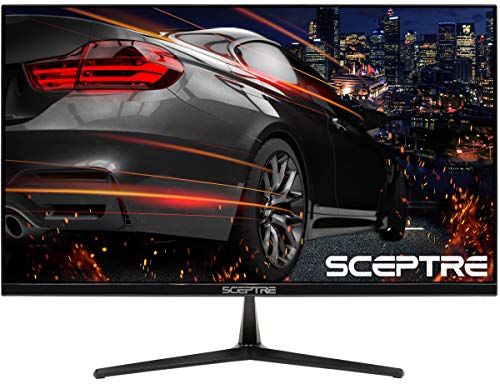
| Sceptre E255B-1658A | Fast-paced games on a slightly larger screen | 24.5-inch, 165Hz, 1ms, FreeSync |
| Acer Nitro KG241Y Sbiip | Smooth play with deep contrast for dark scenes | 23.8-inch VA, 165Hz, 1ms VRB |
| LG UltraGear 24GN600-B | Clean colour and a slim frame for a tidy desk | 24-inch IPS, 144Hz, 1ms GtG, HDR10 |
How to Choose
Start with size and resolution
A 24-inch screen at 1080p is the natural starting point for a first gaming monitor, because text stays readable at a normal desk distance and most graphics cards can drive it at high frame rates without strain. Going much larger at the same resolution stretches the pixels and makes the image look soft, while jumping to a higher resolution demands a stronger graphics card and adds setup complexity a beginner does not need. Measure the desk first: a 24-inch panel fits on a standard desk with room left for a keyboard and a mouse pad. If the desk is shallow, a smaller stand footprint matters more than an extra inch of screen, so check the listed dimensions before ordering.
Read the refresh rate the right way
Refresh rate is the number that changes how a game feels most, and a beginner should look for 144Hz or higher as the headline figure. A 144Hz panel redraws the image more than twice as often as a standard 60Hz office screen, which makes camera movement and fast turns look noticeably smoother. Some monitors reach 165Hz only through an overclock setting or through one specific port, so read the listing carefully and note whether the top rate needs DisplayPort. A higher number is not automatically better if the graphics card cannot keep up, but a 144Hz or 165Hz panel still leaves headroom for later upgrades.
Match the panel type to the room
Panel type shapes colour, contrast, and how the picture looks from the side, so it deserves as much attention as the refresh rate. IPS panels keep colours steady when viewed from an angle, which helps when a friend watches from the side or the screen sits off-centre on a shared desk. VA panels trade a little of that viewing-angle stability for deeper blacks, which makes dark game scenes and night-time video look richer. TN panels are the older, faster option, but their colours shift more when viewed off-axis. For a bright room with the screen facing a window, an IPS panel with a matte finish is usually the easiest choice.
Check ports, stand, and eye comfort
A beginner monitor should connect without adapters, so count the ports on the listing before anything else. Two HDMI ports plus one DisplayPort covers a PC and a console at the same time, while a single HDMI port forces cable swapping whenever the input changes. The stand matters just as much: tilt adjustment is the minimum, and VESA mounting holes open the door to an arm later when desk space gets tight. Built-in speakers are handy for a first setup without a headset, and a low blue light mode plus a flicker-free backlight makes long evening sessions easier on the eyes.
The 4 Best Options
ASUS TUF Gaming VG249Q1A
The VG249Q1A is the most rounded first monitor in this group, pairing a colour-steady IPS panel with a 165Hz refresh rate that covers both competitive shooters and slower story-driven games. Its listing spells out the features a beginner actually needs to compare: adaptive sync, motion blur reduction, a dark-scene boost, and a built-in speaker for a setup without separate audio. The stand and VESA mounting keep the desk options open, and the DisplayPort plus HDMI connections handle a PC and a console without an adapter.
Specs
- 23.8-inch Full HD IPS display, 1920 x 1080
- 165Hz refresh rate, supports 144Hz
- 1ms response time (MPRT)
- AMD FreeSync Premium
- Extreme Low Motion Blur and Shadow Boost
- Built-in speaker
- DisplayPort and HDMI connections, VESA mountable
Best for: A first monitor that has to handle gaming, homework, and streaming without swapping hardware.
Watch out for: The top 165Hz rate is an overclock above 144Hz, so confirm the connection and setting needed to reach it.
Sceptre E255B-1658A
The Sceptre E255B-1658A gives a beginner a slightly larger 24.5-inch screen and the same 165Hz refresh rate as the top pick, which suits fast shooters where a bigger view helps track movement across the screen. Its listing is refreshingly direct about what matters: two HDMI 2.0 ports and one DisplayPort, a 1ms response time, and built-in speakers, so a PC and a console can stay plugged in at once. The extra half inch over a standard 24-inch panel is a small but real gain for split-screen work and wide game maps.
Specs
- 24.5-inch Full HD display, 1920 x 1080
- 165Hz refresh rate, supports 144Hz
- 1ms response time
- AMD FreeSync
- 2x HDMI 2.0 and 1x DisplayPort
- Built-in speakers
Best for: Fast-paced games on a slightly larger screen, with a console kept connected alongside the PC.
Watch out for: The listing does not state the panel type, so check the viewing angle in person if the screen will be watched from the side.
Acer Nitro KG241Y Sbiip
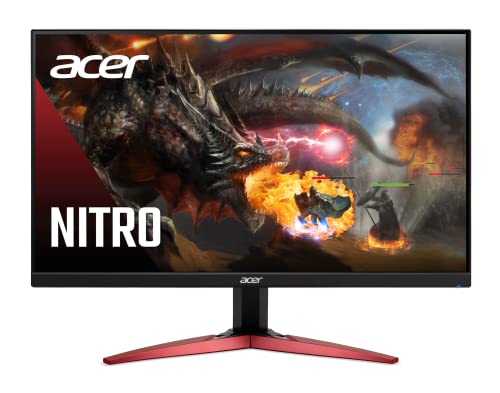
The Acer Nitro KG241Y Sbiip uses a VA panel, which makes it the pick for players who spend their time in dark, atmospheric games and want shadows to look deep instead of washed out. Its 165Hz refresh rate and 1ms VRB response time keep motion clean, while FreeSync Premium smooths out frame dips from a modest graphics card. The ZeroFrame design keeps the borders slim, so the screen looks larger than its 23.8 inches suggest, and the DisplayPort plus two HDMI ports cover a PC and a console without juggling cables.
Specs
- 23.8-inch Full HD VA display, 1920 x 1080
- 165Hz refresh rate
- 1ms response time (VRB)
- AMD FreeSync Premium
- ZeroFrame design
- 1x DisplayPort 1.2 and 2x HDMI 2.0
Best for: Dark, story-driven games where deep contrast matters more than wide viewing angles.
Watch out for: VA panels shift colour more than IPS when viewed from a sharp side angle, so place the screen facing the chair.
LG UltraGear 24GN600-B

The LG UltraGear 24GN600-B is the calmest pick here, with a 144Hz IPS panel, HDR10 support, and a three-side borderless frame that makes a small desk look tidy. Its 1ms GtG response time is stated in the strictest form in this group, and FreeSync Premium keeps the picture smooth when frame rates wobble. The 144Hz rate is honest and direct rather than overclocked, which suits a beginner who wants the listed number to work out of the box. The slim frame also helps when two screens sit side by side later.
Specs
- 24-inch Full HD IPS display, 1920 x 1080
- 144Hz refresh rate
- 1ms response time (GtG)
- AMD FreeSync Premium
- HDR10 support
- 3-side virtually borderless display
Best for: A tidy desk setup where clean colour, a slim frame, and a straightforward 144Hz rate matter most.
Watch out for: The listing does not mention built-in speakers, so plan for a headset or separate speakers.
Which One Fits Your Situation
You are building a first gaming PC
Pick the ASUS TUF Gaming VG249Q1A, because its IPS panel, 165Hz rate, and built-in speaker cover every part of a first setup without extra purchases. The DisplayPort and HDMI connections take a PC and a console, and the VESA mounting leaves a monitor arm as a later upgrade. Nothing about the setup demands a manual or a settings deep dive.
You mostly play fast shooters
Pick the Sceptre E255B-1658A, because the 24.5-inch screen and 165Hz refresh rate give fast games a bigger, smoother view, and the two HDMI ports keep a console connected beside the PC. The built-in speakers mean a headset is optional rather than required, and the 1ms response time keeps quick turns looking clean.
You play dark games and watch films at night
Pick the Acer Nitro KG241Y Sbiip, because its VA panel renders shadows deeper than the IPS options here, which flatters horror titles and night scenes. The 165Hz rate and FreeSync Premium keep motion smooth, and the slim ZeroFrame borders make the picture feel larger in a dim room, so films look good too.
You want a tidy desk for games and schoolwork
Pick the LG UltraGear 24GN600-B, because its three-side borderless frame and steady IPS colours look neat and read clearly for documents as well as games. The direct, smooth 144Hz rate works without any overclock setting, and the HDR10 support adds a little extra depth to supported video and evening streaming.
Common Mistakes
- Buying a 27-inch screen at 1080p and sitting close, which makes text and game edges look soft.
- Chasing the highest refresh rate on the listing without checking whether the graphics card or the cable can reach it.
- Ignoring the panel type, then wondering why colours shift when a friend watches from the side.
- Ordering a monitor with a single HDMI port and discovering a console and a PC cannot stay connected at once.
- Skipping the stand and mounting details, then finding the screen cannot tilt enough for a low desk or a tall chair.
Frequently Asked Questions
What size monitor should a beginner buy?
Start with a 24-inch 1080p monitor. It fits a standard desk, keeps text sharp at normal viewing distance, and runs well on a modest graphics card. A larger screen at the same resolution looks softer up close, while a higher resolution needs a stronger card and more setup work for little gain at first.
Is 144Hz enough for a first gaming monitor?
Yes, 144Hz is the sweet spot for a first monitor. It makes camera movement and fast turns look far smoother than a 60Hz screen, and most starter graphics cards can reach it in popular games. A 165Hz panel adds headroom for later upgrades, but the jump from 60Hz to 144Hz is the one that changes how games feel.
Do I need a DisplayPort cable?
Not always, but it helps. Many monitors reach their top refresh rate only through DisplayPort, while HDMI may cap the rate lower, so check the listing for each port. If the box includes a DisplayPort cable, use it for the PC and keep HDMI free for a console or a laptop.
Can one monitor handle gaming and schoolwork?
Yes, and the picks in this guide are chosen with that in mind. An IPS panel keeps text clear and colours steady for documents, while a 144Hz or 165Hz rate makes games smooth. Add a second input for a laptop and the same screen covers class, homework, and evening games without swapping cables.
FAQ
What size monitor should a beginner buy?
Is 144Hz enough for a first gaming monitor?
Do I need a DisplayPort cable?
Can one monitor handle gaming and schoolwork?
More from Amazon
Programs that pair well with the guide above. Offers and eligibility are set by Amazon and may change.
Free shipping on eligible items, Prime Video and more. Eligible new members can start with a free trial.
Start a Prime free trialAd-free music streaming. Eligible new subscribers can start with a free trial.
Try Music Unlimited freeA Prime membership for ages 18-24 with a trial period. Eligibility is set by Amazon.
See Prime for Young AdultsAudiobooks and podcasts to listen to on the go. Eligible new members can start with a free trial.
Try Audible freeAs an Amazon Associate we earn from qualifying purchases.