Our Top Picks
 SteelSeries Apex 3 TKL RGB Gaming KeyboardApex 3 TKL5.9 x 14.3 x 1.57 inches1.4 poundsCheck on Amazon
- Top Pick: Logitech G413 SE
- Runner-up: Logitech G413 TKL SE
- Also consider: SteelSeries Apex 3 TKL
A good gaming keyboard does not need a premium tier label to feel right for daily play. In the budget tier, the differences that matter most are practical: the feel of the switches, the desk space the board takes up, the lighting style, and the connection. A board that matches your games, desk, and typing habits will serve you better than one with features you never use.
This guide covers five budget-tier gaming keyboards from established brands, each pinned to a specific switch type, layout, and connection. Every pick is described from its published specifications, so you can compare the boards on the same terms. Use the quick answer to narrow the field, then read the notes on the boards that fit your setup best.
As an Amazon Associate, we earn from qualifying purchases.
Quick answer
For most buyers, the Logitech G413 SE is the straightforward starting point, with tactile mechanical switches, a full-size layout, and a wired USB connection. If desk space matters, choose the tenkeyless G413 TKL SE or the SteelSeries Apex 3 TKL. The HyperX Alloy Origins Core suits RGB fans, while the Corsair K55 RGB PRO suits macro users.
How to choose
Start with switch type, because it shapes every keypress. Tactile mechanical switches give a small bump as the key actuates, which many players like for feedback without a loud click. Linear switches travel smoothly, which suits fast, repeated presses. Quiet switches, including whisper-quiet and rubber-dome designs, soften sound and feel, which suits shared rooms and late sessions. Match the switch to your main games and to how much noise you can make.
Next, settle the layout. A full-size board includes a numeric keypad, which suits players who also use the keyboard for work or number entry. A tenkeyless board drops the keypad, freeing desk space for mouse movement, which suits first-person shooters and smaller desks. A board with extra macro keys is wider still, so measure your desk before choosing one.
Connectivity in the budget tier is usually simple. All five picks here use a wired USB connection, which avoids charging and pairing and keeps setup to plugging the board in. Check the operating system support listed for each board, so it works with the computer you already own.
Lighting and software come next. White LED backlighting is simple and easy to read in a dark room. Per-key RGB lighting allows each key to be set on its own, while zone lighting groups keys into a small number of coloured areas. Software adds macro programming and lighting profiles, but it also adds a program to install and maintain. Finally, weigh build extras: an aluminum top case adds rigidity, PBT keycaps resist shine and wear, a detachable palm rest helps during long sessions, and spill resistance adds peace of mind. Anti-ghosting and key rollover matter where several keys are pressed at once, so look for those terms in the specifications of any board you shortlist.
1. Logitech G413 SE

The Logitech G413 SE is the full-size anchor of this roundup, and the pick to start with if you want a plain, durable mechanical board with no extra width for macro keys. Its tactile mechanical switches give a clear bump at actuation, and the board pairs that feel with a brushed aluminum top case and wear-resistant PBT keycaps. It connects by wired USB and works with Windows and macOS, and its full-size layout keeps the numeric keypad for work and games that use it for bindings.
- Specs:
- Switch type: Tactile mechanical switches
- Layout: Full-size, with numeric keypad
- Connectivity: Wired USB
- Backlighting: White LED backlighting
- Keycaps: PBT keycaps
- Case: Brushed aluminum top case
- Rollover: 6-key rollover anti-ghosting
- Media controls: 12 function keys with media controls
- Compatibility: Windows and macOS
Best for a player who wants a full-size mechanical board with a tactile feel.
- ASIN: B08Z6X4NK3
2. Logitech G413 TKL SE
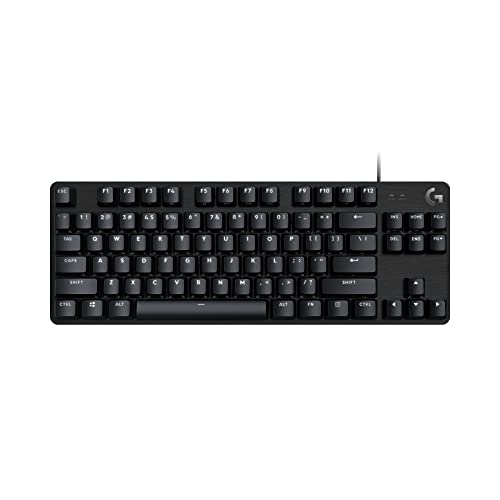
The Logitech G413 TKL SE takes the same approach as its full-size sibling and trims the numeric keypad, giving your mouse hand more room without changing the core feel. It keeps tactile mechanical switches, a brushed aluminum top case, PBT keycaps, and white LED backlighting, so the typing experience stays consistent while the footprint shrinks. For players on a smaller desk, or for anyone who plays shooters with wide mouse sweeps, that extra space is a real, everyday benefit. The wired USB connection keeps setup simple, and the board is listed as compatible with Windows and macOS.
- Specs:
- Switch type: Tactile mechanical switches
- Layout: Tenkeyless, without numeric keypad
- Connectivity: Wired USB
- Backlighting: White LED backlighting
- Keycaps: PBT keycaps
- Case: Brushed aluminum top case
- Rollover: 6-key rollover anti-ghosting
- Media controls: 12 function keys with media controls
- Compatibility: Windows and macOS
Best for a player who likes the G413 SE feel but wants a shorter board.
- ASIN: B08Z7J4KV3
3. SteelSeries Apex 3 TKL
The SteelSeries Apex 3 TKL is the quiet option in this roundup, built around whisper-quiet gaming switches that soften both sound and feel. It is a tenkeyless board, so it keeps the compact footprint that suits smaller desks and wide mouse movement, while its 8-zone RGB illumination adds colour without the complexity of per-key lighting controls. If you share a room, play late, or prefer a softer keypress, this is the board to look at first. It connects by wired USB-A and is listed for PC use, with IP32 water and dust resistance against spills and dust buildup.
- Specs:
- Switch type: Whisper-quiet gaming switches
- Layout: Tenkeyless, without numeric keypad
- Connectivity: Wired USB-A
- Backlighting: 8-zone RGB illumination
- Spill resistance: IP32 water and dust resistant
- Anti-ghosting: Gaming-grade anti-ghosting
- Compatibility: PC
- Model number: 64831
Best for a player who wants a quiet, compact keyboard with RGB lighting and spill protection.
- ASIN: B09FTNMT84
4. HyperX Alloy Origins Core
The HyperX Alloy Origins Core is the RGB pick in this roundup, with per-key RGB lighting, a full aluminum body, and HyperX Aqua tactile mechanical switches. The Aqua switch gives a tactile bump without a click, sitting between the smooth travel of a linear switch and the firmer feedback of a clicky one. Its tenkeyless layout keeps the desk footprint compact, while the detachable braided USB-C to USB-A cable makes the board easy to move or pack. It lists NGENUITY software, three onboard profiles, and three tilt angles, with switches rated for 80 million keypresses and full anti-ghosting with N-key rollover. Compatibility is listed for PC, PlayStation, and Xbox consoles.
- Specs:
- Switch type: HyperX Aqua tactile mechanical switches
- Layout: Tenkeyless, without numeric keypad
- Connectivity: Wired USB-C to USB-A, detachable braided cable
- Backlighting: Per-key RGB lighting
- Case: Full aluminum body
- Rollover: Full anti-ghosting with N-key rollover
- Switch rating: 80 million keypresses
- Onboard memory: Three profiles
- Software: HyperX NGENUITY for lighting and macros
- Compatibility: PC, PlayStation, and Xbox
Best for a player who wants per-key RGB, a tactile feel, and an aluminum frame in a compact layout.
- ASIN:
5. Corsair K55 RGB PRO

The Corsair K55 RGB PRO is the macro and media pick in this roundup, and the only board here built around rubber-dome membrane switches. That switch type gives a soft, quiet keypress, which suits players who prefer a cushioned feel or who are moving from a standard office keyboard. The board trades the crisp feel of a mechanical switch for six dedicated macro keys, dedicated media and volume keys, and a detachable palm rest. It lists five-zone dynamic RGB backlighting, programmable through CORSAIR iCUE software, plus Elgato Stream Deck integration for the macro keys. The board is certified IP42 for dust and spill resistance, lists 12-key selective anti-ghosting, and reports at a 1000Hz polling rate. It connects by wired USB 2.0 Type-A and is listed for PC and Mac.
- Specs:
- Switch type: Rubber-dome membrane switches
- Layout: Full-size extended layout, with six macro keys
- Connectivity: Wired USB 2.0 Type-A
- Backlighting: Five-zone dynamic RGB backlighting
- Macro keys: Six dedicated macro keys
- Spill resistance: IP42 dust and spill resistant
- Palm rest: Detachable palm rest included
- Polling rate: 1000Hz
- Rollover: 12-key selective anti-ghosting
- Software: CORSAIR iCUE, with Elgato Stream Deck integration
- Compatibility: PC and Mac
Best for a player who wants macro keys, media controls, and a palm rest more than a mechanical feel.
- ASIN: B08Y681W3X
Who should skip
Skip this roundup if you need wireless play, because every pick here uses a wired USB connection, and none offers a wireless mode. Skip it too if you want a hot-swappable board, a 60 or 65 percent layout, or an analog Hall effect board, because none of the five picks is built that way. Players who want a clicky switch should also look elsewhere, since the tactile, quiet, and rubber-dome switches here are all chosen for a softer sound than a clicky board. If you want per-key RGB on every board, note that only the HyperX pick offers it, while the others use white LED or zone lighting.
FAQ
Which switch type is best for gaming in the budget tier?
There is no single best switch type, because the right choice depends on feel and noise. Tactile switches suit players who want feedback at actuation, linear switches suit fast repeated presses, and quiet or rubber-dome switches suit shared rooms. Match the switch to your main games and to how much sound you can make.
Is a tenkeyless keyboard better than a full-size keyboard for gaming?
A tenkeyless board is better when desk space and mouse room matter, because removing the numeric keypad frees space for wide mouse movement, which suits shooters and small desks. A full-size board is better when you use the keypad for work, number entry, or extra bindings. Neither layout is faster on its own, so choose by desk size and keypad use.
Do budget gaming keyboards need software to work?
No, all five picks work as wired USB keyboards when plugged in, with basic lighting and media controls available without extra setup. Software adds lighting, macro, and profile options on the HyperX and Corsair picks, and it is worth installing if you want those features, but it is not required for everyday play.
Are wired keyboards better than wireless keyboards for gaming?
A wired USB connection avoids charging and pairing, and it keeps setup simple, which is why every pick in this guide is wired. Wireless boards add freedom of movement and a cleaner desk, but they need charging and a wireless link. For a budget-tier desk setup, a wired board is a practical default, and wireless is worth it only if cable-free play matters more to you.
Final verdict
For most buyers, the Logitech G413 SE is the best starting point, with tactile mechanical switches, a full-size layout, PBT keycaps, and a wired USB connection. If your desk is tight, move to the Logitech G413 TKL SE for the same feel in a shorter board, or to the SteelSeries Apex 3 TKL for a quieter switch and RGB zone lighting. The HyperX Alloy Origins Core is the pick for per-key RGB and an aluminum frame, while the Corsair K55 RGB PRO is the pick for macro keys, media controls, and a palm rest. Choose by switch feel and layout first.
FAQ
Which switch type is best for gaming in the budget tier?
Is a tenkeyless keyboard better than a full-size keyboard for gaming?
Do budget gaming keyboards need software to work?
Are wired keyboards better than wireless keyboards for gaming?
More from Amazon
Programs that pair well with the guide above. Offers and eligibility are set by Amazon and may change.
Free shipping on eligible items, Prime Video and more. Eligible new members can start with a free trial.
Start a Prime free trialAd-free music streaming. Eligible new subscribers can start with a free trial.
Try Music Unlimited freeA Prime membership for ages 18-24 with a trial period. Eligibility is set by Amazon.
See Prime for Young AdultsAudiobooks and podcasts to listen to on the go. Eligible new members can start with a free trial.
Try Audible freeAs an Amazon Associate we earn from qualifying purchases.