Key takeaways
- Compare the best 144Hz gaming monitors for smooth PC play, from QHD IPS panels to budget Full HD picks, with refresh rate, panel, and ports explained.
- Top Pick: Gigabyte G27Q
- Runner-up: ASUS VG279Q
- Also consider: MSI Optix G271
A 144Hz monitor is the sweet spot for many PC gamers. It refreshes the image twice as often as a standard 60Hz screen, so fast movement looks smoother, mouse motion feels more direct, and competitive games are easier to follow. This guide is a refresh-rate roundup: every pick below is listed at exactly 144Hz. It is not a 240Hz roundup, and it is not a price-tier roundup, so it sits apart from the site guides on best-gaming-monitor-240hz and best-gaming-monitor-under-300. The five monitors here cover two resolutions, two screen sizes, and three tiers, from a budget Full HD panel to a premium QHD panel, with IPS panels throughout.
As an Amazon Associate, we earn from qualifying purchases.
Quick answer
For most PC gamers, the LG 27GL83A-B is the strongest all-round pick, with a 27-inch QHD IPS panel at 144Hz. If you want QHD at a lower tier, choose the Gigabyte G27Q. For Full HD at 144Hz, the ASUS VG279Q and MSI Optix G271 are the main 27-inch options, while the AOC 24G2 is the budget 24-inch pick.
How to choose
Start with resolution, because it decides how much work your graphics card must do at 144 frames per second. A Full HD panel at 1920 by 1080 is the easiest to drive at 144Hz, and it suits competitive shooters and older hardware. A QHD panel at 2560 by 1440 is sharper on a 27-inch screen, but it needs a stronger graphics card to hold high frame rates.
Next, check screen size and the connection. A 24-inch panel suits a smaller desk, while a 27-inch panel suits a deeper desk. All five picks use IPS panels, which are listed with wide viewing angles, and all five list DisplayPort, the connection to use for the full 144Hz mode on a PC. Adaptive sync is the next check: G-SYNC Compatible and FreeSync support help the monitor match its refresh rate to the frame output of the graphics card, which reduces tearing. A 1ms response time is listed for every pick, although the measurement method differs, with some listed as GtG and others as MPRT. A height-adjustable stand matters for long sessions, and USB ports and speakers are useful extras, but they should not decide the purchase ahead of resolution, size, and refresh rate.
LG 27GL83A-B
Tier: Premium | Size: 27 inches | Resolution: QHD
The LG 27GL83A-B is the premium pick, for QHD resolution without a higher refresh rate. Its 27-inch IPS panel is listed at 2560 by 1440, with a 144Hz refresh rate and a 1ms GtG response time. That combination suits fast shooters and open-world games, because the higher resolution keeps distant detail sharp while 144Hz keeps motion smooth. LG lists HDR10, NVIDIA G-SYNC compatibility, and AMD FreeSync, so the panel can match its refresh rate to a wide range of graphics cards and reduce tearing.
The stand lists tilt, height, and pivot adjustment, and HDMI and DisplayPort connections are listed. The main limitation is the demand on your system: your graphics card needs to sustain high frame rates at 2560 by 1440 to make full use of QHD at 144Hz.
- Screen size: 27 inches
- Resolution: 2560 by 1440 QHD
- Panel: IPS
- Refresh rate: 144Hz
- Response time: 1ms GtG
- Adaptive sync: NVIDIA G-SYNC Compatible and AMD FreeSync
- HDR: HDR10
- Ports: HDMI and DisplayPort
- Stand: Tilt, height, and pivot adjustment
- ASIN:
Gigabyte G27Q

Tier: Mid-range | Size: 27 inches | Resolution: QHD
The Gigabyte G27Q is the mid-range QHD pick, with the same 27-inch size and 2560 by 1440 resolution as the LG model. Its IPS panel is listed at 144Hz with a 1ms MPRT response time, and it carries AMD FreeSync Premium support for tear-free play with a compatible graphics card. Gigabyte lists VESA Display HDR400 certification and a wide colour gamut of 92 percent DCI-P3, which suits games with rich colour. Brightness is listed at 350 candelas per square metre.
Connectivity is generous for the tier: one DisplayPort 1.2 port, two HDMI 2.0 ports, and two USB 3.0 ports, along with two built-in speakers. The stand lists tilt and height adjustment, and the panel is VESA mount compatible. The main trade-off against the LG pick is the stand, which does not list pivot or swivel adjustment.
- Screen size: 27 inches
- Resolution: 2560 by 1440 QHD
- Panel: IPS
- Refresh rate: 144Hz
- Response time: 1ms MPRT
- Adaptive sync: AMD FreeSync Premium
- HDR: VESA Display HDR400
- Colour gamut: 92 percent DCI-P3
- Ports: DisplayPort 1.2, 2x HDMI 2.0, 2x USB 3.0
- Speakers: Built-in 2W speakers
- Stand: Tilt and height adjustment
- ASIN: B08CS3X1R9
ASUS VG279Q

Tier: Mid-range | Size: 27 inches | Resolution: Full HD
The ASUS VG279Q is the most flexible Full HD pick in this guide. Its 27-inch IPS panel is listed at 1920 by 1080, with a 144Hz refresh rate and a 1ms MPRT response time. Full HD at this size is easier for a graphics card to drive at 144Hz than QHD, so it suits competitive games and mid-range hardware. ASUS lists Adaptive-Sync and FreeSync support, along with Extreme Low Motion Blur technology, which is designed to reduce smearing in fast motion.
The stand and ports are the reasons to choose this model over the other Full HD picks. ASUS lists tilt, swivel, pivot, and height adjustment, the fullest range in this guide, and the monitor is VESA mount compatible. Ports include DisplayPort 1.2, HDMI 1.4, and dual-link DVI-D, plus a headphone jack and two built-in speakers. Brightness is listed at 400 candelas per square metre. The main limitation is resolution: on a 27-inch screen, Full HD is less sharp than QHD.
- Screen size: 27 inches
- Resolution: 1920 by 1080 Full HD
- Panel: IPS
- Refresh rate: 144Hz
- Response time: 1ms MPRT
- Adaptive sync: Adaptive-Sync and FreeSync
- Brightness: 400 candelas per square metre
- Ports: DisplayPort 1.2, HDMI 1.4, dual-link DVI-D
- Speakers: Built-in 2W speakers
- Stand: Tilt, swivel, pivot, and height adjustment
- ASIN: B07KXHTRT5
MSI Optix G271

Tier: Mid-range | Size: 27 inches | Resolution: Full HD
The MSI Optix G271 is a straightforward 27-inch Full HD pick at 144Hz, for players who want a large IPS panel without QHD demands. Its panel is listed at 1920 by 1080, with a 144Hz refresh rate and a 1ms MPRT response time, and MSI lists AMD FreeSync support. The IPS panel is listed with wide viewing angles of 178 degrees in both directions, and colour coverage is listed at 92 percent DCI-P3 and 120 percent sRGB.
The design is frameless on three sides, which helps with two monitors side by side, and the panel is VESA mount compatible at 100 by 100 millimetres. Ports include one DisplayPort 1.2a port, two HDMI 1.4b ports, and an earphone output. Brightness is listed at 250 nits, so it suits a room with controlled lighting. The stand lists tilt adjustment only, so you may need a monitor arm or a riser to set the screen at eye level.
- Screen size: 27 inches
- Resolution: 1920 by 1080 Full HD
- Panel: IPS
- Refresh rate: 144Hz
- Response time: 1ms MPRT
- Adaptive sync: AMD FreeSync
- Brightness: 250 nits
- Ports: DisplayPort 1.2a, 2x HDMI 1.4b, earphone out
- VESA mount: 100 by 100 millimetres
- Stand: Tilt adjustment
- ASIN: B083K17XLF
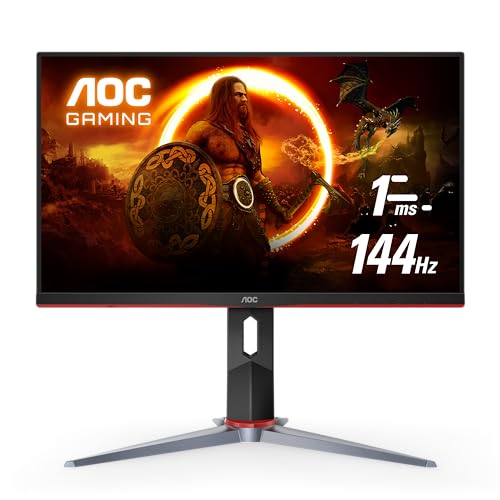
AOC 24G2
Tier: Budget | Size: 24 inches | Resolution: Full HD
The AOC 24G2 is the budget pick in this guide, and the only 24-inch monitor here. Its panel measures 23.8 inches viewable, with a 1920 by 1080 Full HD resolution, an IPS panel, a 144Hz refresh rate, and a 1ms response time. The smaller screen makes Full HD look sharper than on a 27-inch panel, and the lower resolution is the easiest in this guide for a graphics card to drive at 144Hz, which suits competitive shooters and modest hardware. AOC lists AMD FreeSync Premium support.
The stand lists height adjustment, along with tilt, pivot, and swivel movement, a fuller range than the MSI pick offers. Ports include HDMI, DisplayPort, and VGA. AOC also lists a three-year zero dead pixel guarantee. The main limitations are the smaller screen and the lack of HDR certification or a USB hub.
- Screen size: 24 inches, 23.8 inches viewable
- Resolution: 1920 by 1080 Full HD
- Panel: IPS
- Refresh rate: 144Hz
- Response time: 1ms
- Adaptive sync: AMD FreeSync Premium
- Ports: HDMI, DisplayPort, VGA
- Stand: Height, tilt, pivot, and swivel adjustment
- Guarantee: Three-year zero dead pixel guarantee
- ASIN: B07WVN6CWT
Who should skip
Skip this guide if you want a 240Hz monitor, because every pick here is listed at exactly 144Hz, and a 240Hz panel will feel smoother in the fastest competitive games. The site guide on best-gaming-monitor-240hz covers that tier. Skip these monitors if your graphics card cannot sustain high frame rates, because a 144Hz panel only shows its advantage when the game actually runs near 144 frames per second.
Skip the QHD picks, the LG and the Gigabyte, if you play mostly competitive shooters on mid-range hardware, because Full HD at 144Hz is easier to drive. Skip the 27-inch Full HD picks, the ASUS and the MSI, if you sit close to the screen and notice soft text, because the 24-inch AOC or a QHD panel will look sharper at close range.
FAQ
Do I need a powerful graphics card for a 144Hz monitor?
It depends on resolution and on the game. A Full HD panel at 1920 by 1080 is the easiest to drive at 144Hz, and many mid-range cards can reach high frame rates in competitive games at that resolution. A QHD panel at 2560 by 1440 needs a stronger card to hold high frame rates, especially in open-world games with high detail settings.
Is 144Hz worth it over 60Hz for single-player games?
Yes, for most players, because the smoother motion applies to every game, not just competitive shooters. Camera movement, mouse motion, and scrolling all look smoother at 144Hz. The gain is largest in fast games, but even slower games feel more direct. If you mainly play turn-based games or watch video, the gain is smaller, and resolution or colour may matter more.
What cable should I use for 144Hz?
Use DisplayPort for the full 144Hz mode on a PC, because every monitor in this guide lists DisplayPort, and it is the connection the manufacturers list for the highest refresh rate. HDMI can also carry high refresh rates on some models, but the listed maximum can vary by port version.
Final verdict
For most PC gamers, the LG 27GL83A-B is the best starting point. Its 27-inch QHD IPS panel at 144Hz, with a 1ms GtG response time, HDR10, G-SYNC Compatible and FreeSync support, and a tilt, height, and pivot stand, covers sharpness, smoothness, and adjustment in one monitor. It needs a capable graphics card to make full use of QHD at 144Hz.
If you want QHD at a lower tier, choose the Gigabyte G27Q, with the same 27-inch QHD size at 144Hz, FreeSync Premium, Display HDR400, and a USB hub. For Full HD at 144Hz, choose the ASUS VG279Q for the fullest stand adjustment, or the MSI Optix G271 for a simple large IPS display. For a budget first step, choose the AOC 24G2, with a sharp 24-inch Full HD IPS panel and a height-adjustable stand.
FAQ
Do I need a powerful graphics card for a 144Hz monitor?
Is 144Hz worth it over 60Hz for single-player games?
What cable should I use for 144Hz?
More from Amazon
Programs that pair well with the guide above. Offers and eligibility are set by Amazon and may change.
Free shipping on eligible items, Prime Video and more. Eligible new members can start with a free trial.
Start a Prime free trialAd-free music streaming. Eligible new subscribers can start with a free trial.
Try Music Unlimited freeA Prime membership for ages 18-24 with a trial period. Eligibility is set by Amazon.
See Prime for Young AdultsAudiobooks and podcasts to listen to on the go. Eligible new members can start with a free trial.
Try Audible freeAs an Amazon Associate we earn from qualifying purchases.