Our Top Picks
 Playstation 5 DualSense Wireless Controller167.5 cubic inches7.75 x 7.5 x 2.75 inches0.71 poundsCheck on Amazon


The standard PlayStation DualSense Wireless Controller is the best overall PS5 controller for most people, because it is the pad PS5 games are designed around: haptic feedback, adaptive triggers, a built-in microphone and a headset jack in one comfortable shell. Players who want rear paddles and swappable parts should step up to the DualSense Edge, while buyers who prefer a cheaper non-Sony gamepad can consider the SFGSUP model. “PS5 controller” here means a wireless gamepad that connects to a PlayStation 5 console, and in most cases to a PC as well.
Quick List
- DualSense Wireless Controller (Starlight Blue) – best overall for PS5, PC, Mac and mobile play
- DualSense Wireless Controller (White, Renewed) – best for a renewed first-party pad in the classic color
- DualSense Wireless Controller (Midnight Black) with USB Cable – best for PC gamers who want the cable in the box
- DualSense Edge Wireless Controller – best for competitive players who want remapping and swappable sticks
- DualSense (Gray Camouflage, Renewed) – best for a renewed pad with a distinctive finish
- SFGSUP Wireless Pro Controller – best for Hall effect sticks and RGB lighting on a third-party pad
Which One Is Right for You?
| If you… | Choose |
|---|---|
| want the full DualSense feature set for PS5 and other devices | DualSense Wireless Controller (Starlight Blue) |
| mainly play Steam games and want a USB-C cable included | DualSense (Midnight Black) with USB Cable |
| play competitive shooters and want back buttons, trigger stops and profiles | DualSense Edge |
| are comfortable with a renewed unit and prefer a classic white finish | DualSense (White, Renewed) |
| like a camouflage look and accept a renewed unit | DualSense (Gray Camouflage, Renewed) |
| care more about drift-resistant sticks and RGB than adaptive triggers | SFGSUP Wireless Pro Controller |
The deciding factor is usually how much you want the signature DualSense features. If adaptive triggers and haptic feedback are the draw, stay with a Sony pad. If you want to customize inputs for competitive play, the Edge is the clear step up. The SFGSUP is a different kind of product: it focuses on stick technology and lighting, and its listing describes dual-motor vibration rather than DualSense haptics, so treat it as a runner-up for players who do not need those features.
All 6 Picks in Detail
1. DualSense Wireless Controller (Starlight Blue) – Best overall for PS5 and beyond
As an Amazon Associate we earn from qualifying purchases at no extra cost to you.

This is the standard Sony controller in a blue finish, and it is the safest buy for anyone who wants the intended PS5 experience. The listing highlights haptic feedback, adaptive triggers, a built-in microphone with a mute button and a 3.5mm headset jack. It also connects by USB Type-C or Bluetooth to Windows PC, Mac, Android and iOS devices as well as the console. It suits families, single-player fans and anyone who wants a dependable second pad. Because it is the reference design, accessories such as charging stands, faceplates and skins are widely available, and game menus show matching button prompts. If you are buying your first PS5 controller or a replacement for a worn one, this is the pick with the fewest surprises.
Haptic feedback replaces the older rumble motors with finer vibrations, and adaptive triggers can change resistance to simulate drawing a bow or braking a car, in games that support them. The pad does not change what a game offers, so the experience depends on developer support.
- Haptic feedback and adaptive triggers
- Built-in microphone, mute button and 3.5mm headset jack
- USB Type-C and Bluetooth connectivity
- Works with PS5, Windows PC, Mac, Android and iOS per the listing
- Listing dimensions about 7.5 x 7.48 x 2.87 inches
Pros
- Full first-party feature set
- Broad device support
Cons
- No back buttons or trigger stops
- Standard sticks, so drift is possible over years of use
Compared with the Midnight Black bundle, it offers the same core pad; the bundle simply adds a cable aimed at PC players.
2. DualSense Wireless Controller (White, Renewed) – Best renewed classic

This listing is a renewed white DualSense, the original launch design. It suits players who want a first-party pad for a spare seat at the couch and are comfortable with a refurbished unit. The feature bullets describe haptic feedback through dual actuators, adaptive triggers, a built-in microphone and a headset jack, along with compatibility with PS5 and PC. The listing states clearly that it is not compatible with PS4. A renewed pad makes the most sense as a secondary controller, for example for a guest or a child, where a slightly used unit is no problem. If it will be your daily driver, look closely at the seller’s return policy so you can send it back if the sticks or battery feel off.
It also mentions an operating temperature of 41 to 95 degrees Fahrenheit, which is a useful reminder to keep a controller away from a hot car or a cold garage.
- Renewed white DualSense with haptics and adaptive triggers
- Built-in microphone and 3.5mm headset jack
- PS5 and PC compatible; not compatible with PS4
- PS Remote Play support with the latest software
- Listing dimensions about 7.75 x 7.5 x 2.75 inches, weight 0.71 pounds
Pros
- First-party pad in a renewed unit
- Same feature set as the new model
Cons
- Condition and battery wear vary by unit
- Internet and an account are needed for online chat
It matches the Starlight Blue pad feature for feature, so the choice comes down to finish and whether you prefer a new or renewed unit.
3. DualSense Wireless Controller (Midnight Black) with USB Cable – Best for PC play

This bundle is pitched at PC gamers: a Midnight Black DualSense plus a USB Type-C cable. The listing says it supports 10,000+ Steam games, pairs by Bluetooth or cable, and can stay paired with up to four Bluetooth devices. It suits players who switch between a desktop, a laptop and a console. Wired play is useful on PC because it removes pairing quirks and charges the controller at the same time. Keep in mind that the console and PC treat the pad separately, so you may need to re-pair it when switching platforms.
The listing also mentions the free PlayStation Accessories app for firmware updates, and PS Remote Play for streaming games from a PS5 or PS4 to a PC. Check game by game how adaptive triggers and haptics are supported on PC, because support varies by title.
- Midnight Black DualSense with a USB Type-C cable
- Bluetooth pairing to Windows PC
- Up to four paired Bluetooth devices
- Firmware updates through the PlayStation Accessories app
- Listing weight about 1 pound (likely including packaging)
Pros
- Cable included for wired play and charging
- Easy multi-device pairing
Cons
- Advanced features depend on the game
- Same standard sticks as other DualSense pads
Pick this over the Starlight Blue unit if a PC is your main platform; otherwise the two are close.
4. DualSense Edge Wireless Controller – Best for competitive customization

The Edge is Sony’s customizable version of the DualSense. It suits competitive and long-session players who want to tune their controls. The listing describes swappable stick modules, three types of changeable stick caps, two swappable sets of mappable back buttons, adjustable trigger lengths, remappable buttons and quick-swap control profiles. Profiles are the feature that benefits most from preparation: set one layout for a fast shooter with short trigger stops and another for a racing game with full travel, then swap on the fly instead of digging through menus. Players who only game casually may never use most of this.
Sony’s materials note that the Edge has a smaller 1,050 mAh battery than the 1,560 mAh pack in the standard model, so plan for shorter play time between charges. Treat the listing weight of 2.6 pounds as including the carry case.
- Replaceable stick modules and three stick cap types
- Two sets of swappable, mappable back buttons
- Adjustable trigger travel
- Button remapping and saved control profiles
- Shorter battery life than the standard DualSense
Pros
- Deep customization and replaceable sticks
- Profiles for different games
Cons
- Shorter battery life
- Premium-tier controller, so check current pricing on the product page
Next to the standard DualSense, it is the only pick here that lets you change sticks, triggers and button layout.
5. DualSense Wireless Controller (Gray Camouflage, Renewed) – Best renewed style pick

This renewed Sony DualSense in a gray camouflage finish suits buyers who like a distinct look and accept a renewed unit. The listing says it connects wirelessly by Bluetooth, features haptic feedback and adaptive triggers, and works with PS5 games and accessories. It also mentions 17 buttons including customizable ones; since the standard DualSense has no extra programmable buttons, confirm that claim on the product page before relying on it. Treat the camouflage finish as a style choice rather than a performance upgrade. Under the shell it is the same family of controller as the others, so the main questions are the condition of the sticks and how long the battery holds a charge.
- Renewed DualSense in Gray Camouflage
- Bluetooth wireless connection
- Haptic feedback and adaptive triggers
- PS5 compatible
- Listing dimensions about 7.5 x 7.5 x 2.75 inches, weight 0.75 pounds
Pros
- Distinctive finish on a first-party pad
- Haptics and adaptive triggers
Cons
- Renewed condition varies
- Button-count claim is unclear, so confirm before buying
It is functionally close to the white renewed model, so choose by color and the condition notes on each listing.
6. SFGSUP Wireless Pro Controller – Best third-party option with Hall effect sticks
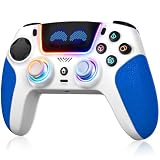
This third-party pad is listed for PS5 Pro, PS5, Windows, Mac and Steam Deck. It does not mirror the DualSense feature set, so it is a runner-up rather than a like-for-like alternative: the listing describes dual-motor vibration, a 6-axis motion sensor and turbo, not haptic feedback or adaptive triggers. It suits players who want magnetic sticks and lighting. The listing offers a free replacement for quality-related defects and promises a reply within 24 hours of a message. That is useful context for a lesser-known brand, but read the full warranty terms on the product page before relying on it.
- Hall effect joysticks and triggers per the listing
- 8-color RGB lighting with four modes
- Programmable buttons and macros
- 1,500 mAh battery, listed at up to 10 hours
- Textured, sweat-resistant grips
Pros
- Drift-resistant sticks as described
- Customization features at a lower price tier
Cons
- No haptic feedback or adaptive triggers in the listing
- Third-party support for PS5 features may differ
It trades the DualSense Edge’s official build for lighting and magnetic sensors, so check which matters more to you.
Specs Compared
| Controller | Condition | Haptics and adaptive triggers | Connection (per listing) | Extras | Battery |
|---|---|---|---|---|---|
| DualSense (Starlight Blue) | New | Yes | USB-C, Bluetooth | Mic, mute button, headset jack | Confirm on listing |
| DualSense (White, Renewed) | Renewed | Yes | PS5 and PC; confirm on listing | Mic, mute button, headset jack | Confirm on listing |
| DualSense (Midnight Black) with cable | New | Confirm on listing | Bluetooth, USB-C cable | Up to four paired devices | Confirm on listing |
| DualSense Edge | New | Confirm on listing | Confirm on listing | Back buttons, stick modules, trigger stops, profiles | 1,050 mAh (Sony) |
| DualSense (Gray Camouflage, Renewed) | Renewed | Yes | Bluetooth | Camouflage finish | Confirm on listing |
| SFGSUP Wireless Pro Controller | New | No (dual-motor vibration) | PS5, PC, Mac, Steam Deck | Hall effect, RGB, macros, turbo | 1,500 mAh, up to 10 hours |
How We Chose These
We assembled this list from the six controllers in the current catalog set and compared manufacturer pages, retailer listing titles and specification fields. Our criteria were how closely each pad matches the DualSense feature set, how it connects, what extras it adds and what the listing says about battery and condition. We did not run our own trials, so we avoid performance claims and stick to stated specifications. Where details were unclear, such as the camouflage pad’s button count, we flag them for confirmation. Renewed items are labeled as such, since condition varies by unit. Sony’s published details on the DualSense Edge informed the battery and customization notes.
What to Look For
Haptics and adaptive triggers
The DualSense replaced the classic rumble motors with voice-coil-style actuators for finer vibration and added triggers that can push back. Only Sony pads in this list advertise both. Third-party pads typically use ordinary dual-motor rumble, which is fine for most games but misses the textured feedback some titles use. If you mostly play racing games and shooters that support trigger effects, a Sony pad is the better match.
Stick technology and drift
Standard sticks wear over time and can drift. Hall effect sticks use magnets and no contact track, which is why they are marketed as drift-resistant, and TMR sticks are a related magnetic technology. The Edge instead lets you swap stick modules, so a worn stick does not mean replacing the whole controller. If drift concerns you, choose either swappable modules or magnetic sticks.
Connectivity and platform
All six pads work with a PS5, and most work with a PC. Bluetooth pairing is simple on Windows, Mac, Android and iOS, and a cable removes latency worries for competitive play. Check whether Steam recognizes the pad out of the box: Sony lists support across 10,000+ Steam games, while third-party pads vary.
Battery and care
The standard DualSense battery is 1,560 mAh and the Edge uses a smaller 1,050 mAh pack, so the Edge needs charging more often. A rule of thumb: if you play two hours a night, expect to plug in a standard DualSense every few days, and the Edge a little more often. Keep controllers within the 41 to 95 degree Fahrenheit operating range mentioned in the listing, and avoid leaving them in a hot car.
Remapping, back buttons and trigger travel
Back buttons let your fingers trigger actions without leaving the sticks, which is why competitive players like them. The Edge provides two sets of mappable back buttons, and the SFGSUP listing mentions programmable buttons and macros. Trigger travel matters too: a shorter pull registers faster in a shooter, while a longer pull gives finer throttle control in a racing game. Note that a shorter trigger stop can disable adaptive trigger resistance on some pads, so decide which you value more.
A built-in microphone and 3.5mm jack let you plug a wired headset directly into the pad, which keeps voice chat simple and avoids a separate adapter. The mute button is a small but useful convenience when you need to silence the mic quickly. Online chat requires a PlayStation Network account and an internet connection. If you use a wireless headset with its own dongle, the controller’s audio features matter less.
A renewed pad saves money, but the sticks and battery have had previous use. Read the condition description, return window and warranty before ordering, and be ready to replace the pad sooner than a new one.
Accessories deserve a mention too. Charging stands, silicone grips and replacement stick caps are widely available for the standard DualSense, which makes a first-party pad easy to maintain. Third-party pads usually rely on the maker’s own parts and support, so check the warranty terms before you buy. Whatever you choose, keep the firmware current through the console or the PlayStation Accessories app on PC, since updates can fix connection issues and add features.
Worked example: a household with one PS5, two players and a laptop for Steam needs pads that pair easily and handle both platforms. Two standard DualSense units cover that, with the Midnight Black bundle assigned to the laptop because its cable is already in the box.
Questions
Is the DualSense Edge worth it over the standard DualSense?
It is worth considering if you value back buttons, adjustable triggers and replaceable stick modules. The tradeoff is shorter battery life. Casual players will do fine with the standard pad.
Can I use a PS5 controller on PC?
Yes. The listings say these DualSense pads pair with Windows PC by Bluetooth or USB-C cable. Support for haptics and adaptive triggers depends on the game.
Do PS5 controllers work on PS4?
One listing states that the DualSense is not compatible with PS4. Check the product page if you need a pad for an older console.
What is stick drift and how can I avoid it?
Stick drift is unwanted movement from worn stick sensors. You can reduce the risk with Hall effect sticks, as listed on the SFGSUP model, or by choosing the Edge with replaceable stick modules.
Is a renewed DualSense a good idea?
It can be, as long as the listing explains the condition and offers a return window. Expect some wear and consider it a budget route to a first-party pad.
Does the SFGSUP controller have adaptive triggers?
The listing describes dual-motor vibration, a 6-axis motion sensor and Hall effect triggers, but not haptic feedback or adaptive trigger effects. Confirm on the product page if those features matter.
Update History
- October 14, 2026 – Initial publication; product set drawn from current catalog listings.
- Check the product page for current specifications and availability before buying.
Sources
- Manufacturer product and specification pages for PlayStation
- Retailer listing titles, feature bullets and specification fields for each product
- General technical references on Hall effect and TMR thumbstick technology