Key takeaways
- A620: The low-cost AM5 option. It suits a Ryzen 5 system when you need basic connectivity and do not require extensive CPU overclocking or many high-speed expansion slots.
- B650 and B650E: Strong value choices for Ryzen 7000 and Ryzen 9000. They commonly provide one fast graphics slot, at least one PCIe 4.0 NVMe slot, and enough USB connectivity for a normal gaming PC.
- B850: A newer mainstream choice for Ryzen 9000-era builds, typically offering modern firmware support and useful PCIe connectivity without the cost of a flagship board.
- X670 and X670E: Premium previous-generation options with more lanes and ports. They can be good value when discounted, provided the BIOS supports the selected processor.
- X870 and X870E: Premium modern AM5 platforms. They are most useful for USB4, additional high-speed storage, stronger expansion options, and high-end multi-device builds. X870E generally provides more total PCIe resources than X870.
Best AMD CPU and Motherboard Combos
The best AMD CPU and motherboard combo for most gaming PCs is the Ryzen 7 9800X3D with a B850 motherboard; choose an X870 or X870E board only when you need more expansion, storage, USB4, or overclocking features, while budget builders can pair a Ryzen 5 9600X with B650 or B850.
Quick recommendations by build type
| Build goal | Recommended CPU | Recommended motherboard class | Why it fits | Typical platform budget |
|---|---|---|---|---|
| High-value 1440p gaming | Ryzen 5 9600X | B650 or B850 | Six Zen 5 cores, strong gaming performance, and a sensible upgrade path | Usually $300–$500 |
| Top-tier gaming | Ryzen 7 9800X3D | B850 or X870 | Eight cores with 3D V-Cache and enough platform features for a premium GPU | Usually $550–$800 |
| Gaming plus content creation | Ryzen 9 9950X3D | X870 or X870E | High multi-core performance, 3D V-Cache, and substantial I/O headroom | Usually $850–$1,200 |
| Affordable new AM5 system | Ryzen 5 7600 | B650 | Lower entry cost while retaining DDR5 and future AM5 processor support | Usually $250–$450 |
| Compact or low-power gaming PC | Ryzen 7 7800X3D | Compact B650 or B850 | Efficient eight-core gaming performance with a mature AM5 ecosystem | Usually $450–$700 |
These are platform ranges for the CPU and motherboard together, excluding memory and cooling. Actual pricing changes with sales, board size, firmware features, and whether Wi-Fi is included.
Our top picks




As an Amazon Associate we earn from qualifying purchases at no extra cost to you. Ratings are shown as listed on Amazon.
How to choose the right AMD combination
1. Match the processor to the socket
AMD’s current mainstream upgrade platform is AM5. AM5 processors include Ryzen 7000, Ryzen 8000G, and Ryzen 9000 desktop chips. They require a motherboard using a compatible AM5 chipset and DDR5 memory. Do not pair an AM5 processor with an older AM4 board, even if the motherboard also carries a Ryzen-compatible brand name.
AM4 processors such as the Ryzen 5 5600, Ryzen 7 5700X3D, and Ryzen 7 5800X3D use DDR4 and belong on B450, B550, X470, or X570 boards with the appropriate BIOS. An AM4 upgrade can be excellent when you already own compatible memory and a motherboard, but a new build should normally use AM5 for a longer upgrade path.
2. Pick the chipset according to features, not CPU price
- A620: The low-cost AM5 option. It suits a Ryzen 5 system when you need basic connectivity and do not require extensive CPU overclocking or many high-speed expansion slots.
- B650 and B650E: Strong value choices for Ryzen 7000 and Ryzen 9000. They commonly provide one fast graphics slot, at least one PCIe 4.0 NVMe slot, and enough USB connectivity for a normal gaming PC.
- B850: A newer mainstream choice for Ryzen 9000-era builds, typically offering modern firmware support and useful PCIe connectivity without the cost of a flagship board.
- X670 and X670E: Premium previous-generation options with more lanes and ports. They can be good value when discounted, provided the BIOS supports the selected processor.
- X870 and X870E: Premium modern AM5 platforms. They are most useful for USB4, additional high-speed storage, stronger expansion options, and high-end multi-device builds. X870E generally provides more total PCIe resources than X870.
A $250 motherboard will not make a Ryzen 5 9600X faster than a $150 board at stock settings. The extra money is justified by connectivity, power delivery, networking, audio, M.2 slots, rear USB ports, and convenience features such as BIOS flashback.
3. Confirm memory support before buying
All mainstream AM5 combinations use DDR5. For a gaming build, 32GB in a 2x16GB kit is the practical baseline; 64GB in a 2x32GB kit is better for heavy modding, video editing, virtual machines, or demanding productivity workloads.
A sensible starting point is DDR5-6000 with AMD EXPO support and moderate timings. Two modules are preferable to four because they usually place less stress on the integrated memory controller. Very high advertised memory speeds can require manual tuning and may reduce stability, especially with four DIMMs.
Check the motherboard’s memory QVL when buying a large kit or aiming above DDR5-6000. A listed kit is not the only memory that can work, but it reduces troubleshooting risk.
Best combinations in detail
Ryzen 5 9600X plus B650 or B850: the value choice
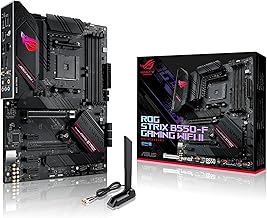
The Ryzen 5 9600X is a strong match for a mid-range graphics card and high-refresh 1080p or 1440p gaming. Select B650 if it is substantially cheaper and has the slots you need. Select B850 when the price difference is small and you want a newer board generation or easier support for later Ryzen processors.
Look for a board with a capable VRM heatsink, two M.2 slots, 2.5Gb Ethernet, Wi-Fi 6E or Wi-Fi 7 if wireless networking matters, and BIOS flashback. Avoid paying for X870 unless you need its additional USB4 or expansion features.
Ryzen 7 9800X3D plus B850: the gaming sweet spot
The Ryzen 7 9800X3D is designed for buyers who want very high gaming performance without moving to a 12- or 16-core processor. A good B850 board is sufficient for a single-GPU gaming system. An X870 board becomes sensible if you need several Gen 5 M.2 drives, USB4 peripherals, extensive rear I/O, or more demanding workstation features.
Pair it with a substantial air cooler or a quality 240mm or larger liquid cooler, depending on the case and noise target. Motherboard overclocking features matter less than reliable memory support and good firmware because the processor’s gaming performance does not require an expensive flagship board.
Ryzen 9 9950X3D plus X870 or X870E: gaming and creation
The Ryzen 9 9950X3D is aimed at users who game while also rendering, compiling, streaming, editing, or running other heavily threaded workloads. Choose X870 for a powerful single-GPU workstation with modern connectivity. Choose X870E when you need more PCIe resources for multiple NVMe drives, add-in cards, or a more complex expansion layout.
For this class, inspect the motherboard’s sustained power-delivery cooling, CPU power connectors, M.2 heatsinks, and BIOS recovery features. A premium CPU deserves a board that remains convenient under long workloads, but the most expensive board is still unnecessary if you only install one GPU, one SSD, and a few USB devices.
Ryzen 7 7800X3D plus B650: a discounted gaming platform
The Ryzen 7 7800X3D remains a sensible option when its price is clearly below newer X3D processors. B650 is enough for a normal gaming system, and the platform supports DDR5 and later AM5 upgrades. Confirm that the board has a BIOS version compatible with the processor; newer stock may be ready, while older inventory may require a BIOS update.
Worked power-budget example
Motherboard selection should not be based on CPU wattage alone. Consider a Ryzen 7 9800X3D system with a graphics card rated around 350W. A realistic peak estimate might be:
- Graphics card: 350W
- CPU package and boost allowance: 150W
- Motherboard, memory, SSDs, fans, and USB devices: 80W
- Transient and aging reserve: about 20 percent
The estimated sustained hardware load is 580W. Adding a 20 percent reserve gives 696W, so a quality 850W power supply is a comfortable target. The motherboard does not need to advertise an extreme CPU power limit for this configuration; its important jobs are stable power delivery, cooling, firmware support, and adequate connectivity.
Decision matrix: which combo should you buy?
| Your situation | CPU | Chipset | Memory target | Key buying check |
|---|---|---|---|---|
| Existing AM4 PC, limited budget | Ryzen 7 5700X3D if supported | B550 | 32GB DDR4 | Update BIOS before replacing the CPU |
| New budget gaming PC | Ryzen 5 7600 or 9600X | B650 or B850 | 32GB DDR5-6000 | Keep board and memory cost under control |
| Competitive 1080p or 1440p gaming | Ryzen 7 9800X3D | B850 | 32GB DDR5-6000 | Spend the savings on the graphics card or monitor |
| Gaming plus professional workloads | Ryzen 9 9950X3D | X870 or X870E | 64GB DDR5-6000 | Check cooling, VRM design, and storage expansion |
| Several fast SSDs or USB4 devices | Any suitable AM5 Ryzen | X870 or X870E | 32GB or 64GB DDR5 | Read the lane-sharing diagram in the manual |
Compatibility checks before ordering
- Verify the socket: AM5 CPUs need AM5 boards; AM4 CPUs need AM4 boards.
- Check the CPU support list: Confirm the exact processor appears on the manufacturer’s support page.
- Check BIOS update options: BIOS flashback is valuable if the board may ship with older firmware.
- Check physical clearance: Confirm the CPU cooler fits the case and does not obstruct the memory slots.
- Check M.2 lane sharing: Some boards disable SATA ports or reduce slot availability when certain M.2 sockets are populated.
- Check rear I/O: Count the USB-A, USB-C, display, audio, and networking connections you will actually use.
For most buyers, the best AMD CPU and motherboard combo is not the most expensive pairing. Start with the graphics card, monitor resolution, software workload, and number of storage devices. Then choose the least expensive chipset that provides the required memory support, expansion, power delivery, and upgrade path. That approach makes the Ryzen 5 9600X with B650/B850 the value leader, the Ryzen 7 9800X3D with B850 the leading gaming choice, and the Ryzen 9 9950X3D with X870/X870E the better option for demanding mixed-use systems.